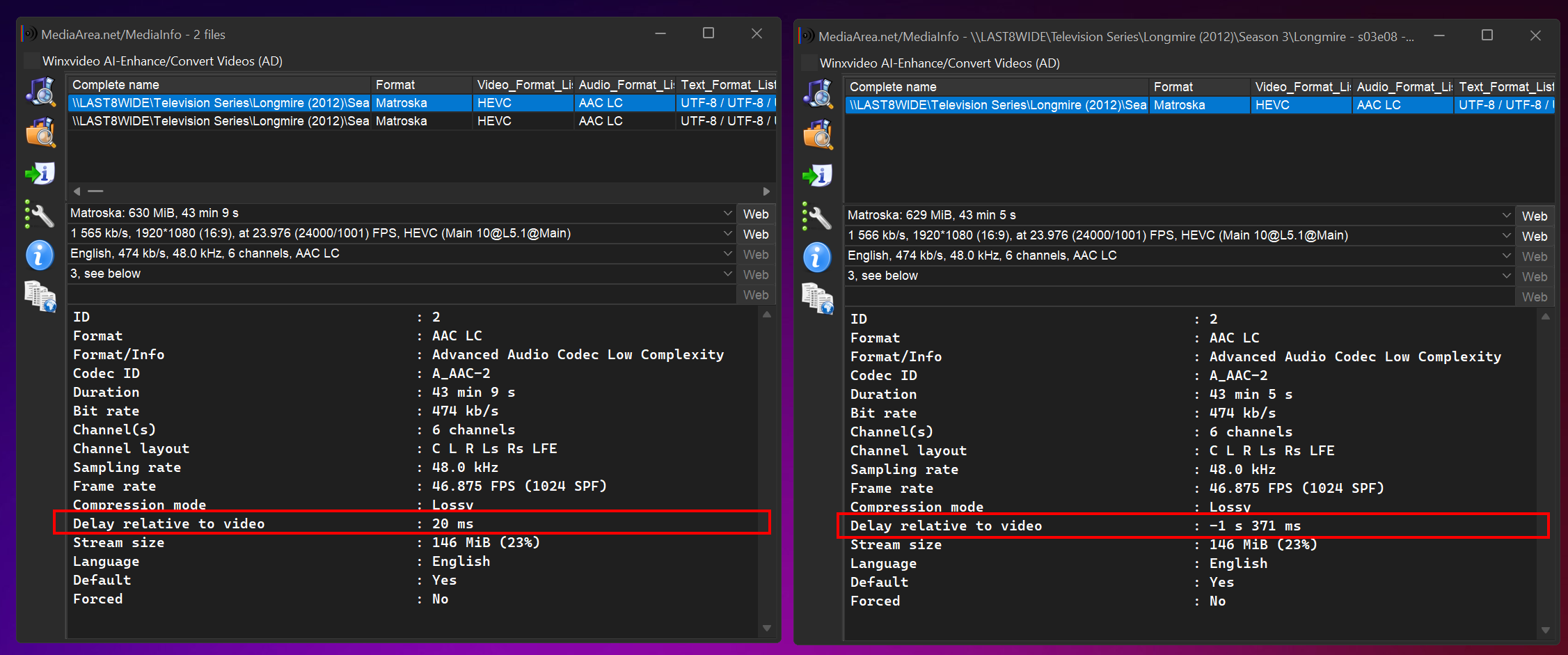
Even the videos that have just been renamed and subs muxed appear to have all carried over the delay properly – 20 ms on the source, 20 ms on the processed video.
4 second trim outcome.
first with no trim, second with 4 second trim
Yes I did see that. It’s how ffmpeg works when copying (no reencoding) streams. However I’m not seeing any issues with the playback, infact the playback is perfectly in sync when using VLC to play it back as it’s just storing the time sync information in the MKV container. Are you seeing an issue with playback in VLC or Apple TV or some other player?
Correct.
Apple TV clients can NOT play these videos back. Also, if the offset is 6-10+ seconds, VLC will not display the first couple/few seconds of video, while the audio starts pretty close to immedialy.
In the past, I have also had issues with my own Roku, via Plex Direct Stream/Play not be able to play them back as well, but since they were fixed/repaired by remuxing, I can’t say for sure this was the same issue, but since they played after turning off Direct Stream/Play I’m thinking it was possibly the same issue. I have not seen this issue on my Roku since they re-wrote the client app a couple of years ago.
Lastly (for now) - do you have a way of taking my mkv file (untouched) and play it back directly on you Apple TV via a USB stick or ethernet/cloud playback? I’m curious if this is a “Plex Thing” and “Apple TV Thing” or is it purely a “my thing!”
Funny you say that, I have that file I downloaded from your PMS sitting on the Desktop. When lying in bed last night I was thinking the same. Will test soon and report back.
Update that file was the correct one, so Download a fresh copy from you now.
I also reviewed my Resillio app and see numerous instances over the years where Apple TV (with multiple users) played 0 minutes of episodes, while those same episodes appeared to have been played (in full) by other users or the same users on different devices.
Yes it’s on our list. This is a little complex because this issue is specific to Apple TV as other players don’t have the playback issue. Kinda like a bug in Apple tv not using the saved information about the audio offset.
Since we can’t fix Apple TV (thanks Apple for the amazing support), we’re looking to how we can prevent ffmpeg from creating the offset while remuxing files or why it’s creating the offset.
First off, thanks for acknowledging the audio delay issue—especially the complexities around Apple TV’s handling of offset metadata. I understand this isn’t a straightforward fix, and I appreciate that it’s on your radar.
That said, I’d like to gently push back on the idea that this is only an Apple TV issue. In VLC, for example, affected files don’t start at the 0 mark either. If the delay is 3, 12, or even 16 seconds, there’s simply no video for that duration. VLC may mask the problem better, but the underlying issue still exists.
I realize this may not be a top priority since many players can work around it. But for me—and increasingly for my family—it’s becoming a major usability challenge. Several relatives have recently switched to Apple TV, and now years of MCEBuddy-trimmed content are essentially unplayable for them without manual intervention. I’ve been trimming network intros for ages, and the idea of reprocessing thousands of episodes isn’t feasible.
My family isn’t tech-savvy, and they’re not inclined to tweak Plex playback settings or switch apps. I’ve already started isolating files that were affected (MKV + SRT) into a separate folder, and I’m sitting on over 1,100 episodes (plus 2x the subs) starting from Aug 31.
If there’s any way to bump this up the queue or explore a workaround that prevents ffmpeg from introducing the offset during remuxing, I’d be incredibly grateful. I know you’re juggling a lot, but this fix would make a huge difference for users like me who rely on MCEBuddy for long-term media management.
Thanks again for all your work—and for listening.
Is there any way of knowing where this issue stands and what type of priority or no priority is is getting in relation to your existing development schedule?
I’ve been saving all my episodes and srts since this issue was discovered, in the hope of re-processing them later after a fix was implemented, but so far I have saved over 4,000 episodes equaling 2.7TB of data (add in the srts for foreign, sdh, etc and that’s over 13,000 files).
Any update would be appreciated.
Also, for the tens of thousands of videos I have passed through MCE Buddy over the years (no telling how many of my 128,363 episodes in total this has affected) that all have multiple to tens of seconds of audio delay, is there any possibility of a fix for that too included in your pipeline?
It was mentioned that this was identified as an issue with ffmpeg, has there been a bug report filed?
I found this post and am wondering it’s related and or helpful for your research/fix of the matter.
Has this issue’s place in the list changed? Any work on this issue yet?
Also, I just want to reiterate that this is not just a problem with Apple TV. It just so happens that Apple TV is the device that will not play the video files, but even apps like VLC that will play nearly everything also has issues playing back these files. VLC manifests the issue by taking x to xx seconds before playback begins. Sometimes the vides play with a 3-4 second delay or other times, playback doesn’t start for around 16 seconds.