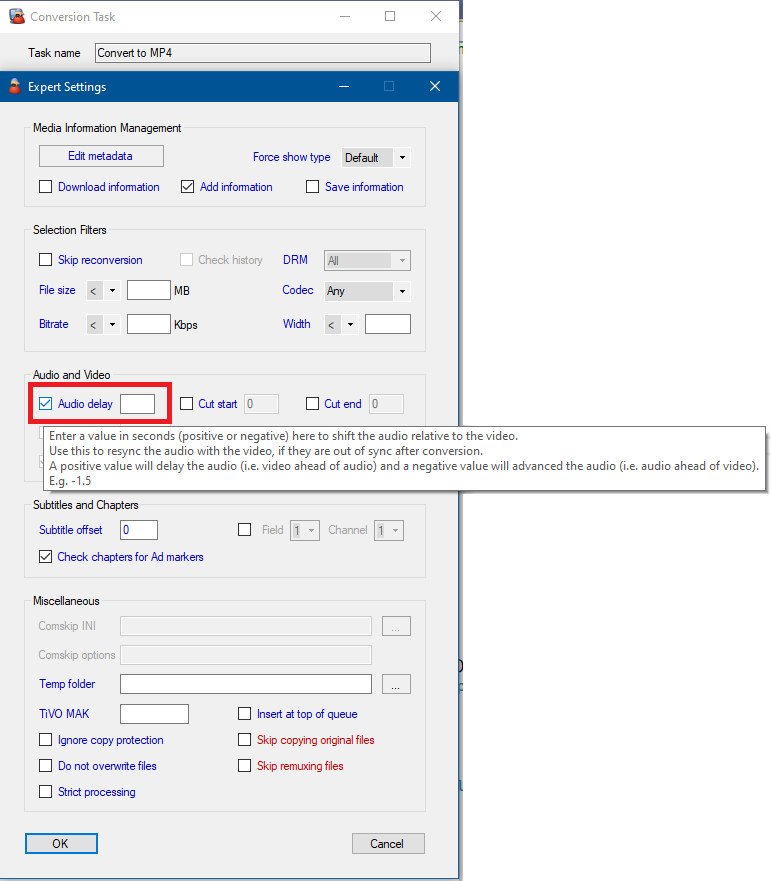
It’s actually not uncommon to see audio delays when converting files. They can happen for a variety of reasons.
MCEBuddy can detect these audio delays and compensate for them if required (by default it does not). Most of the time the delay information is stored in the converted video so the playback software should be able to correct for the delays at runtime. If that’s not happening with your player, you can ask MCEBuddy to auto correct for these delays by editing your profile.
See this: MCEBuddy - Advanced Settings, Commands and Tweaking
John, from your logs I see in your profile:
ffmpeg-audiodelay=skip
change this to
ffmpeg-audiodelay=auto
and it should automatically correct for the audio delays while converting. Note this only works for profiles based on ffmpeg, handbrake and mencoder encoders, it does not work on profiles using the copy encoder.
Alternatively, if you’re seeing a fixed amount of deviation in all videos, you could also correct for it from the Conversion task → Expert settings → Audio delay