My MCEBuddy setup worked great with PlayOn Home recordings. I strip commercials and cut off the PlayOn banners in the first and last 5 seconds of recordings. I switched to PlayOn Cloud. I downloaded some recordings and ran them through MCEBuddy and it failed consistently. Here’s the log content. I had logging level set to Error,
ERROR> 2026-01-09T21:06:37 MCEBuddy.RemuxMediaCenter.RemuxMCERecording → ReMuxer failed to create remux file
ERROR> 2026-01-09T21:06:51 MCEBuddy.RemuxMediaCenter.RemuxMCERecording → ReMuxer failed to create remux file
ERROR> → Slow Remux using FFMPEG failed at 0%
ERROR> 2026-01-09T21:06:51 MCEBuddy.RemuxMediaCenter.RemuxMCERecording → DirectShow Streams remuxing only supported for WTV, DVR-MS and TIVO files
ERROR> 2026-01-09T21:06:51 MCEBuddy.RemuxMediaCenter.RemuxMCERecording → All remux options failed
ERROR> 2026-01-09T21:06:51 MCEBuddy.Engine.ConversionJob → Remux failed
After searching the forums, the best solution I could find was to do a fresh install. After doing so, the conversion job runs for much longer time, but I end up with a 48-byte output file. The attached log is set for full Debug level.
Thanks for the logs, the conversion actually failed because your GPU hardware (graphics driver) hung while trying to convert the file. MCEBuddy should have marked the conversion as failed and fallen back to software encoding when the hardware encoder hung. We will look into this and fix it in the next build.
ERROR> → No response from process for 300 seconds, process likely hung - killing it
ERROR> → Process hung, killing process
→ FFMpeg output file size [KB] → 0.00
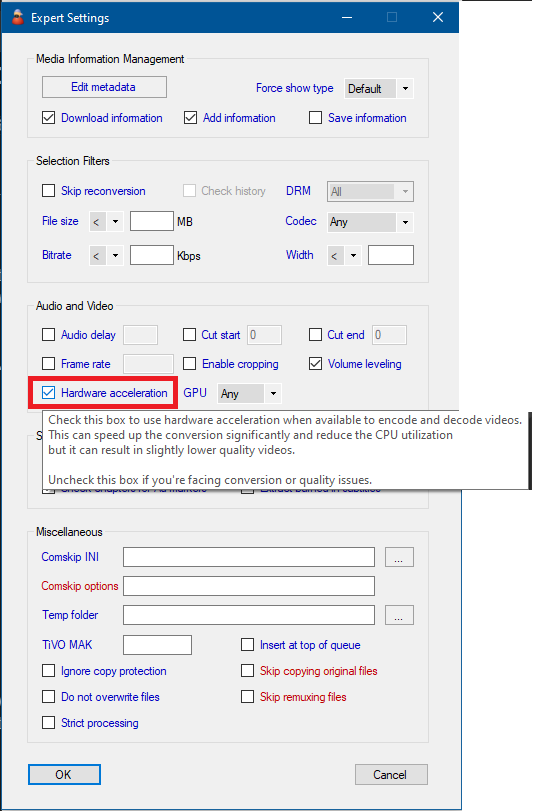
In the meanwhile, the issue appears to be related to your graphics driver hanging. I would suggest turning off hardware encoding from the Conversion task → Expert settings → Hardware acceleration
If you want to use the GPU hardware acceleration feature I would recommend changing your driver to a more stable version. You can check out the graphics driversFAQ page for more details and recommended driver versions.
Thanks for reporting this issue. There was a bug where 1 pass ffmpeg profiles would not fall back to software encoding if the hardware encoder failed. It has now been fixed in today’s 2.7.1 beta build.