I’m trying to retrieve closed captions from a video. It retrieves them for the first video, but for the other five in the season, it’s not generating the .srt file—so it seems to be hit or miss.
Please let me know how I can fix this; I’m probably doing something wrong 
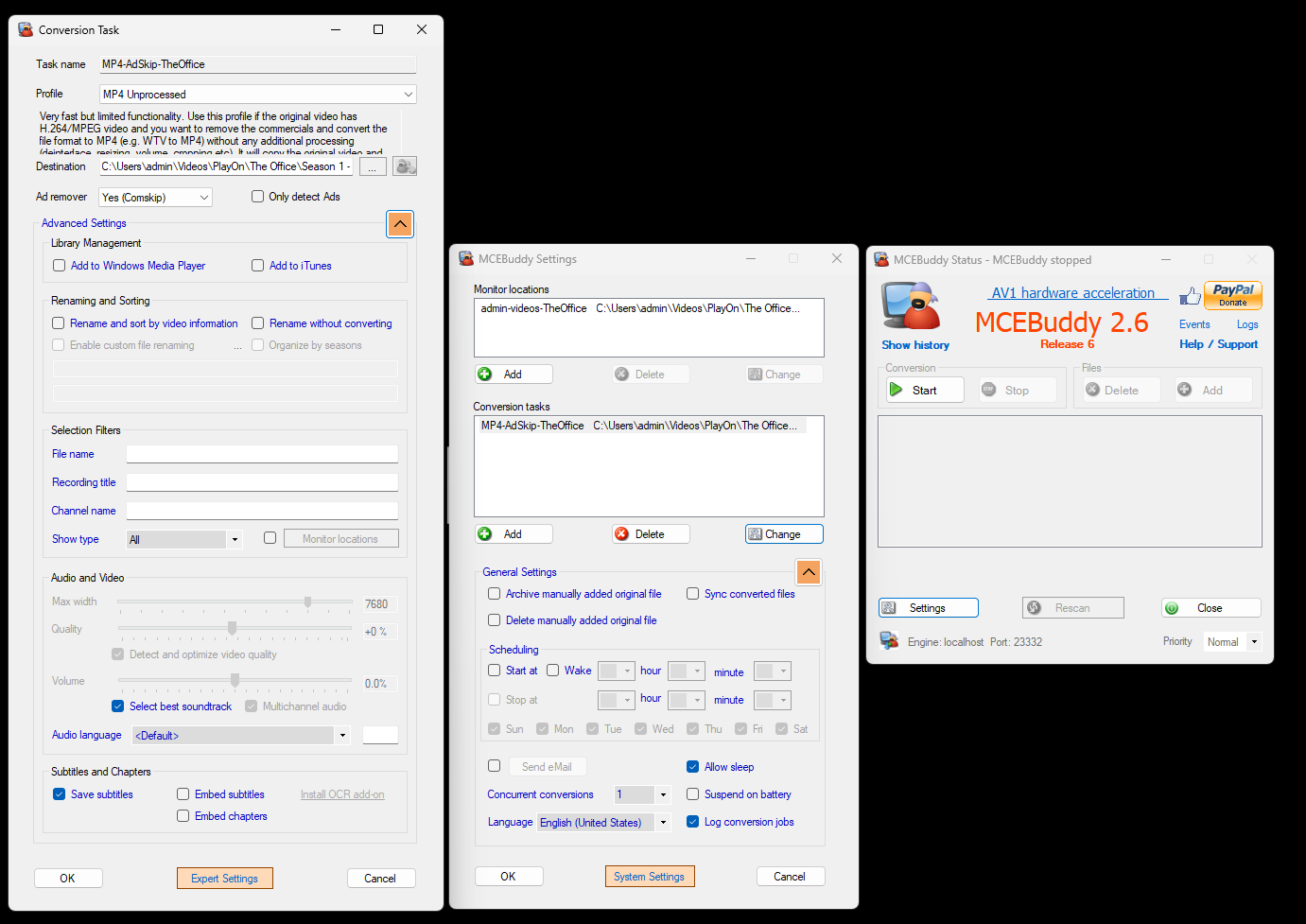
here are my settings :
Hi ChopperOllie,
Thanks for reaching out! It’s definitely frustrating when things work for one file but not others.
Based on your description and screenshots, here are a few things we can check:
- Check the “Save subtitles” option: Your screenshot shows “Save subtitles” is checked, which is good. Just double-check that it’s consistently checked for all your conversion tasks.
- Verify the input video files: Are the videos for which subtitles aren’t being generated definitely known to have closed captions? Sometimes, videos might not have them embedded, even if they appear to. You can use a tool like MediaInfo to check if a video file has a subtitle track.
- Look at the MCEBuddy conversion logs: MCEBuddy generates detailed logs for each conversion job. These logs are crucial for troubleshooting as they often contain specific error messages or warnings related to subtitle extraction.
- On the MCEBuddy main screen, you can click on “Logs” (next to “Help / Support”) to open the log folder.
- Find the log files corresponding to the videos that failed to generate
.srtfiles and look for any entries related to subtitles, errors, or warnings. You can even copy and paste relevant sections here if you’re unsure what to look for.
- Try different profiles: While “MP4 Unprocessed” is a good starting point, sometimes different profiles handle subtitle extraction differently. You could try using a different conversion profile, even temporarily, to see if that makes a difference.
- Re-install OCR add-on: If you’re trying to extract subtitles from an image-based format (like VobSub), you might need the OCR add-on. While your screenshot shows the “Install OCR add-on” button, if it’s already installed, sometimes a re-installation can resolve issues.
- Update MCEBuddy: Ensure you’re running the latest version of MCEBuddy. While your screenshot shows MCEBuddy 2.6 Release 6, it’s always a good idea to check the MCEBuddy website for the absolute latest release, as updates often include bug fixes and improvements.
To help me narrow down the problem, could you please:
- Share the relevant sections of your conversion logs for both a successful and an unsuccessful subtitle extraction?
- Confirm if the videos without
.srtfiles are known to contain closed captions.
We’ll get to the bottom of this!
Can you attach the conversion log of a conversion where it did not work. That will show what’s going on. Be sure the logs are set to debug.
Hopefull this is what your looking for, if not please let me know how to get what you need
The Office - s01e06 -2025-08-04T15-48-45.log (1.3 MB)
Thanks, it looks like it’s not able to recognize the track format.
2025-08-04T15:49:29 MCEBuddy.AppWrapper.CCExtractor → Unsupported track type text:text! Please report.
Could you upload the original file to the server so we can analyze it see what’s going on to try and fix it.
I think I did the upload correctly please let me know what else I can do
That video doesn’t contain any subtitle tracks (like from your previous conversion log). It only contains a hard burnt in subtitle which is completely different from the embedded subtitles in your previous log file.
Do you have the original file from the previous log?
That is the same video all I did was snip it to 30 seconds so then it’s not a huge file
Maybe upload the entire file then, the snippet doesn’t contain the same data unfortunately.
I have uploaded the entire file and a new log file right before the upload
What were you able to find out ?
It appears that the subtitles in the video are corrupted. Playon is making a corrupt container and the subtitles can’t be extracted or played back (in VLC)
But we’re also seeing if we can extract the subtitles from the burnt in captions by using OCR.
let me know if I can do anything to make it easier on you
If you have a recording where the subtitle extraction is working could you upload that original file so we can compare the two see what may be happening.
I am now noticing that some times it generates a srt and some times it does not, just to make sure my setting are correct for extracting Spanish closed captions what should they be?
is there a way i can edit the OCR Settings ?
it seems it will only generate a Closed Captions file if i run an ad remover , and for some episodes it will only give me the file when “Comskip” is running or " Use Markers" is running .
any ideas / settings I am missing?
Currently OCR is limited to using it to extract subtitles in DVB image format which are embedded as a separate subtitle track. It does this automatically. We are working on an option to use OCR to also extract from burnt in subtitles (which your sample upload appears to be using).
If you have some that working, I would recommend uploading that original file and the corresponding logs so we can compare the differences between the ones that are working and the ones aren’t working.
Regarding the track, you can select the audio language option in the Conversion settings, on your case setting it to spa for Spanish and it will ignore the other tracks and only extract that track (if available). Again the original video and log files will help us see what’s going on in those that are working vs those that aren’t.
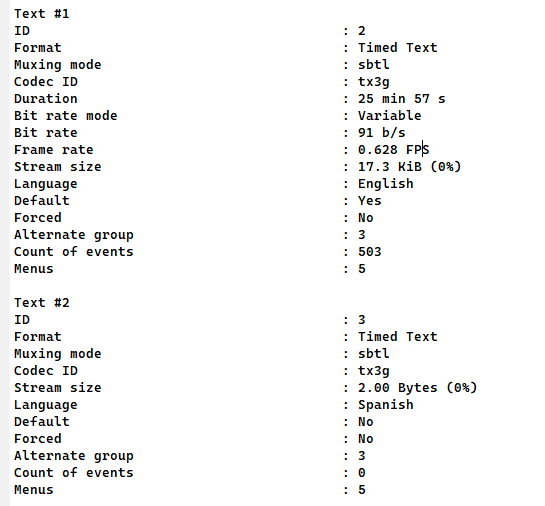
My apologies — I was unaware that MCEBuddy does not currently support full OCR for subtitle extraction. I recently discovered that PlayOn is actually pulling subtitles, but it’s pulling the English ones. This explains why it appears that MCEBuddy is only able to retrieve English — it’s reading the existing subtitle tracks in the video file rather than performing OCR on burned-in subtitles.
Going forward, my only options to capture this information would be to either use another application that supports OCR or configure PlayOn to record the Spanish subtitles directly.
Do you have an ETA for when full OCR capabilities will be available in MCEBuddy?
Here is what Playon is grabing
We’re working on it, so probably in the next few weeks.
We’re also have a roadmap to include an option/tool to translate the closed captions from one language to another.