So to confirm, in the recordings where you’re able to extract the subtitle, it’s in english, is that correct?
It’s a 50/50 chance whether PlayOn records it in the file. If PlayOn includes the subtitles in the file, then MCEBuddy can retrieve the subtitle track that PlayOn created — but MCEBuddy cannot generate it on its own.
So to answer your question Yes MCE Buddy can retrieved Closed Captions
Okay so now we have full OCR capabilities including the ability to do whole screen OCR (for burnt in subtitles like you have) and other types of images based subtitles also (and loads of new subtitle features).
Try out today’s 2.7.1 beta version, in the Conversion task → Expert settings enable the option Extract burned-in subtitles
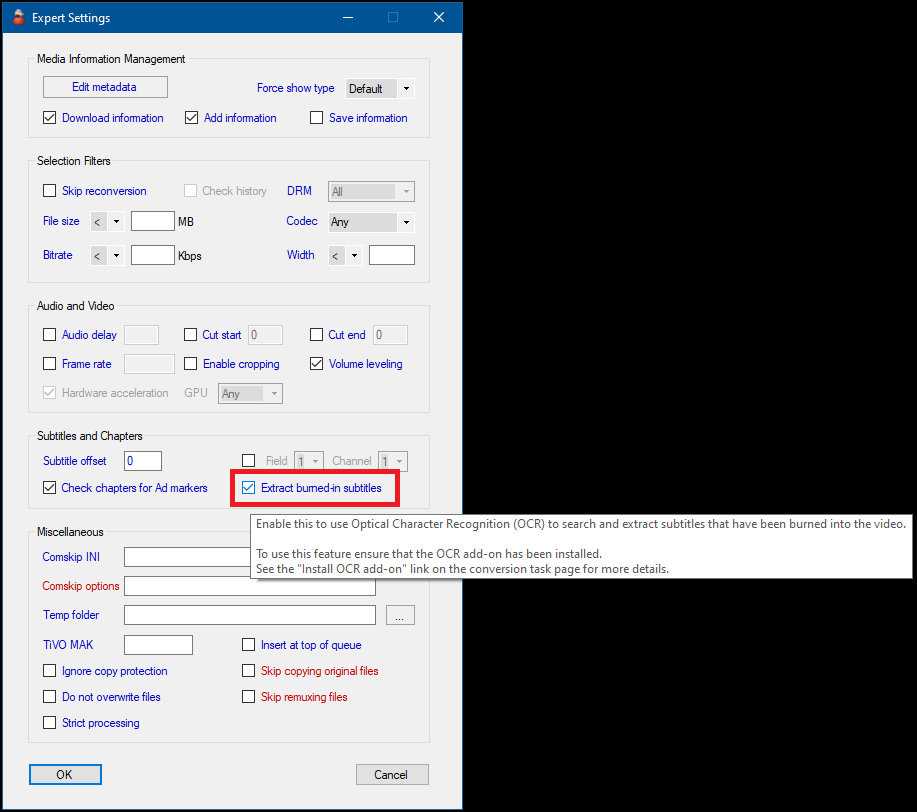
Couple of notes:
- If MCEBuddy is able to successfully extract any embedded subtitle tracks then it won’t do whole screen OCR looking for burnt in subtitles, even if the option is enabled. The while screen OCR option will only be triggered if mcebuddy isn’t able to find or extract any subtitle files (embedded or external).
- Doing a whole screen OCT looking for subtitles is a slow process which is why this option isn’t enabled by default. Other image based subtitles tracks (like VobSub or DVR) are automatically extracted.
Let me know how it goes.