调整 Comskip 和自定义 Comskip INI 文件(按国家/频道)

調校 Comskip 廣告偵測

如需安裝自訂版 Comskip,請參閱這篇文章

調校 Comskip INI

Comskip 可依不同國家/地區進行微調,更精準地偵測與剪除廣告。在 MCEBuddy 安裝目錄(預設為 C:\Program Files\MCEBuddy2x)下的 comskip 資料夾中,可找到名為 comskip.ini 的檔案。調校參數的詳細說明請見:http://www.kaashoek.com/files/tuning.htm

注意: 自 v2.4.1 起,安裝資料夾內含 GUI 版 Comskip INI 編輯器 (MCEBuddy\\Comskip\\ComskipINIEditor.exe)。可直接透過 GUI 了解並修改各項設定,無須手動編輯。
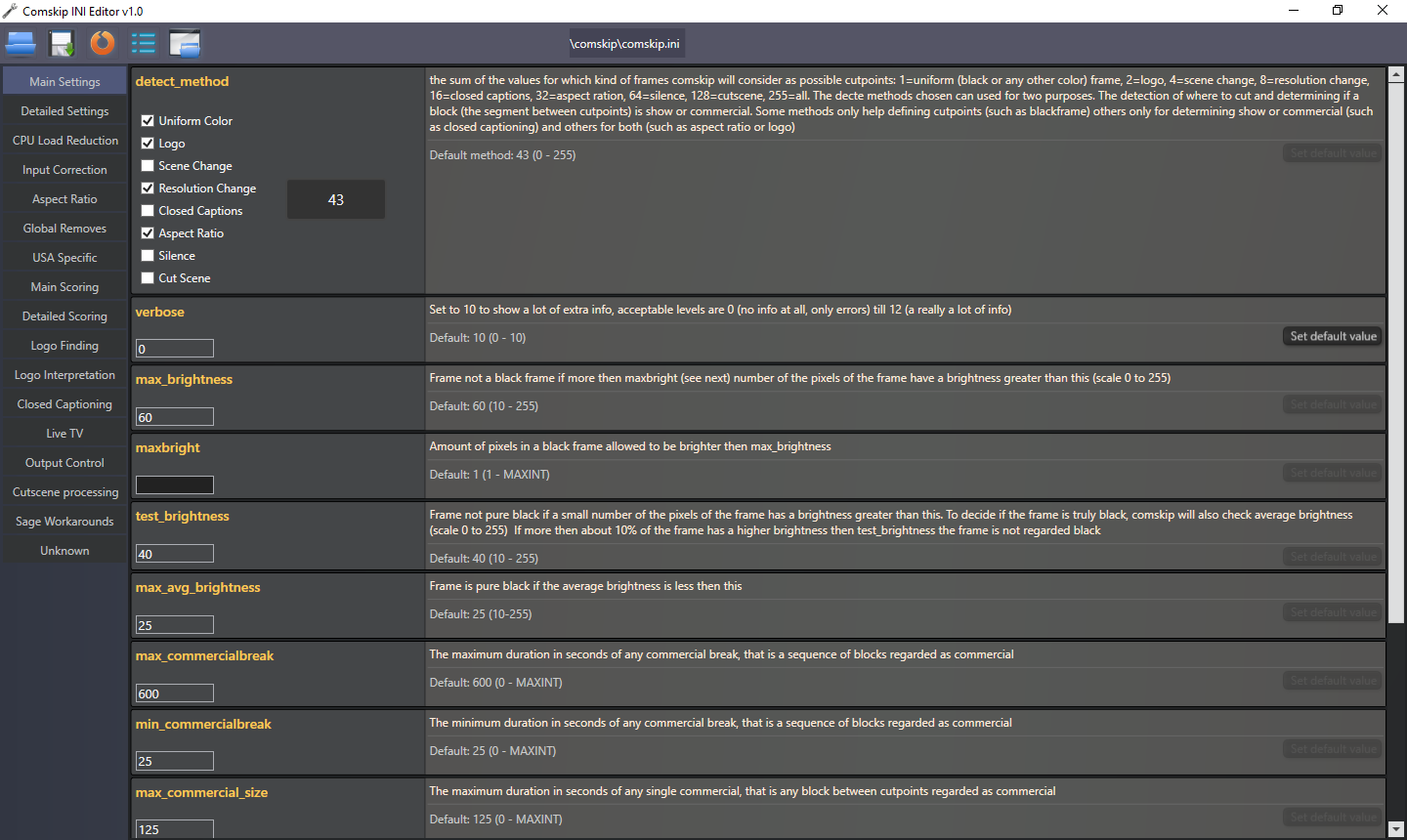
社群 Comskip INI

以下連結彙整了全球使用者自訂的 Comskip.ini。Comskip 雖用於廣告偵測,但並非完美;可透過 comskip.ini 高度自訂。

使用者已針對特定國家/頻道建立專屬版本,歡迎自由使用並回饋至討論區。

安裝自訂 Comskip INI

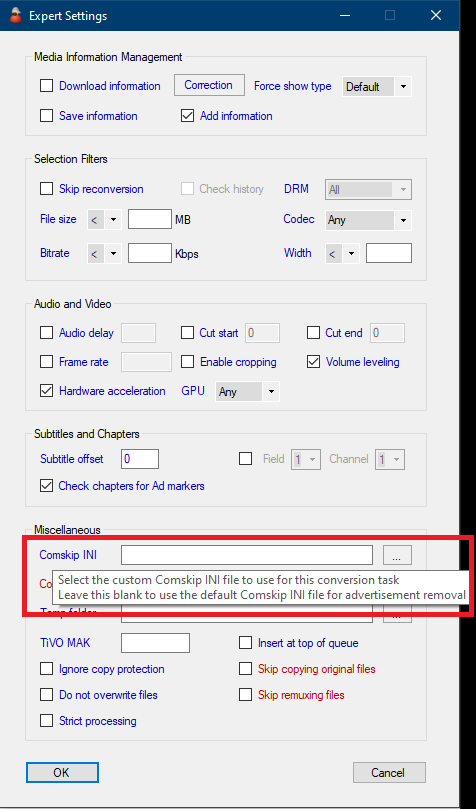
若使用 MCEBuddy 進階版,下載或建立自訂 comskip INI 後,可透過以下方式設定:

  1. 每個轉檔工作使用專屬 INI ─ 於「轉檔工作 → 進階設定 → Comskip INI」指定不同 INI 檔。請將自訂 INI 另存於獨立資料夾。

  2. 所有轉檔工作共用自訂 INI ─ 若想取代 MCEBuddy 預設 INI,可直接覆蓋 MCEBuddy\\Comskip 安裝資料夾內的 comskip.ini。(注意:升級或重裝 MCEBuddy 後將被覆蓋)

若同時設定選項 1(個別工作)與選項 2(預設/全部),選項 1 的 INI 將優先生效。

注意:

建議採用選項 1,升級時設定會保留;選項 2 會在升級時被覆蓋。
Comskip CLI 執行階段參數

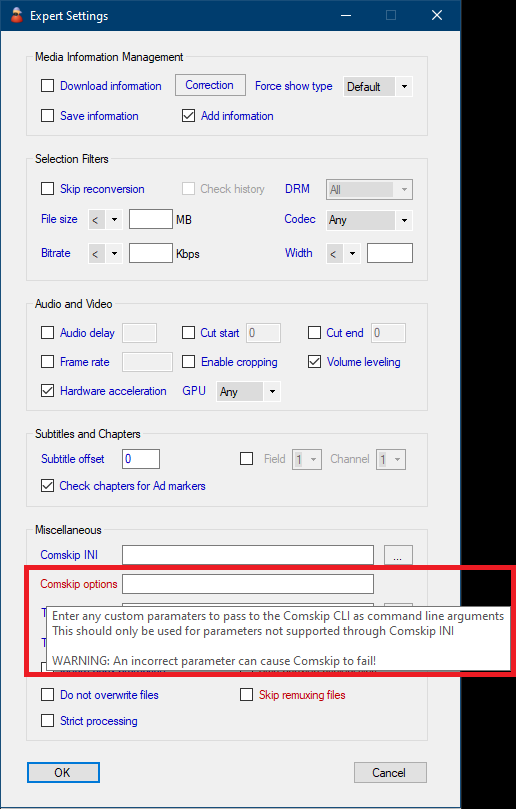
  • 可在「轉檔工作 → 進階設定 → Comskip 選項」中輸入自訂參數,傳遞給 Comskip CLI。

注意:輸入錯誤參數可能導致 Comskip 失敗!
使用硬體解碼

  • MCEBuddy 2.6.4+ 內建硬體加速版 Comskip,可加速解碼與偵測。

  • 於「轉檔工作 → 進階設定 → Comskip 選項」設定對應參數:

    • --cuvid:Nvidia NVDEC
    • --qsv:Intel QSV
    • --dxva2:AMD AMF/VCE/通用

    注意--dxva2 亦可用於其他硬體(如 Intel 或 NVIDIA),透過 Windows 媒體硬體解碼篩選器。若原生選項(如 --qsv)因驅動問題停擺或不如預期,可改用此選項,有時反而更快。

注意:損壞的顯示卡驅動或不相容 GPU 可能導致 Comskip 停擺或失敗!

參考 Comskip 硬體解碼效能測試:Hardware v/s Software Encoding Performance Benchmarking - #2

如需自訂 Comskip 安裝,請參閱此主題

若使用 ShowAnalyzer,請參閱此主題

2個讚
Tuning ShowAnalyzer
Commercial cutting adjustment
Comskip Not Finding Commercials
MCEBuddy - Advanced Settings, Commands and Tweaking
Comskip deletes part of show at start of each commercial break
Commercials not being detected
Some of my conversions are getting truncated
WTV, remove commercials, use subtitles, watch on xBox360 extender
HDHomeRun H.264 - Subtitles?
All videos are cut 90 seconds short
Comskip working on Tv shows but not movies
Multiple Conversions?
Comskip Issues and Audio Out Of Sync
No longer removing commercials
Not cutting longer commercials
OTA - PBS Shows
HD HomeRun Recordings
Donated version of MCEBuddy & Comskip just doesn't work, seems to not even try
MCEBuddy - KNOWN ISSUES
MeTV / Top TickerTape / TopLogo Comskip says no commercials found
Adverts/commercials not being removed
Newbie cant get 1 commercial to remove
Same Commercials get Through all Channels
Newbie cant get 1 commercial to remove
Not removing ads from sky recordings
How to install a custom Comskip and get additional INI files
Does not remove all adverts from video files
Recording needs to be reconverted to remove commercials
Does not remove all adverts from video files
Comskip removing intro of video files
FoxNews Gutfeld! Commercials not being removed
Can't Get Automatic Commercial Removal to work
Comskip Profiles for Xfinity
Comskip not detecting commercials
Software is no longer removing ads
Remove interstitials?
MCE Buddy runs but it does not do anything 2.4.8
MCEBuddy FAQ - Common Issues and Errors
Running to Commercial Removal Issues with Football Games on Fox Sports One
Commercial detection and removal
Mcebuddy failed to remove some commercials and removed some of the movie
Comskip removing all video and creating an audio file instead
Comskip not detecting commercials
Comskip taking over 1 hour to process 1/2 hour show?
Comskip not detecting commercials
Need help with customizing custom cuts edl files
Using MCEBuddy with Playon (Hulu channel)
MceBuddy 2.3.13 vs 2.5.4 - PlayOn AdSkip vs Comskip
Failure to remove commercials
Commercials Not Being Removed