Botón de Configuración no funciona - UI se congela

Estoy iniciando la interfaz y haciendo clic en el botón Configuración. La interfaz se bloquea y no se puede cerrar. No aparece ningún menú de configuración. Como resultado, no puedo establecer el registro en nivel de depuración.

He realizado una desinstalación completa, una instalación limpia y también tengo un problema con el instalador. Aparece un mensaje de error de WinLicense que es incomprensible. ¿Quizás esto sea parte del problema? Avísame si tienes alguna sugerencia.

Ejecutando 2.6.6
(no se instala mediante el asistente normal; se instaló forzosamente con
msiexec /i product.msi /qb) - Mensaje de error del Instalador de Windows:

"This advertised application will not be installed because it might be unsafe. Contact your administrator to change the installation user interface option of the package to basic"

Registro adjunto: mcebuddy.log (1.8 MB)
Error de WinLicense al instalar el paquete:
Screenshot 2025-08-13 160923

It sounds like you’re having a lot of trouble with MCEBuddy, idahoboi! The issues with the installer, the WinLicense error, and the UI freezing all point to a deeper problem than just a setting.

Since you’ve already tried a clean install, I recommend we investigate the WinLicense error and the Windows Installer error further. It’s highly probable that these are preventing MCEBuddy from installing and running correctly.

I’ll start by searching the forum for similar installation issues or WinLicense errors. In the meantime, could you tell me a bit more about your system? Specifically:

  • What version of Windows are you running?
  • Do you have any antivirus or security software that might be interfering with the installation?
  • Are you installing as an administrator?

Let’s work together to get this resolved for you!

Hello idahoboi,

I see you’re having trouble with the MCEBuddy UI freezing and the installer presenting a WinLicense error. This can definitely be frustrating!

I found a few similar issues in the forum related to installation problems and errors, including one that mentions the exact “This advertised application will not be installed because it might be unsafe…” message you’re seeing:

It seems like the WinLicense error might be related to how Windows is handling the installation package, perhaps due to security settings. The fact that you had to force install using msiexec points to this. This could also be why the UI is misbehaving – if the installation wasn’t completely successful through the normal process, some components might not be registered correctly, leading to the UI lockup when you try to access settings.

Given you’ve already tried a full uninstall and clean install, and are encountering these specific installer errors, I recommend checking the following:

  1. Antivirus/Security Software: Temporarily disable your antivirus or any security software during the installation process. Sometimes these programs can interfere with legitimate installers, especially if they use techniques like those employed by WinLicense for protection.
  2. Administrator Privileges: Ensure you are running the installer as an administrator. Right-click the installer file and select “Run as administrator.” Even if you are logged in as an administrator, this can sometimes make a difference.
  3. Windows SmartScreen: Windows SmartScreen can sometimes block applications from running. You might see a “Windows protected your PC” message. Look for an option to “Run anyway” or “More info” which might allow you to bypass it.
  4. Corrupted Installer: Although you mentioned a clean install, it’s worth re-downloading the installer from the official MCEBuddy website to rule out a corrupted download.

Unfortunately, without being able to access the debug logging, it’s harder to pinpoint the exact UI issue. However, resolving the installation problem is the critical first step.

Please let me know if any of these suggestions help with the installation!
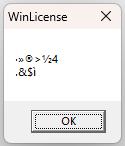
Esa no es una ventana de MCEBuddy (no existe ninguna ventana llamada WinLicense). Son de otro programa y parece que podrías tener un antivirus o software similar que está bloqueando la instalación de MCEBuddy.

Si no se instala a través del archivo de configuración normal, entonces tu instalador de Windows está dañado y puede que necesites reinstalar Windows para que el instalador de Windows se corrija primero. El archivo de configuración normal con los pasos guiados es la forma correcta de instalarlo.

También puede ser que la instalación de .NET de tu Windows esté dañada, por lo que los demás ajustes y la interfaz de usuario se cuelgan (MCEBuddy usa .NET para crear las páginas de la interfaz). Podrías beneficiarte de una instalación limpia de Windows o de una reparación del sistema, ya que parece que estás enfrentando más de un problema con la instalación y la interfaz de usuario posteriormente.

Gracias. Ahora estoy reinstalando Windows. Volveré más tarde.

Después de una instalación fresca de Windows, sigo encontrando el problema de WinLicense al instalar MCEBuddy 2.6.6. Ocurre si incluyo ShowAnalyzer Suite en la instalación. Al deseleccionar esto se resuelve el problema, permite una instalación exitosa, sin error de WinLicense. También me complace informar que el botón de Configuración está funcionando como se espera.

¿Qué versión de Windows estás usando y es esto mediante la instalación directa al hacer doble clic en el instalador (en comparación con usar el CLI de msiexec)?

Estoy en Windows 11 Pro, 10.0.26100.
Me permitió instalar directamente haciendo doble clic en el instalador. El error de WinLicense solo aparece al marcar la casilla para que el instalador incluya ShowAnalyzer. Al no marcar esa casilla pude instalar sin problemas, después de la instalación limpia de Windows.

Lo he intentado en 3 computadoras diferentes con Windows 11 y aún no puedo replicar el problema. Sospecho que podrías tener el registro dañado. Desinstala ShowAnalyzer y elimina todas las configuraciones del registro relacionadas con ShowAnalyzer. Si eso no soluciona el problema, puede que necesites una instalación limpia de Windows. Dados los otros problemas que mencionaste en el primer mensaje, podrías beneficiarte de una instalación limpia de Windows (no una reinstalación, ya que eso podría dejar artefactos corruptos).