我正在尝试从视频中提取字幕。第一个视频可以成功提取,但同一季的另外五个视频却无法生成 .srt 文件——看起来时好时坏。
请告诉我该如何修复;可能是我哪里操作不当 
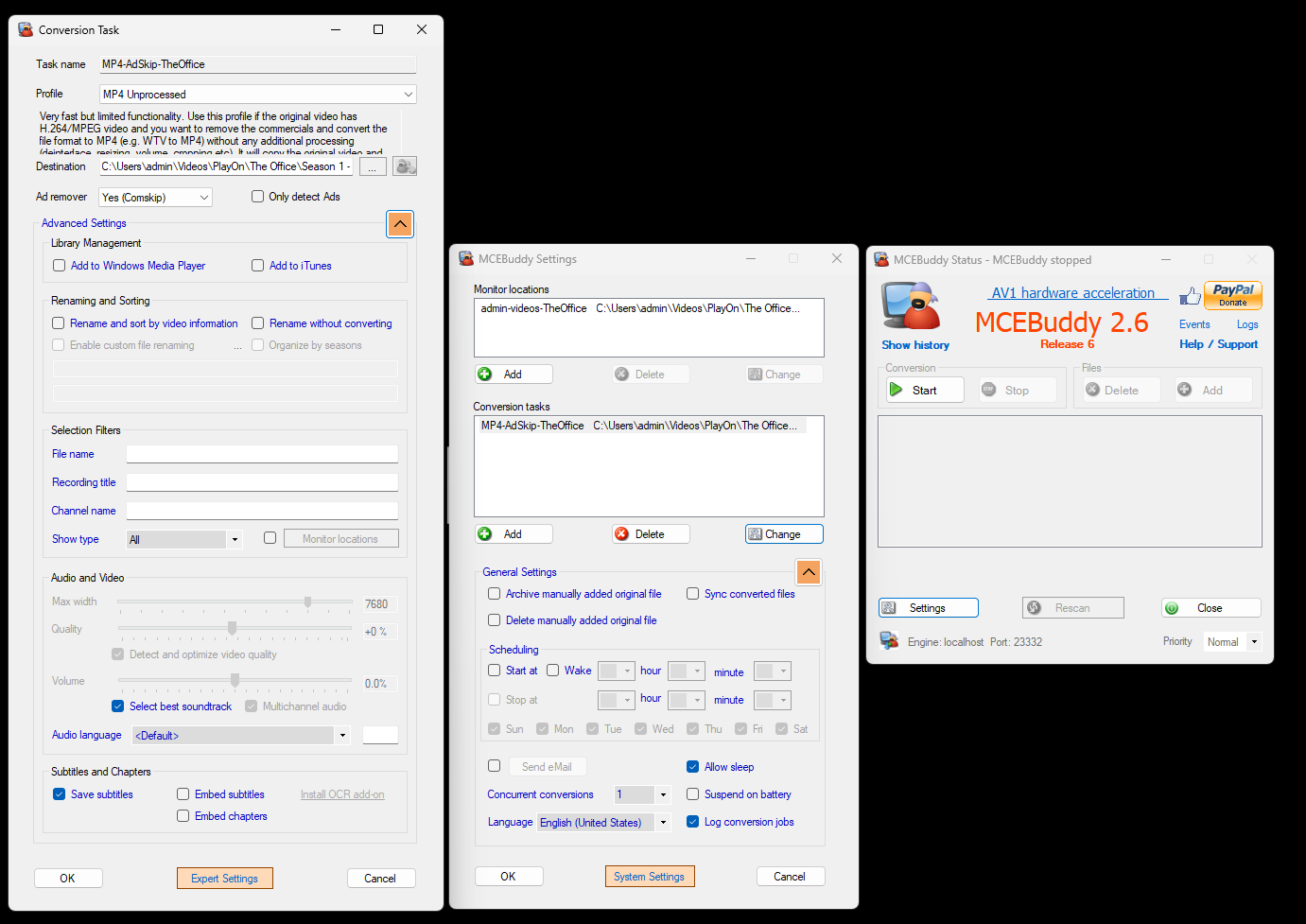
这是我的设置:
Hi ChopperOllie,
Thanks for reaching out! It’s definitely frustrating when things work for one file but not others.
Based on your description and screenshots, here are a few things we can check:
- Check the “Save subtitles” option: Your screenshot shows “Save subtitles” is checked, which is good. Just double-check that it’s consistently checked for all your conversion tasks.
- Verify the input video files: Are the videos for which subtitles aren’t being generated definitely known to have closed captions? Sometimes, videos might not have them embedded, even if they appear to. You can use a tool like MediaInfo to check if a video file has a subtitle track.
- Look at the MCEBuddy conversion logs: MCEBuddy generates detailed logs for each conversion job. These logs are crucial for troubleshooting as they often contain specific error messages or warnings related to subtitle extraction.
- On the MCEBuddy main screen, you can click on “Logs” (next to “Help / Support”) to open the log folder.
- Find the log files corresponding to the videos that failed to generate
.srtfiles and look for any entries related to subtitles, errors, or warnings. You can even copy and paste relevant sections here if you’re unsure what to look for.
- Try different profiles: While “MP4 Unprocessed” is a good starting point, sometimes different profiles handle subtitle extraction differently. You could try using a different conversion profile, even temporarily, to see if that makes a difference.
- Re-install OCR add-on: If you’re trying to extract subtitles from an image-based format (like VobSub), you might need the OCR add-on. While your screenshot shows the “Install OCR add-on” button, if it’s already installed, sometimes a re-installation can resolve issues.
- Update MCEBuddy: Ensure you’re running the latest version of MCEBuddy. While your screenshot shows MCEBuddy 2.6 Release 6, it’s always a good idea to check the MCEBuddy website for the absolute latest release, as updates often include bug fixes and improvements.
To help me narrow down the problem, could you please:
- Share the relevant sections of your conversion logs for both a successful and an unsuccessful subtitle extraction?
- Confirm if the videos without
.srtfiles are known to contain closed captions.
We’ll get to the bottom of this!
可以提供一次轉換失敗的轉換記錄嗎?這樣就能看出問題所在。請確認記錄等級已設為 debug。
希望这就是你要找的内容,如果不是,请告诉我如何获取你需要的东西
The Office - s01e06 -2025-08-04T15-48-45.log (1.3 MB)
谢谢,看起来它无法识别轨道格式。
2025-08-04T15:49:29 MCEBuddy.AppWrapper.CCExtractor → Unsupported track type text:text! Please report.
你能把原始文件上传到服务器吗,这样我们可以分析并尝试修复。
我觉得我已经正确上传了,请告诉我还能做些什么
该视频没有任何字幕轨道(如您之前的转换日志中所示)。它只包含硬烧录字幕,这与您之前日志文件中嵌入的字幕完全不同。
您还有之前日志中的原始文件吗?
那是同一部影片,我只是把它剪成30秒,這樣檔案就不會太大。
那就上传整个文件吧,这段代码片段里的数据并不相同。
我已經上傳了整個檔案,還有在上傳前的新記錄檔
你发现了什么?
看來影片中的字幕已損毀。Playon 正在製作損壞的容器,導致字幕無法被提取或在 VLC 中播放。
但我們也在嘗試是否能透過 OCR 從燒錄在畫面上的字幕中提取出文字。
告诉我是否需要我做什么来帮你轻松一点
如果您有一段可以成功提取字幕的錄音,能否請您上傳該原始檔案,讓我們可以比對兩者,看看可能發生了什麼問題。
我现在注意到它有时生成srt文件,有时却不生成。为了确保我的设置正确提取西班牙语字幕,应该怎么做?
我可以編輯 OCR 設定嗎?
看起來只有在我執行廣告移除工具時才會產生隱藏字幕檔案,而且對某些集數來說,只有在「Comskip」執行或「使用標記」執行時才會給我檔案。
有什么想法/设置我遗漏了吗?
目前,OCR 仅限于从 DVB 图像格式的字幕中提取内容,这些字幕是作为单独的轨道嵌入的,并且会自动完成。我们正在开发一个选项,使其也能从烧录字幕中提取(您上传的样本似乎使用了这种字幕)。
如果您有能正常工作的文件,建议上传原始文件及对应的日志,以便我们对比正常工作与不正常的文件之间的差异。
关于音轨,您可以在转换设置中选择音频语言选项,例如设置为 spa 表示西班牙语,这样将忽略其他轨道,仅提取该语言轨道(如果存在)。同样,原始视频和日志文件将帮助我们了解哪些文件正常工作,哪些不正常。
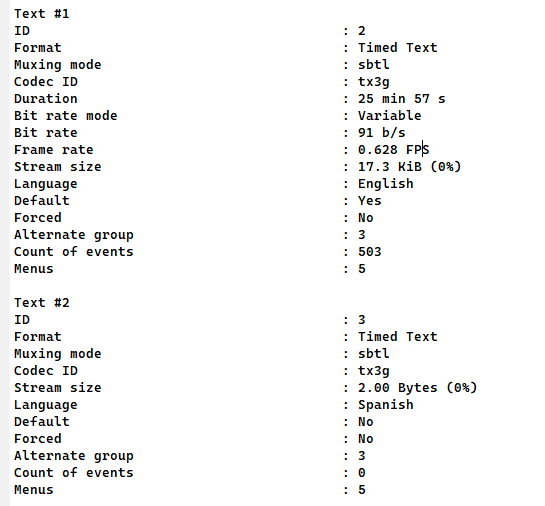
很抱歉——我之前并不知道 MCEBuddy 目前尚不支持完整的 OCR 字幕提取。最近我发现 PlayOn 确实在拉取字幕,但它拉取的是英文字幕。这就解释了为什么看起来 MCEBuddy 只能获取英文——它读取的是视频文件中已有的字幕轨道,而不是对烧录在画面上的字幕进行 OCR。
接下来,我若要捕获这些信息,只能要么使用另一款支持 OCR 的应用,要么把 PlayOn 配置成直接录制西班牙语字幕。
请问 MCEBuddy 的完整 OCR 功能预计何时上线?
这是 PlayOn 抓取到的内容
我们正在处理,所以可能在未来几周内完成。
我们还计划增加一个选项/工具,用于将字幕从一种语言翻译成另一种语言。