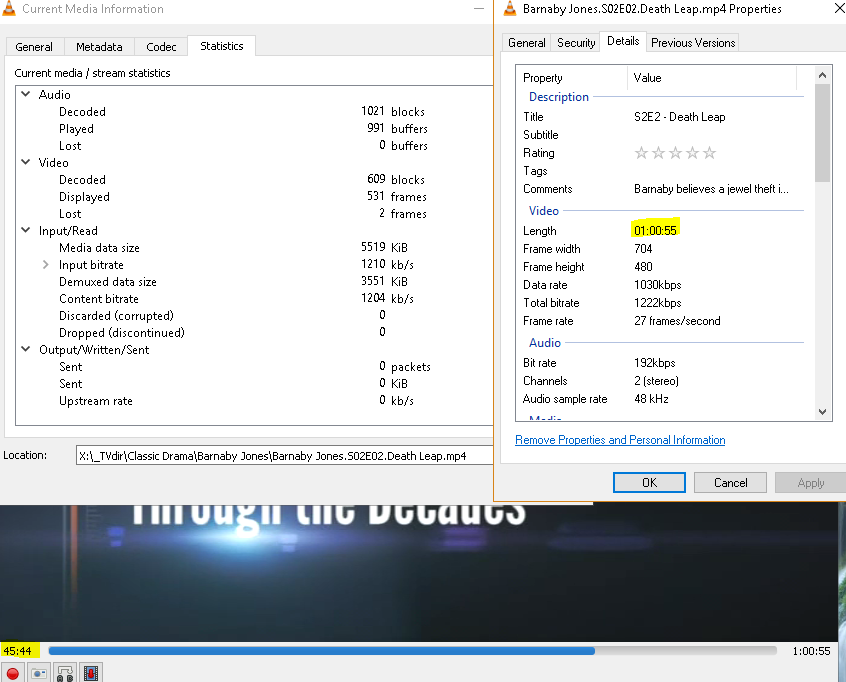
Recentelijk blijven de speelduur van mijn video’s hetzelfde na het knippen van reclames.
De lengte in geconverteerde bestanden toont nog steeds de oorspronkelijke tijd, zelfs nadat de reclames zijn verwijderd.
Bijvoorbeeld: een TS van 1 uur en 4 minuten, geconverteerd naar een MP4 waarbij de reclame is verwijderd en de duur is teruggebracht tot 45 minuten, verschijnt nog steeds als 1 uur en 4 minuten in het geconverteerde mp4-bestand.
Ik probeerde logbestanden, het eerste stukje van de video en een screenshot te uploaden, maar de FTP werkt niet:
Status: Verbinding tot stand gebracht, wacht op welkomstbericht…
Response: 220 Welcome to the MCEBuddy server. If you are not a member of the Early Access program you can join at MCEBuddy 2.x
Command: AUTH TLS
Response: 234 AUTH command ok. Expecting TLS Negotiation.
Status: TLS initialiseren…
Error: GnuTLS-fout -48: Key usage violation in certificate has been detected.
Error: Kon geen verbinding maken met server
Don’t use TLS, just use regular FTP or ignore the TLS certificate. You can attach the logs in this forum but uploading the original TS would be useful to replicate it.
I can’t replicate the issue with the regular MP4 normal so I went through your logs.
You’re using a custom profile with a key critical change, you’ve removed PreConversionCommercialRemover=true from your profile. Any specific reason (this is the cause of the issue)?
This is what’s causing the issue. Normally, MCEBuddy will remove the commercials BEFORE the encoding, not only is this more efficient (since you don’t encode commercials) but also why you’re facing an issue. When ffmpeg tries to cut the commercials post encoding it’s messing up the timelines trying to join the segments back. It’s an issue with ffmpeg but the answer would be to include the above line in your profile and it should solve your issue.
As to the second part of your question, use the MP4 High Quality profile, it’s take a lot of a time but generates the smallest and best quality videos.
You also mentioned that your mcebuddy.log file is over 2GB is size, have you disabled the option to limit the file size in the System Settings page? The default size is 50MB (it’s keep removing older entries from the log).
I can’t remember now what possessed me to change Commercial Remover to after conversion. But I fixed it.
In my System Setting page I have logging level and Logfile age (days). I don’t see a limit for the size of mcebuddy.log.
Also I changed my profile to MP4 High Quality and corrected PreConversionCommercialRemover=true.
My first conversion was a movie that ended up with over 1139:30:59 long which is not true. The original TS file was 2:01:15 long.
I’ve watched the original TS file and it plays great, no issue. I’m reprocessing it on another computer with more power and memory and will let you know how it turns out.
I would suggest do a clean install and use the stock profiles. If you’re making a custom profile copy it and make a new one so you have a comparison point. There are other changes I also noticed.
You can also set the days age to a reasonable number to limit your log file size.