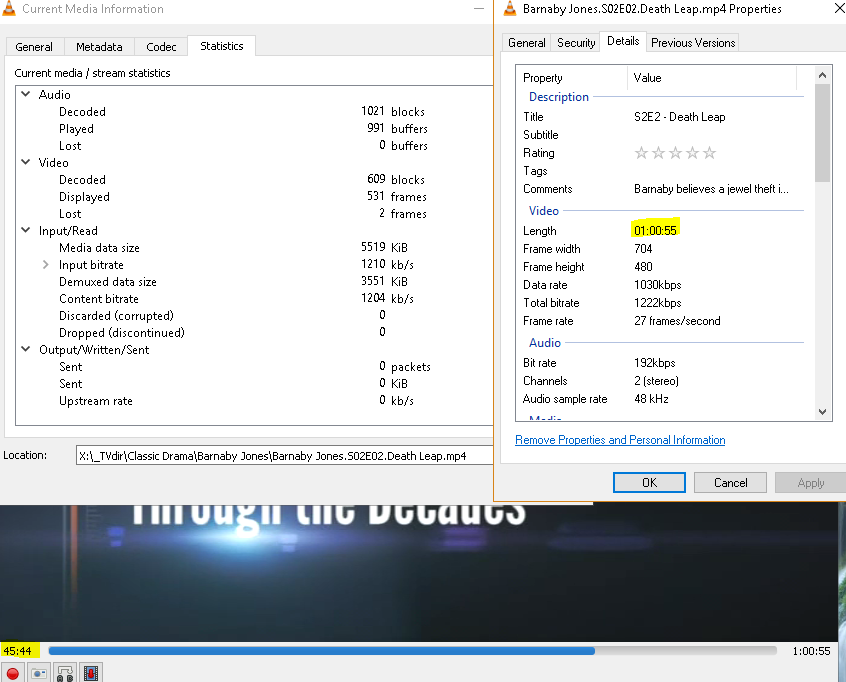
For nylig forbliver mine videostørrelser og varigheder de samme, efter at reklamer er klippet ud.
Længden i de konverterede filer viser stadig den oprindelige tid, selv efter at reklamerne er fjernet.
For eksempel viser en TS-fil på 1 time og 4 minutter, som er konverteret til en MP4 med fjernede reklamer og forkortet til 45 minutter, stadig som 1 time og 4 minutter i den konverterede mp4-video.
Jeg forsøgte at uploade logs, det første klip af videoen og et skærmbillede, men FTP fungerer ikke:
Status: Forbindelse etableret, venter på velkomstmeddelelse…
Response: 220 Velkommen til MCEBuddy-serveren. Hvis du ikke er medlem af Early Access-programmet, kan du tilmelde dig på MCEBuddy 2.x
Command: AUTH TLS
Response: 234 AUTH-kommando ok. Forventer TLS-forhandling.
Status: Initialiserer TLS…
Error: GnuTLS-fejl -48: Nøglebrugs-overtrædelse i certifikat er blevet opdaget.
Error: Kunne ikke oprette forbindelse til serveren
Don’t use TLS, just use regular FTP or ignore the TLS certificate. You can attach the logs in this forum but uploading the original TS would be useful to replicate it.
I can’t replicate the issue with the regular MP4 normal so I went through your logs.
You’re using a custom profile with a key critical change, you’ve removed PreConversionCommercialRemover=true from your profile. Any specific reason (this is the cause of the issue)?
This is what’s causing the issue. Normally, MCEBuddy will remove the commercials BEFORE the encoding, not only is this more efficient (since you don’t encode commercials) but also why you’re facing an issue. When ffmpeg tries to cut the commercials post encoding it’s messing up the timelines trying to join the segments back. It’s an issue with ffmpeg but the answer would be to include the above line in your profile and it should solve your issue.
As to the second part of your question, use the MP4 High Quality profile, it’s take a lot of a time but generates the smallest and best quality videos.
You also mentioned that your mcebuddy.log file is over 2GB is size, have you disabled the option to limit the file size in the System Settings page? The default size is 50MB (it’s keep removing older entries from the log).
I can’t remember now what possessed me to change Commercial Remover to after conversion. But I fixed it.
In my System Setting page I have logging level and Logfile age (days). I don’t see a limit for the size of mcebuddy.log.
Also I changed my profile to MP4 High Quality and corrected PreConversionCommercialRemover=true.
My first conversion was a movie that ended up with over 1139:30:59 long which is not true. The original TS file was 2:01:15 long.
I’ve watched the original TS file and it plays great, no issue. I’m reprocessing it on another computer with more power and memory and will let you know how it turns out.
I would suggest do a clean install and use the stock profiles. If you’re making a custom profile copy it and make a new one so you have a comparison point. There are other changes I also noticed.
You can also set the days age to a reasonable number to limit your log file size.