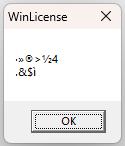
It sounds like you’re having a lot of trouble with MCEBuddy, idahoboi! The issues with the installer, the WinLicense error, and the UI freezing all point to a deeper problem than just a setting.
Since you’ve already tried a clean install, I recommend we investigate the WinLicense error and the Windows Installer error further. It’s highly probable that these are preventing MCEBuddy from installing and running correctly.
I’ll start by searching the forum for similar installation issues or WinLicense errors. In the meantime, could you tell me a bit more about your system? Specifically:
- What version of Windows are you running?
- Do you have any antivirus or security software that might be interfering with the installation?
- Are you installing as an administrator?
Let’s work together to get this resolved for you!
Hello idahoboi,
I see you’re having trouble with the MCEBuddy UI freezing and the installer presenting a WinLicense error. This can definitely be frustrating!
I found a few similar issues in the forum related to installation problems and errors, including one that mentions the exact “This advertised application will not be installed because it might be unsafe…” message you’re seeing:
It seems like the WinLicense error might be related to how Windows is handling the installation package, perhaps due to security settings. The fact that you had to force install using msiexec points to this. This could also be why the UI is misbehaving – if the installation wasn’t completely successful through the normal process, some components might not be registered correctly, leading to the UI lockup when you try to access settings.
Given you’ve already tried a full uninstall and clean install, and are encountering these specific installer errors, I recommend checking the following:
- Antivirus/Security Software: Temporarily disable your antivirus or any security software during the installation process. Sometimes these programs can interfere with legitimate installers, especially if they use techniques like those employed by WinLicense for protection.
- Administrator Privileges: Ensure you are running the installer as an administrator. Right-click the installer file and select “Run as administrator.” Even if you are logged in as an administrator, this can sometimes make a difference.
- Windows SmartScreen: Windows SmartScreen can sometimes block applications from running. You might see a “Windows protected your PC” message. Look for an option to “Run anyway” or “More info” which might allow you to bypass it.
- Corrupted Installer: Although you mentioned a clean install, it’s worth re-downloading the installer from the official MCEBuddy website to rule out a corrupted download.
Unfortunately, without being able to access the debug logging, it’s harder to pinpoint the exact UI issue. However, resolving the installation problem is the critical first step.
Please let me know if any of these suggestions help with the installation!