重新转换现有文件

您好,我是 MCEBuddy 的新手。我购买了两个许可证,一个用于我带有 CableCard 的古老 Win 8.1 WMC 盒子,另一个用于我配备独立 GPU 的极速新机器。

我本打算使用快速机器转码数百个现有录音,将转码后的文件从我的 WMC 机器移动到我的 NAS 盒子。然后,我将让旧的、慢速的机器运行 MCEBuddy,以便转码新录制的节目。

第一部分工作正常,但旧机器上的 MCEBuddy 想要重新转码所有文件。我原以为勾选“跳过重新转换”应该会检查目标位置,看(将要重命名的)文件名是否存在,如果存在就跳过转换。然而,这似乎没有奏效。我是不是遗漏了什么?

我确实有一个自定义重命名规则,但这个规则字符串在快速机器上成功转换了资料库,而在我只想转换新录音的慢速机器上却不行。

Hi John, and welcome to MCEBuddy!

You’re right, the “skip reconversion” option should prevent MCEBuddy from re-transcoding files that already exist in the destination with the same (renamed) filename. It sounds like you’ve set up your renaming rules identically on both machines, which is a good start.

Let’s try to figure out what might be happening. When you say the old machine “wants to re-transcode all the files,” do you mean it’s actually starting the conversion process, or is it just listing them as pending in the queue?

Here are a few things we can check:

  1. Exact Match: The “skip reconversion” feature relies on an exact match of the destination filename. Even a slight difference, like an extra space or a different case, can cause MCEBuddy to see it as a new file. Could you double-check that the renaming rules on both machines are truly identical character by character?
  2. Destination Folder: Is the destination folder configured identically on both machines? MCEBuddy needs to know where to look for the existing files.
  3. File Attributes: Sometimes, file attributes (like creation date or modification date) can play a role. Have the files been moved or copied in a way that might have altered these attributes significantly?
  4. Log Files: The MCEBuddy log files would be very helpful in understanding what’s happening. Can you share a snippet of the log from the old machine when it’s attempting to re-transcode the files? Look for entries related to “skip reconversion” or the files in question.
  5. MCEBuddy Version: While unlikely to be the primary cause, ensuring both machines are running the same version of MCEBuddy could eliminate any potential version-specific quirks.

Let’s start there. If you can provide some more details, especially from the logs, we can narrow down the issue.

這裡有幾件事我們可以檢查:

  1. 完全比對 (Exact Match): 「略過重新轉碼 (skip reconversion)」功能依賴於目標檔案名稱的完全比對。即使是微小的差異,例如多一個空格或不同的大小寫,都可能導致 MCEBuddy 將其視為新檔案。您能否仔細檢查兩台機器上的重新命名規則是否逐字元都完全相同? [JD 絕對,這是個很好的觀點,我一到家就會檢查這個]

    目標資料夾 (Destination Folder): 兩台機器的目標資料夾設定是否完全相同? MCEBuddy 需要知道去哪裡尋找現有的檔案。 [JD 是的,它們是相同的,在我的 NAS 盒上是同一個資料夾,憑證等也都一樣]

  2. 檔案屬性 (File Attributes): 有時候,檔案屬性(如建立日期或修改日期)可能會起作用。這些檔案的移動或複製方式是否可能顯著改變了這些屬性? [JD 發生在檔案上的唯一事情是 MCEBuddy 轉碼了它們並將它們移動到不同的目錄,這應該沒問題吧?]

  3. 日誌檔案 (Log Files): MCEBuddy 的日誌檔案對於理解正在發生的情況非常有幫助。您能否分享舊機器在嘗試重新轉碼這些檔案時的日誌片段?尋找與「略過重新轉碼 (skip reconversion)」或相關檔案的條目。 [JD 是的,我一定會查看並張貼任何相關部分。]

  4. MCEBuddy 版本 (MCEBuddy Version): 雖然不太可能是主要原因,但確保兩台機器都運行相同版本的 MCEBuddy 可以排除任何潛在的版本特定怪癖。 [是的,它們是同時下載的,但我會再次確認。另外,它確實似乎在重新轉碼,而不僅僅是將已經轉碼的檔案加入佇列。]

非常感謝您快速的回覆和檢查清單!

Hi John,

Thanks for the additional information! It’s good to know that the destination folder and credentials are identical, and that you’ll be checking the renaming rules and logs.

The fact that MCEBuddy is actually re-converting the files, and not just queuing them, is a key piece of information. This strongly suggests that it’s not recognizing the existing files as identical, even with the “skip reconversion” option enabled.

Regarding your question about file attributes, it’s generally fine if MCEBuddy moves the files after transcoding. The “skip reconversion” feature primarily relies on the destination filename, not the original file’s attributes. However, if the files were moved in a way that significantly altered their modification dates (e.g., if a new copy was created rather than a move), it could potentially cause issues with other features, but it’s less likely to be the direct cause of “skip reconversion” failing if the filenames are indeed identical.

Let’s focus on those renaming rules and the logs. The logs will be the most valuable in telling us why MCEBuddy thinks it needs to reconvert the files. Look for messages related to the “skip reconversion” check and any discrepancies it might be reporting.

Once you have a chance to check the exact renaming rules and share those log snippets, we should be able to get a clearer picture of what’s going on.

No problem at all! We’ll get this sorted out.

这适用于同一台机器上的文件。MCEBuddy 会保留一个跟踪转换的 _history_ 文件在 _config_ 文件夹中。因此,如果您在两台独立的机器上运行 MCEBuddy,它们不知道另一台机器正在做什么,因此无法跟踪机器之间的文件。有解决此问题的方法,请在论坛中搜索“Daisy Chaining”(菊花链)以了解如何通过组合文件夹和过滤器来实现此目的。

例如,您可以将它们放在新旧机器的不同文件夹中,或者您可以使用基于文件名的过滤器、节目名称的过滤器,甚至可以根据上次修改的时间戳来判断转换任务(或监控任务)是否应处理或监控这些文件。

嗯,看起來問題確實出在名稱上。我以為我找到了問題所在,以下是我使用的重新命名規則:

TV Series%showname%%showname%.S%season%##E%episode%##.%episodename%>>

\TV Series%showname%%showname%.S%season%##E%episode%##.%episodename%>>

較快的電腦上多了一個反斜線。不過,我將舊電腦的規則更改為包含反斜線,它仍然重新轉換了。

以下是一些日誌中的相關部分。我只需要弄清楚為什麼名稱被視為不同:

Skip ReProcessing → True

Check Reprocessing History → True

Auto Increment Filename → False

Add to iTunes Library → False

INFORMATION> 2025-09-08T15:37:37 MCEBuddy.Engine.ConversionJob → Checking for destination file skip reprocessing

- → Custom Renaming Command → TV Series%showname%%showname%.S%season%##E%episode%##.%episodename%>>

INFORMATION> 2025-09-08T15:37:37 MCEBuddy.Engine.ConversionJob → Destination file \\192.168.0.46\User Homes\johndefiore\Media\Converted\TV SeriesEva Longoria Searching for MexicoEva Longoria Searching for Mexico.S01E02.Yucatan.mp4 does not exist, continuing with conversion

INFORMATION> 2025-09-08T15:37:37 MCEBuddy.Engine.ConversionJob → Running [LINK REMOVED]

- → Custom Renaming Command → TV Series%showname%%showname%.S%season%##E%episode%##.%episodename%>>

- → Custom Renaming Command → TV Series%showname%%showname%.S%season%##E%episode%##.%episodename%>>

2025-09-08T15:37:37 MCEBuddy.Transcode.CustomCommand → Engine running as service, enabling PreCustomCommandUISession, since PreCustomCommandShowWindow is enabled

2025-09-08T15:37:37 MCEBuddy.Transcode.CustomCommand → [Link removed] parameters read →

PreCustomCommandPath =

PreCustomCommandParameters =

PreCustomCommandHangPeriod = 300

PreCustomCommandCritical = False

PreCustomCommandUISession = True

PreCustomCommandShowWindow = True

PreCustomCommandExitCodeCheck = False

INFORMATION> 2025-09-08T15:37:37 MCEBuddy.Transcode.CustomCommand → No [LINK REMOVED] found

2025-09-08T15:37:37 MCEBuddy.Engine.ConversionJob → Finished pre remuxing custom command , source file size [KB] 2,233,088.00

2025-09-08T15:37:37 MCEBuddy.AppWrapper.FFmpegMediaInfo → Launching process C:\Program Files\MCEBuddy2x\ffmpeg\ffprobe.exe

2025-09-08T15:37:37 MCEBuddy.AppWrapper.FFmpegMediaInfo → Process arguments -hide_banner -probesize 100M -analyzeduration 300M -v quiet -print_format json -show_programs -show_format -show_streams -show_chapters -i “E:\Recorded TV\Eva Longoria- Searching for Mexico_CNNHD_2025_05_25_20_58_00.wtv”

2025-09-08T15:37:37 MCEBuddy.AppWrapper.FFmpegMediaInfo → UI Session Admin Process : False

2025-09-08T15:37:37 MCEBuddy.AppWrapper.FFmpegMediaInfo → Setting process priority to Idle
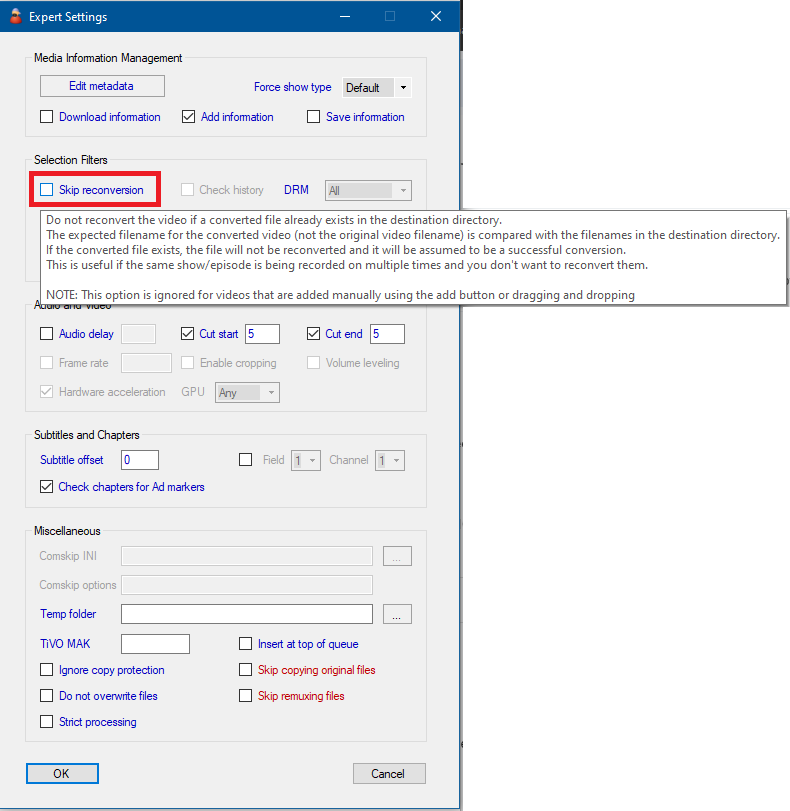
啊,谢谢,我明白了。我以为该功能会检查 文件名 是否存在于目标目录中,如果存在相同的文件名就不会转换。那似乎是一个有用的功能,但如果它只依赖于历史文件,我就能理解为什么它会进行重新转换了。

(尽管日志文件似乎表明它在重新转换之前可能会检查目标文件:

INFORMATION> 2025-09-08T15:37:37 MCEBuddy.Engine.ConversionJob → 目标文件 \\\\192.168.0.46\\User Homes\\johndefiore\\Media\\Converted\\TV SeriesEva Longoria Searching for MexicoEva Longoria Searching for Mexico.S01E02.Yucatan.mp4 不存在,继续转换

是的,該功能也存在,請前往 轉換任務 → 進階設定 尋找名為 跳過重新轉換 (Skip reconversion) 的選項

此功能完全依賴於目標檔名。您可以查看彈出式說明以獲得詳細描述,但基本上,啟用後,如果 MCEBuddy 發現轉換後檔案的「預期」名稱與目標目錄中已存在的檔案名稱相符,它將決定跳過轉換。這完全基於預期的目標檔名,因此請注意重新命名規則、目標資料夾等。

我不是专家,而且我认为你已经有最顶尖的专家与你合作了,但是两个 MCE 副本可以配置为使用同一个历史文件吗?那会有帮助吗?

我有同樣的想法,但我不知道該如何讓它奏效。我無法弄清楚為什麼名稱不匹配,它們對我來說看起來完全一樣,所以我只是讓我的慢速機器重新轉換所有內容。它快完成了,所以這是解決問題的笨拙方法。如果以後有時間,我可能會再研究一下。