Hello all, hopefully this is the right location for what may be a more general question, if not please move this post to the appropriate place.
I seem to be having an issue with the way I have setup MCEBuddy. I am on both premium version of MCEBuddy and Comskip.
I use my hdhomerun prime to record both Movies and TV
I have a few different paths I would like to monitor:
\server\hdhomerun
\server\playon recordings\
I have a few different conversion task goals.
-
use hdhomerun profile, remove commercials, delete original recording, replace original recording. maintain original quality.
-
use hdhomerun profile, remove commercials, delete original recording, replace original recording. convert to 720p at 50% file size
then I have a few 1 off conversion tasks that I use. These are based on a location on the desktop running MCEBuddy.
- Remove commercial, maintain quality, output as MKV
- Remove commercial, convert 720p at 50% file size, output as MKV.
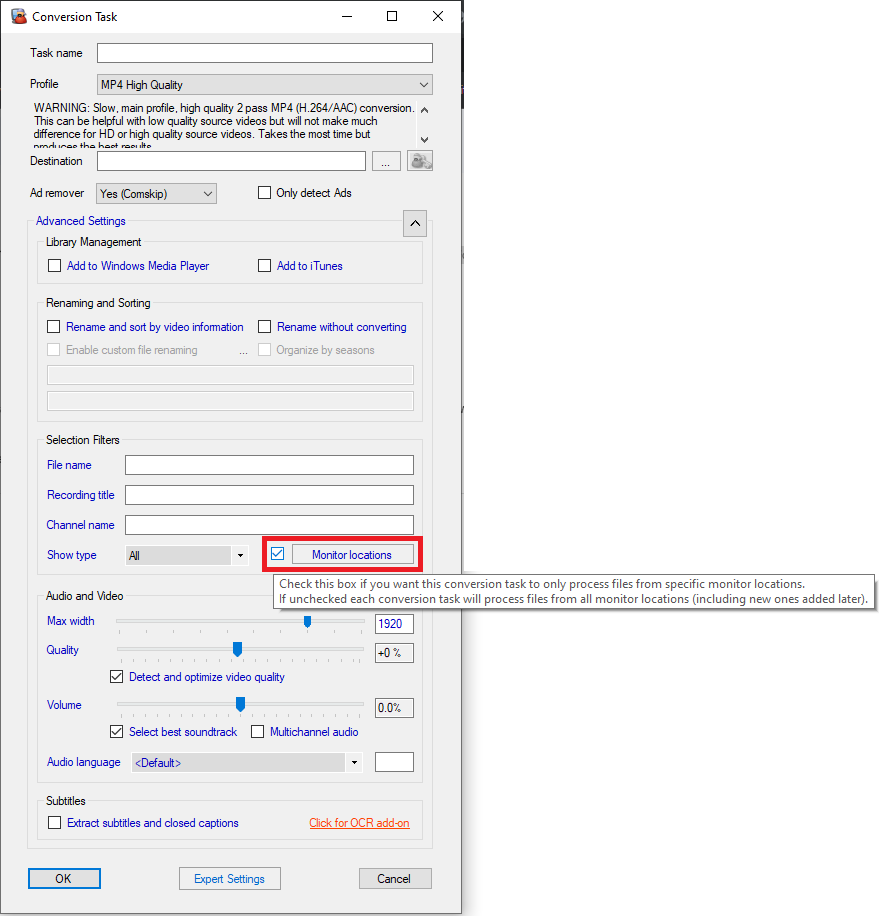
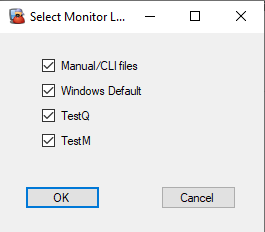
The issue I am finding is that no matter what MCEBuddy attempts to process a single recording with all (4) of the conversion tasks. I have been struggling with this for over a year now and have just now had time to replace the windows machine running MCEBuddy. at this point in time I manually add the recorded file to MCEBuddy and wait until it queues up all (4) of the conversion tasks. could an option be set in the monitor location to select one of the conversion tasks available? I read documentation on the old site and new site and seem to be missing this rule.
Thanks, sorry for the long post but I wanted to be as specific as possible (i’m sure I missed something).