嗨,我在这里发布了我问题的简短版本。
简单来说,我有一些以1080i60录制的NFL比赛录像,我希望通过去隔行处理,将每秒60场的流畅画面保留为每秒60帧。
我在“专家设置”中将帧率指定为59.94(也试过60,没有区别)。
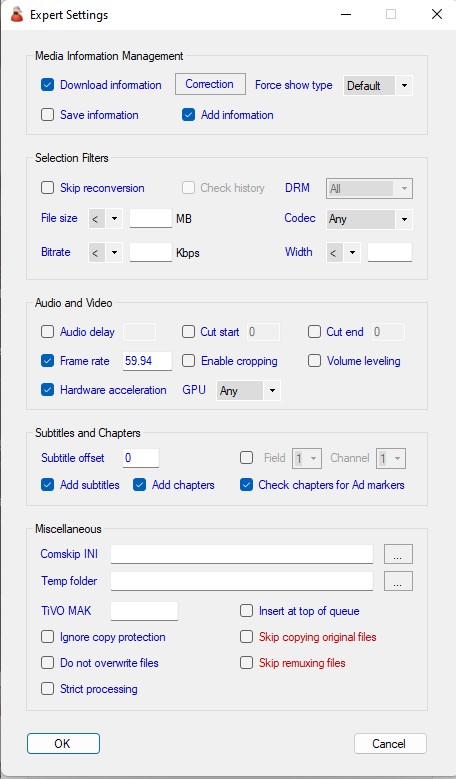
按照这个帖子的解决方案,使用Bob算法进行去梳/去隔行,我基于默认配置文件创建了2个自定义配置文件。我的设置如下。
不幸的是,输出的视频始终是30fps。我尝试用手动方式,在Handbrake里只指定60fps可变帧率和Bob去梳,基于默认的Fast 1080p30配置文件修改,就能得到我想要的流畅60fps。
希望能得到支持,因为我不知道还能做什么。下面附上转换日志,每个配置文件一份。如需更多信息请告诉我!
NFL Football 2017-10-08 Los Angeles Chargers at New York Giants 2017-10-08-1300.mpg-Transcode-2022-07-13T21-23-03.log (9.4 MB)
NFL Football 2017-10-08 Los Angeles Chargers at New York Giants 2017-10-08-1300.mpg-Transcode-2022-07-13T19-16-47.log (4.5 MB)
[HEVC Sports]

Description=HEVC in MP4 (H.265/AAC) conversion. Creates a smaller file (50% smaller than H.264) with comparable quality but very slow.

order=handbrake,ffmpeg
ffmpeg-general=-threads 0
ffmpeg-video=-ss 0 -tag:v hvc1 -vf yadif=0:-1:1,hqdn3d -vcodec libx265 -preset medium -crf 26 -map 0:v -sn
ffmpeg-audio=-acodec aac -ab 128k -map 0:a
ffmpeg-audioac3=-acodec aac -ab 160k -map 0:a
ffmpeg-ext=.mp4
ffmpeg-audiodelay=skip
ffmpeg-VideoOptimized=true
handbrake-general=--decomb=bob --loose-anamorphic --verbose=2 -f mp4
handbrake-video=--start-at duration:0 -e x265 --encoder-preset medium -q 26
handbrake-audio=-E faac -R auto -B 128 -D 0 -a 1,2,3,4,5
handbrake-audioac3=-E faac -R auto -B 160 -D 0 -a 1,2,3,4,5
handbrake-ext=.mp4
handbrake-audiodelay=skip
PreConversionCommercialRemover=true
RenameExt=.mpg

[H264 Sports]

Description=WARNING: Slow, main profile, high quality 2 pass MP4 (H.264/AAC) conversion. This can be helpful with low quality source videos but will not make much difference for HD or high quality source videos. Takes the most time but produces the best results.

2pass=true
order=handbrake,ffmpeg,mencoder
mencoder-general=-ss 0 -vf pullup,softskip,yadif=0:-1,hqdn3d,harddup
mencoder-video=-ovc x264 -x264encopts bitrate=1800:me=hex:trellis=2:subq=8:partitions=all:8x8dct:ref=5:rc_lookahead=50:keyint=25:keyint_min=20:bframes=3:weight_b:level_idc=40:b_pyramid=normal:direct_pred=auto:mixed_refs:deblock=-1,-1:nofast_pskip:nodct_decimate:b_adapt=2:threads=auto
mencoder-audio=-oac faac -faacopts br=192:mpeg=4:tns:object=2
mencoder-audioac3=-oac faac -faacopts br=384:mpeg=4:tns:object=2
mencoder-ext=.avi
mencoder-remuxto=.mp4
mencoder-audiodelay=skip
ffmpeg-general=-threads 0
ffmpeg-video=-ss 0 -vf yadif=0:-1:1,hqdn3d -vcodec libx264 -b 1800k -x264opts me=hex:trellis=2:subq=8:partitions=all:8x8dct=1:ref=5:rc-lookahead=50:keyint=25:min-keyint=20:bframes=3:weightb=1:level=4.0:b-pyramid=normal:direct=auto:mixed-refs=1:deblock=-1,-1:no-fast-pskip=1:no-dct-decimate=1:b-adapt=2:threads=auto -map 0:v -sn
ffmpeg-audio=-acodec aac -ab 192k -map 0:a
ffmpeg-audioac3=-acodec aac -ab 384k -map 0:a
ffmpeg-ext=.mp4
ffmpeg-audiodelay=skip
handbrake-general=--decomb=bob --denoise="weak" --loose-anamorphic --verbose=2 -T -f mp4 -O
handbrake-video=--start-at duration:0 -e x264 -b 1800 -x me=hex:trellis=2:subq=8:partitions=all:8x8dct:ref=5:rc-lookahead=50:keyint=25:keyint-min=20:bframes=3:weightb=1:level-idc=40:b-pyramid=1:direct-pred=auto:mixed-refs:deblock=-1,-1:nofast-pskip:nodct-decimate:b-adapt=2:threads=auto
handbrake-audio=-E faac -R auto -B 192 -D 0 -a 1,2,3,4,5
handbrake-audioac3=-E faac -R auto -B 384 -D 0 -a 1,2,3,4,5
handbrake-ext=.mp4
handbrake-audiodelay=skip
PreConversionCommercialRemover=true
RenameExt=.mpg