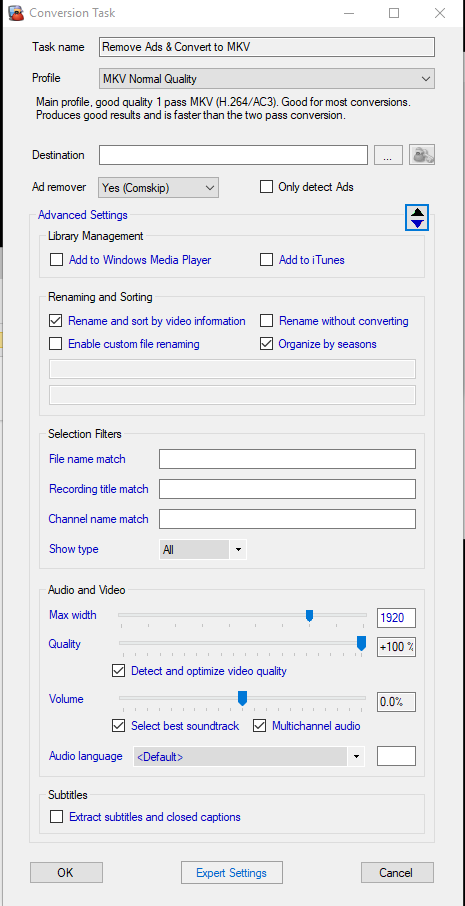
Most often, after MCE buddy finishes converting a file that was recorded by Plex, then the newly converted file is deleted leaving no recording at all. I have left the Destination empty so it will put the converted file where the original file was. The weird thing is that for a few days it all works perfectly and then it goes back to this auto-deletion step.
My goal was to have MCEbuddy remove commercials for all new Recordings from Plex and them encode to MKV H.264 and replace the original, It would be so amazing if it would work!
There were two shows recorded yesterday (7/31) successfully according to Plex. Both were deleted by MCEbuddy
Special Report With Bret Baier
Tucker Carlson Tonight
But only the first one produced a conversion log which I attached. I also attached the image Plex confirming the Recording of the second show which MCEbuddy did not product a conversion log.
Your log is showing that the file was moved successfully to your network share, and after moving the file size was also confirmed and showing as 1.9GB. So the file was definitely moved.
INFORMATION> 2017-07-31T16:24:38 MCEBuddy.Engine.ConversionJob → Moving converted file E:\MCEBuddy Temp\working0\Special Report With Bret Baier-2017-07-31 1607.mkv to \\HOME-SERVER\Recorded TV\Plex DVR\Special Report With Bret Baier (2009)\Season 2017\Special Report With Bret Baier\Special Report With Bret Baier-2017-07-31 1607.mkv
INFORMATION> 2017-07-31T16:24:55 MCEBuddy.Transcode.CustomCommand → No custom commands found
2017-07-31T16:24:55 MCEBuddy.Engine.ConversionJob → Finished end of conversion custom command, file size [KB] 1,942,254.00
Check your monitor task expert settings incase you’ve set it to delete the original file after conversion. If not then something else is deleting your file. You should enable file logging on your network server to track down which application is deleting it.
If there’s no conversion log then the conversion did not start. You should go through mcebuddy.log file to find out why the conversion didn’t start (it could be the file wasn’t accessible, the log will tell the story).
I have set it to delete the original file after conversion. But for some reason (sometimes) the converted file is getting deleted as well and I have nothing shown in the folder. As I have MCEbuddy set to save the file to the same destination as the source (i.e by leaving that setting blank), when it works, the converted file shows up as a replacement for the original (although the Metadata is missing more often than not).
If the converted file and original file have the same name then the monitor task will delete the original file it will end up deleting the converted file (it goes by filename/path). If they aren’t the same name then something else is deleting the file.
Hier zijn de instellingen. Ik zie dat ik had ingesteld dat het moet “Hernoemen en sorteren op video-informatie”, dus dat zou moeten voorkomen dat het geconverteerde bestand wordt verwijderd.
Dat werkte helemaal niet (er werd niets opgenomen). Je zou denken dat dit allemaal veel eenvoudiger zou moeten zijn!
Even off-topic: ik weet niet precies hoe de metadata-tagging werkt, maar het zou geweldig zijn als het geconverteerde programma de metadata zou behouden die Plex tijdens de oorspronkelijke opname heeft verzameld (terug naar hoe het beste in te stellen voor gebruik met Plex). Dit is een secundair probleem. Voor nu wil ik gewoon dat de bestanden stoppen met verwijderen na conversie.
Try a simple experiment. Change your destination folder to a local disk. Is that makes a difference.
also attach your MCEBuddy.log file or go through it and look for the file name that was deleted. If MCEBuddy is deleting it then it will show up in the log file (its like an audit of every transaction)
Sorry for the delay. At the end of the day I did nothing but is hasn’t been deleting the processed files for about a week. Wish I could say why/why not. I’ll keep monitoring.