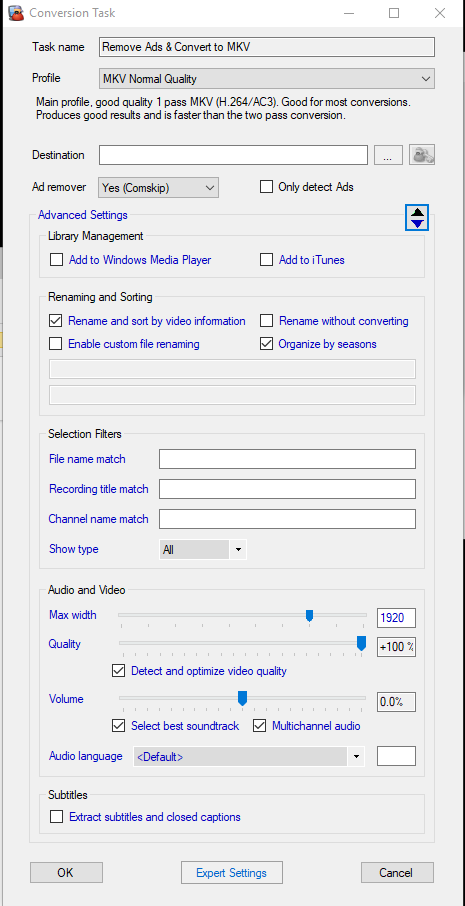
Most often, after MCE buddy finishes converting a file that was recorded by Plex, then the newly converted file is deleted leaving no recording at all. I have left the Destination empty so it will put the converted file where the original file was. The weird thing is that for a few days it all works perfectly and then it goes back to this auto-deletion step.
My goal was to have MCEbuddy remove commercials for all new Recordings from Plex and them encode to MKV H.264 and replace the original, It would be so amazing if it would work!
There were two shows recorded yesterday (7/31) successfully according to Plex. Both were deleted by MCEbuddy
Special Report With Bret Baier
Tucker Carlson Tonight
But only the first one produced a conversion log which I attached. I also attached the image Plex confirming the Recording of the second show which MCEbuddy did not product a conversion log.
Your log is showing that the file was moved successfully to your network share, and after moving the file size was also confirmed and showing as 1.9GB. So the file was definitely moved.
INFORMATION> 2017-07-31T16:24:38 MCEBuddy.Engine.ConversionJob → Moving converted file E:\MCEBuddy Temp\working0\Special Report With Bret Baier-2017-07-31 1607.mkv to \\HOME-SERVER\Recorded TV\Plex DVR\Special Report With Bret Baier (2009)\Season 2017\Special Report With Bret Baier\Special Report With Bret Baier-2017-07-31 1607.mkv
INFORMATION> 2017-07-31T16:24:55 MCEBuddy.Transcode.CustomCommand → No custom commands found
2017-07-31T16:24:55 MCEBuddy.Engine.ConversionJob → Finished end of conversion custom command, file size [KB] 1,942,254.00
Check your monitor task expert settings incase you’ve set it to delete the original file after conversion. If not then something else is deleting your file. You should enable file logging on your network server to track down which application is deleting it.
If there’s no conversion log then the conversion did not start. You should go through mcebuddy.log file to find out why the conversion didn’t start (it could be the file wasn’t accessible, the log will tell the story).
I have set it to delete the original file after conversion. But for some reason (sometimes) the converted file is getting deleted as well and I have nothing shown in the folder. As I have MCEbuddy set to save the file to the same destination as the source (i.e by leaving that setting blank), when it works, the converted file shows up as a replacement for the original (although the Metadata is missing more often than not).
If the converted file and original file have the same name then the monitor task will delete the original file it will end up deleting the converted file (it goes by filename/path). If they aren’t the same name then something else is deleting the file.
Her er indstillingerne. Jeg kan se, at jeg havde sat den til “Omdøb og sorter efter video-information”, så det burde forhindre, at den konverterede fil bliver slettet.
Det virkede slet ikke (der blev ikke optaget noget). Jeg ville tro, at det hele burde være meget nemmere!
Lidt off-topic: Jeg er ikke sikker på, hvordan metadata-tagning fungerer, men det ville være fantastisk, hvis det konverterede program kunne beholde de metadata, som Plex indsamlede under den oprindelige optagelse (tilbage til, hvordan man bedst opsætter det til at virke med Plex). Det er et sekundært problem. Lige nu ville jeg bare ønske, at filerne holdt op med at blive slettet efter konvertering.
Try a simple experiment. Change your destination folder to a local disk. Is that makes a difference.
also attach your MCEBuddy.log file or go through it and look for the file name that was deleted. If MCEBuddy is deleting it then it will show up in the log file (its like an audit of every transaction)
Sorry for the delay. At the end of the day I did nothing but is hasn’t been deleting the processed files for about a week. Wish I could say why/why not. I’ll keep monitoring.