# Update Metadata for Ripped movies and Shows
**URL:** https://discussion.mcebuddy2x.com/t/update-metadata-for-ripped-movies-and-shows/2794
**Category:** Metadata and Renaming
**Created:** [April 22, 2019, 12:04pm UTC](https://discussion.mcebuddy2x.com/t/update-metadata-for-ripped-movies-and-shows/2794 "2019-04-22T12:04:34Z")
**Posts on this page:** 10
**Page:** 1
### Author:  [@Yonahinthewhale](https://discussion.mcebuddy2x.com/u/Yonahinthewhale)
#### Post date: [April 22, 2019, 12:04pm UTC](https://discussion.mcebuddy2x.com/t/update-metadata-for-ripped-movies-and-shows/2794/1 "2019-04-22T12:04:34Z")
I’m not sure if this was asked or where I can find it. I have a long list of movies I have ripped and simply renamed. All the metadata is generic from the disk. Example: Star Wars - 04 - A New Hope.mp4 (Metadata title: Out\_Title 1) Can MCEBuddy Allow me to drop in my movies, read the file name and update the Metadata? Right now I have it set to MP4 Uncompressed, No ad skip, Rename without converting. Is this even an option? If so how? LOVE this program! Thank you.
---
### Author:  [@Goose](https://discussion.mcebuddy2x.com/u/Goose)
#### Post date: [April 22, 2019, 1:06pm UTC](https://discussion.mcebuddy2x.com/t/update-metadata-for-ripped-movies-and-shows/2794/2 "2019-04-22T13:06:48Z")
The short answer is Yes but it depends on how you set it up.
By default MCEBuddy assumes that programs are TVShows so it tries to process the metadata accordingly. There needs to be an indicator that’s the metadata is a Movie (or Sports) to treat it differently. Many recording softwares include this information in the metadata.
In your case since it is just generic filenames, you need to tell MCEBuddy that it’s a movie. I would recommend setting up a separately Monitor location that monitors your movie folders. Then create a new Conversion Task and connect it to the Monitor location you just created for your movies by clicking on _Select Monitor Locations_ (so it will process files only from this location). Then click on _Expert Settings → Force Show Type → Movies_
I would also recommend checking out this post to see how to make the most of metadata renaming.
> [@Metadata matching, extraction, renaming from files and downloading from the Internet](https://discussion.mcebuddy2x.com/t/renaming-extracting-metadata-from-files-and-downloading-from-the-internet/69):
>
> MCEBuddy can extract metadata in many ways from a file, summarizing the sequence: Extract from WTV and DVRMS file using Windows DirectShow filters (see this thread on how to install the filters in [Windows Servers](https://discussion.mcebuddy2x.com/t/enabling-metadata-extraction-on-windows-servers/70)) Extract from containers that support metadata like MP4, MKV, M4V, AVI, MP3, TS and WMV Extract from proprietary recording software containers like TiVO, PlayLater, SiliconDust DVR Extract using supporting metadata files like XML, NFO and PROPERTIES from Media Portal, nPVR,…
---
### Author:  [@Yonahinthewhale](https://discussion.mcebuddy2x.com/u/Yonahinthewhale)
#### Post date: [April 24, 2019, 12:56pm UTC](https://discussion.mcebuddy2x.com/t/update-metadata-for-ripped-movies-and-shows/2794/3 "2019-04-24T12:56:23Z")
I got it set up to do what you said. But even with the conversion process I can’t seem to get it to work without setting it to MP4 Unprocessed which still makes each file have to go through remuxing (Don’t even know what that is) and it creating a new file. This all takes an upwards of 5-10 minutes depending on the file. I simply want it to update the metadata without it going through the unnecessary steps. If I check rename without converting it wont even recognize the files no matter what I drop in. Is what I want to do even possible? Thanks again for the quick reply.
---
### Author:  [@Goose](https://discussion.mcebuddy2x.com/u/Goose)
#### Post date: [April 24, 2019, 4:38pm UTC](https://discussion.mcebuddy2x.com/t/update-metadata-for-ripped-movies-and-shows/2794/4 "2019-04-24T16:38:18Z")
> [@Yonahinthewhale](#):
>
> I simply want it to update the metadata without it going through the unnecessary steps
You need to
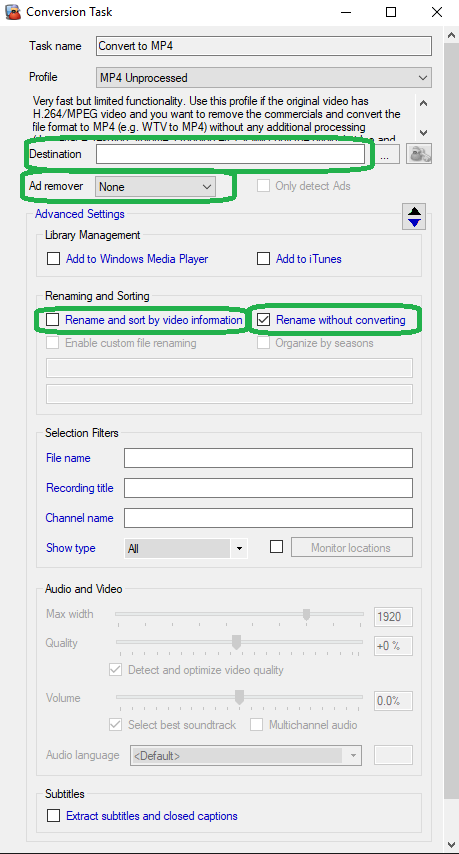
- click on `Renaming without converting` and disable Renaming (so it’ll use the original filename)
- on the _Conversion Task → Expert Settings_ check the option for `Add information` to add the metadata to the files
- If you want MCEBuddy to download additional information from the internet (like art work, release dates, actors etc) check the `Download information` button which will supplement what’s already there based on the link I had provided above.
- If you don’t want MCEBuddy to create a new file, then in the _Expert Settings_ page check the option for `Skip copying original file`. I would recommend doing this AFTER testing that everything works as you expect since this will end up overwriting the original file (the destination folder should be empty in the _Conversion Task_ so it’ll write back to the same directory)
For all this to work you need to be the latest release of MCEBuddy as this functionality was just added in the last release.
---
### Author:  [@Yonahinthewhale](https://discussion.mcebuddy2x.com/u/Yonahinthewhale)
#### Post date: [April 24, 2019, 6:36pm UTC](https://discussion.mcebuddy2x.com/t/update-metadata-for-ripped-movies-and-shows/2794/5 "2019-04-24T18:36:28Z")
thank you I’ll give this a try tonight
---
### Author:  [@Yonahinthewhale](https://discussion.mcebuddy2x.com/u/Yonahinthewhale)
#### Post date: [April 29, 2019, 1:02pm UTC](https://discussion.mcebuddy2x.com/t/update-metadata-for-ripped-movies-and-shows/2794/6 "2019-04-29T13:02:58Z")
Sorry it took me so long. I tried all your steps and when I drag a file in the window to test nothing happens.
---
### Author:  [@Goose](https://discussion.mcebuddy2x.com/u/Goose)
#### Post date: [April 29, 2019, 1:37pm UTC](https://discussion.mcebuddy2x.com/t/update-metadata-for-ripped-movies-and-shows/2794/7 "2019-04-29T13:37:15Z")
That mean MCEBuddy can’t access your file or it doesn’t match a filter you’ve setup. Open MCEBuddy.log scroll to the end and search for the filename you dragged and you’ll see what’s going on.
---
### Author:  [@Yonahinthewhale](https://discussion.mcebuddy2x.com/u/Yonahinthewhale)
#### Post date: [May 18, 2019, 3:32pm UTC](https://discussion.mcebuddy2x.com/t/update-metadata-for-ripped-movies-and-shows/2794/8 "2019-05-18T15:32:32Z")
I know this took forever to reply, I just never got a chance to deal with it. I got it so it will say its looking up information during the conversion process but nothing is added and the file is exactly like the original. None of the Metadata changes. I was looking at this program called MetaX that seems to work with issues but I would like to not have to buy it if I don’t have to.
---
### Author:  [@Goose](https://discussion.mcebuddy2x.com/u/Goose)
#### Post date: [May 20, 2019, 1:21pm UTC](https://discussion.mcebuddy2x.com/t/update-metadata-for-ripped-movies-and-shows/2794/9 "2019-05-20T13:21:09Z")
Did you enable the option to `Add information` in the expert setting page?
If the look up failed then it only wrote the original metadata so it comes down to whether the look up succeeded.
The only to tell is by looking at your conversion log. If you can attach it I can go through and tell you what’s going on.
---
### Author:  [@jobby99](https://discussion.mcebuddy2x.com/u/jobby99)
#### Post date: [July 17, 2025, 7:22pm UTC](https://discussion.mcebuddy2x.com/t/update-metadata-for-ripped-movies-and-shows/2794/10 "2025-07-17T19:22:32Z")
While mcebuddy acts as a front-end for many ffmpeg and handbrake conversions, it is not a metadata manager. You would be better off with tiny media manager. Even with all the correct settings, mcebuddy doesn’t necessarily pull the right data. You can check it easier with a metadata manager. It is easier than right clicking and using mediainfo freeware. I don’t even bother looking up metadata anymore using mcebuddy, I just tell it to save what is in the xml file that I get from [schedulesdirect.org](http://schedulesdirect.org) guide listings.
[https://www.tinymediamanager.org/](https://www.tinymediamanager.org/) (no need to buy a license for extra features)