# Tuning Comskip and Custom Comskip INI's (Country / Channel specific)
**URL:** https://discussion.mcebuddy2x.com/t/tuning-comskip-and-custom-comskip-inis-country-channel-specific/29
**Category:** Commercial Removal
**Tags:** documentation, comskip, commercialremoval, tweaking
**Created:** [June 11, 2017, 12:14am UTC](https://discussion.mcebuddy2x.com/t/tuning-comskip-and-custom-comskip-inis-country-channel-specific/29 "2017-06-11T00:14:28Z")
**Posts on this page:** 2
**Page:** 1
### Author:  [@mcebuddy2x](https://discussion.mcebuddy2x.com/u/mcebuddy2x)
#### Post date: [June 11, 2017, 12:14am UTC](https://discussion.mcebuddy2x.com/t/tuning-comskip-and-custom-comskip-inis-country-channel-specific/29/1 "2017-06-11T00:14:28Z")
# **[Tuning Comskip](https://discussion.mcebuddy2x.com/t/29) Commercial Detection**
See [this post for details if you’re want to install a custom version of Comskip](https://discussion.mcebuddy2x.com/t/64).
## INI’s
> Comskip can be fine tuned to better detect and cut commercials for each country/region. There is a file called comskip.ini in the comskip directory in the MCEBuddy installation directory (by default C:\Program Files\MCEBuddy2x). The details of the tuning parameters can be found at: [http://www.kaashoek.com/files/tuning.htm](http://www.kaashoek.com/files/tuning.htm)
>
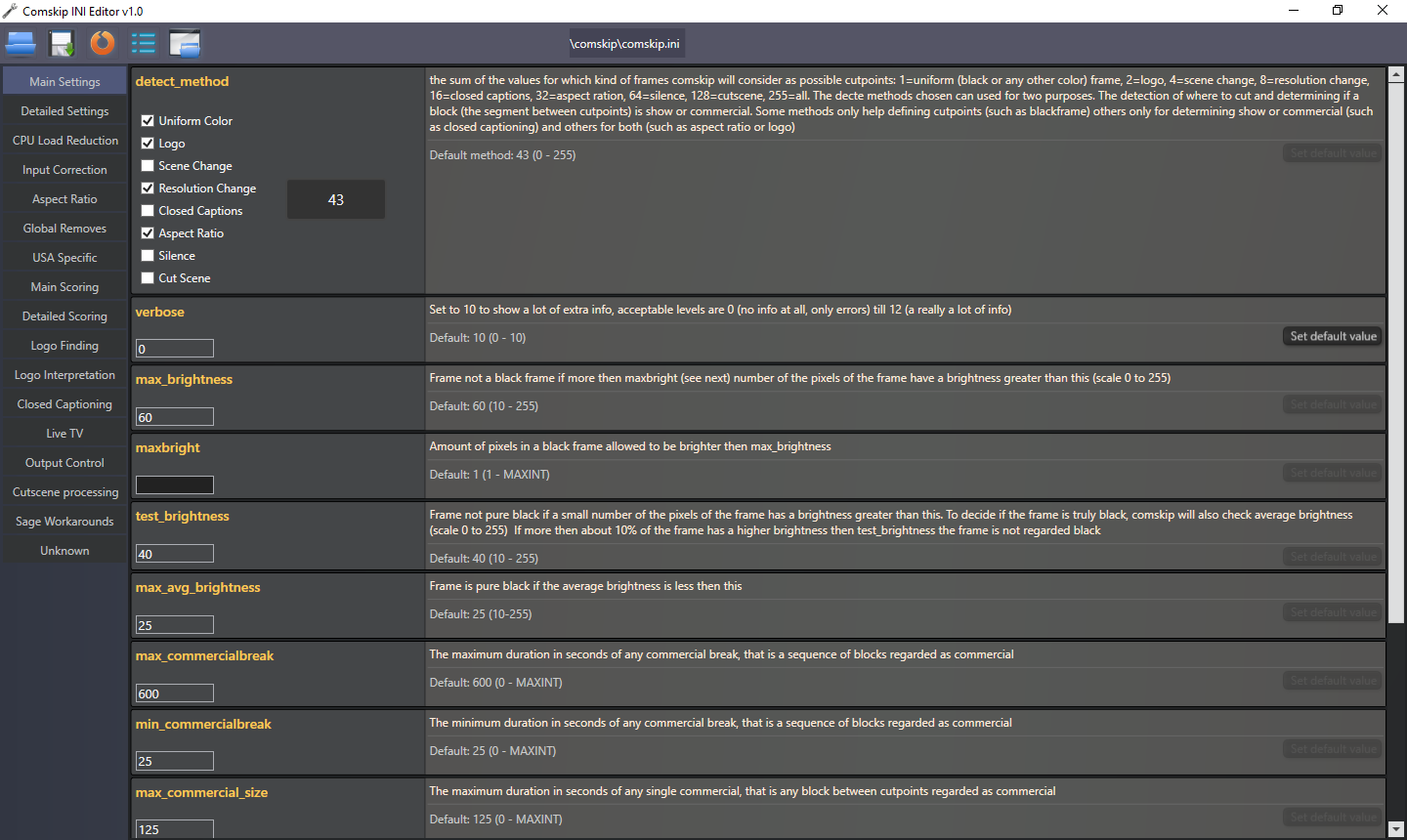
> _ **NOTE:** _ Starting v2.4.1 there is a GUI based **Comskip INI Editor** included in the `MCEBuddy\Comskip\ComskipINIEditor.exe` installation folder. You can use this to understand the various options and edit them through the GUI directly without having to manually edit/understand the options.
>
> 
## Community Comskip INI’s
> The links below are an aggregation of [custom Comskip](https://discussion.mcebuddy2x.com/t/64).ini files created by various users across the globe. Comskip is used for commercial detection, but it isn’t perfect. However it can be heavily customized via the _comskip.ini_.
>
> Users have created custom version of specific channels in specific countries. Feel free to use them and contribute back to this discussion.
>
> -
> ### [Custom Comskip.ini created by users (Country Channel)](http://www.mcebuddy2x.com/MCEBUDDY/SHARED_INFORMATION/Comskip%20INIs/)
> -
> ### [Comskip Forum where you can find more country/channel specific Comskip INI files](http://www.kaashoek.com/comskip/viewforum.php?f=7&sid=129cd15205e9d49be1b5f9c7e0ddf0c2)
> -
> ### [Comskip Forum where you can find more discussions](http://www.kaashoek.com/comskip/viewforum.php?f=2&sid=ce60aca94754a8bf67872adce994f316)
## Installing INI’s
If you’re using the [Premium Access versions of MCEBuddy](http://www.mcebuddy2x.com/#a2), once you’ve downloaded/created your [custom comskip](https://discussion.mcebuddy2x.com/t/64) INI file you can configure them using on the following options:
> 1. [Custom comskip](https://discussion.mcebuddy2x.com/t/64) INI for each conversion tasks - You can configure a separate INI file for each conversion task by configuring the option _Conversion Task_ → _Expert Settings_ → _Comskip INI_. Save your custom comkip INI file in a separate folder.
>
> 2. [Custom comskip](https://discussion.mcebuddy2x.com/t/64) INI file for all conversion tasks - If you want to replace the default INI that ship with MCEBuddy, you can so that by replacing the _comkip.ini_ file that lies in the `MCEBuddy\Comskip installation folder`. (_NOTE_: This method is temporary and does not carry over when MCEBuddy is upgraded/reinstalled)
>
> Any custom INI files configured in option 1 (individual conversion tasks) will take precedence over the custom INI configured in option 2 (default/all conversion tasks)
>
> ### NOTE:
>
> Option 1 is the preferred approach as the settings will be carried over when MCEBuddy is upgraded. With Option 2 the default Comskip INI will be overwritten when MCEBuddy is upgraded.
## Runtime Parameters for Comskip CLI
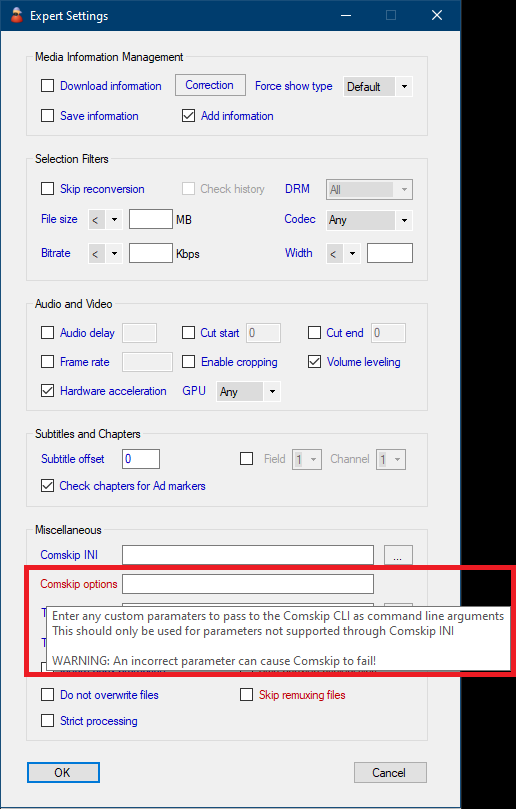
> - You can also pass custom runtime parameters to the Comskip CLI by entering them in _Conversion Task_ → _Expert Settings_ → _Comskip options_
> 
>
> _ **NOTE** _: Be careful when entering [custom comskip](https://discussion.mcebuddy2x.com/t/64) cli parameters as an incorrect option can cause comskip to fail!
## Using Hardware Decoding
> - MCEBuddy version 2.6.4+ includes a hardware accelerated version of Comskip which can [speed up](https://discussion.mcebuddy2x.com/t/62) the decoding and detection process.
>
> - Set the appropriate parameter for Comskip CLI in _Conversion Task_ → _Expert Settings_ → _Comskip options_
> 
>
> _ **NOTE** _: A bad graphics driver or incompatible GPU can cause Comskip to hang or fail!
>
> See Comskip hardware decoding benchmarks: [Hardware v/s Software Encoding Performance Benchmarking - #2](https://discussion.mcebuddy2x.com/t/hardware-v-s-software-encoding-performance-benchmarking/59/2)
For a [custom Comskip](https://discussion.mcebuddy2x.com/t/64) installation [see this topic](https://discussion.mcebuddy2x.com/t/64).
If you’re using ShowAnalyzer [see this topic](https://discussion.mcebuddy2x.com/t/4426).
---
### Author:  [@mcebuddy2x](https://discussion.mcebuddy2x.com/u/mcebuddy2x)
#### Post date: [June 11, 2017, 6:18pm UTC](https://discussion.mcebuddy2x.com/t/tuning-comskip-and-custom-comskip-inis-country-channel-specific/29/2 "2017-06-11T18:18:31Z")