# Time length in converted files still shows the original even after commercials have been removed
**URL:** https://discussion.mcebuddy2x.com/t/time-length-in-converted-files-still-shows-the-original-even-after-commercials-have-been-removed/212
**Category:** General Support / Questions
**Created:** [July 9, 2017, 12:37am UTC](https://discussion.mcebuddy2x.com/t/time-length-in-converted-files-still-shows-the-original-even-after-commercials-have-been-removed/212 "2017-07-09T00:37:42Z")
**Posts on this page:** 6
**Page:** 1
### Author:  [@p37307](https://discussion.mcebuddy2x.com/u/p37307)
#### Post date: [July 9, 2017, 12:37am UTC](https://discussion.mcebuddy2x.com/t/time-length-in-converted-files-still-shows-the-original-even-after-commercials-have-been-removed/212/1 "2017-07-09T00:37:43Z")
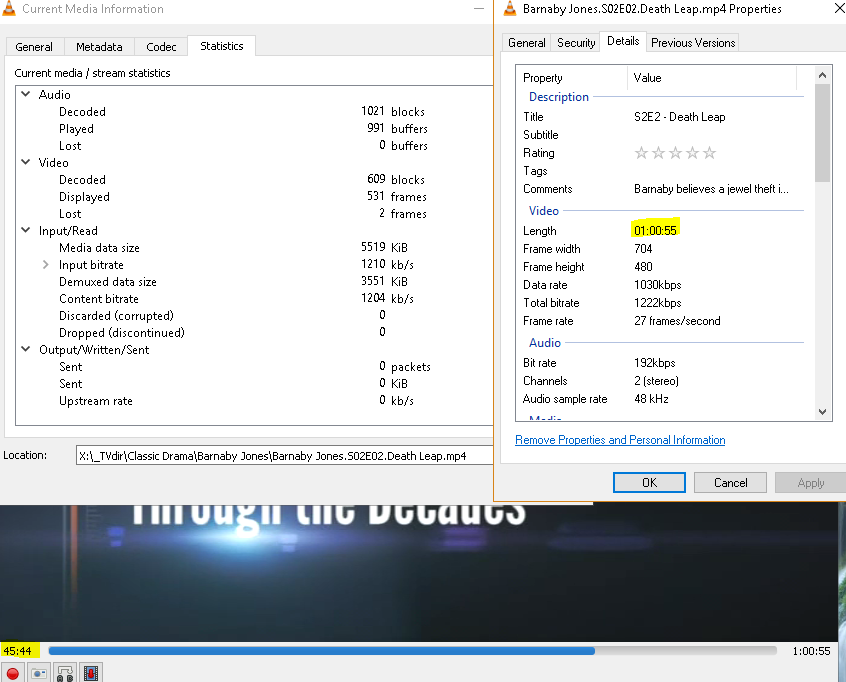
Recently my video sizes times are staying the same after cutting out commercials.
The length in converted files still shows the original even after commercials have been removed.
For example, a 1 hour and 4 minute TS, converted to a MP4 with commercial removed reduced to 45 minutes still shows up as 1 hour and 4 minutes in the converted mp4 video.
I tried to upload logs, the first slice of the video and a screenshot but the FTP is not working:
Status: Connection established, waiting for welcome message…
Response: 220 Welcome to the MCEBuddy server. If you are not a member of the Early Access program you can join at [MCEBuddy - Home](http://www.mcebuddy2x.com/#a1)
Command: AUTH TLS
Response: 234 AUTH command ok. Expecting TLS Negotiation.
Status: Initializing TLS…
Error: GnuTLS error -48: Key usage violation in certificate has been detected.
Error: Could not connect to server
[Barnaby Jones.S02E02.Death Leap.ts-movies1-2017-07-06T15-13-19.5810672-04-00.log](https://mcebuddy-discussion-forum.s3.amazonaws.com/original/1X/6a9c080f9015d10c1b2083e3ff302dca00d4b0a5.log) (4.3 MB)
---
### Author:  [@RBoy](https://discussion.mcebuddy2x.com/u/RBoy)
#### Post date: [July 9, 2017, 9:58am UTC](https://discussion.mcebuddy2x.com/t/time-length-in-converted-files-still-shows-the-original-even-after-commercials-have-been-removed/212/2 "2017-07-09T09:58:41Z")
Don’t use TLS, just use regular FTP or ignore the TLS certificate. You can attach the logs in this forum but uploading the original TS would be useful to replicate it.
---
### Author:  [@p37307](https://discussion.mcebuddy2x.com/u/p37307)
#### Post date: [July 9, 2017, 11:12am UTC](https://discussion.mcebuddy2x.com/t/time-length-in-converted-files-still-shows-the-original-even-after-commercials-have-been-removed/212/3 "2017-07-09T11:12:01Z")
Thank you RBoy.
I am in the process of uploading now to the FTP.
It’s not the video listed above, (The TS for it got deleted.
Instead it’s an Ironside and I’ve included the log in the FTP folder. The upload is about 21% done right now.
The TS recording is 1 hour 2 minutes, converted to MP4 with Com skip donators, it’s around 48 minutes.
---
### Author:  [@RBoy](https://discussion.mcebuddy2x.com/u/RBoy)
#### Post date: [July 12, 2017, 12:43am UTC](https://discussion.mcebuddy2x.com/t/time-length-in-converted-files-still-shows-the-original-even-after-commercials-have-been-removed/212/4 "2017-07-12T00:43:30Z")
I can’t replicate the issue with the regular MP4 normal so I went through your logs.
You’re using a custom profile with a key critical change, you’ve removed `PreConversionCommercialRemover=true` from your profile. Any specific reason (this is the cause of the issue)?
This is what’s causing the issue. Normally, MCEBuddy will remove the commercials BEFORE the encoding, not only is this more efficient (since you don’t encode commercials) but also why you’re facing an issue. When ffmpeg tries to cut the commercials post encoding it’s messing up the timelines trying to join the segments back. It’s an issue with ffmpeg but the answer would be to include the above line in your profile and it should solve your issue.
As to the second part of your question, use the MP4 High Quality profile, it’s take a lot of a time but generates the smallest and best quality videos.
You also mentioned that your mcebuddy.log file is over 2GB is size, have you disabled the option to limit the file size in the _System Settings_ page? The default size is 50MB (it’s keep removing older entries from the log).
---
### Author:  [@p37307](https://discussion.mcebuddy2x.com/u/p37307)
#### Post date: [July 12, 2017, 7:07pm UTC](https://discussion.mcebuddy2x.com/t/time-length-in-converted-files-still-shows-the-original-even-after-commercials-have-been-removed/212/5 "2017-07-12T19:07:11Z")
I can’t remember now what possessed me to change _Commercial Remover_ to after conversion. But I fixed it.
In my _System Setting_ page I have logging level and _Logfile age (days)_. I don’t see a limit for the size of _mcebuddy.log_.
Also I changed my profile to _MP4 High Quality_ and corrected PreConversionCommercialRemover=true.
My first conversion was a movie that ended up with over 1139:30:59 long which is not true. The original TS file was 2:01:15 long.
I’ve watched the original TS file and it plays great, no issue. I’m reprocessing it on another computer with more power and memory and will let you know how it turns out.

---
### Author:  [@RBoy](https://discussion.mcebuddy2x.com/u/RBoy)
#### Post date: [July 12, 2017, 8:02pm UTC](https://discussion.mcebuddy2x.com/t/time-length-in-converted-files-still-shows-the-original-even-after-commercials-have-been-removed/212/6 "2017-07-12T20:02:04Z")
I would suggest do a clean install and use the stock profiles. If you’re making a custom profile copy it and make a new one so you have a comparison point. There are other changes I also noticed.
You can also set the days age to a reasonable number to limit your log file size.