# Recursive Files/Folders destinations
**URL:** https://discussion.mcebuddy2x.com/t/recursive-files-folders-destinations/3477
**Category:** General Support / Questions
**Created:** [March 9, 2020, 1:36pm UTC](https://discussion.mcebuddy2x.com/t/recursive-files-folders-destinations/3477 "2020-03-09T13:36:12Z")
**Posts on this page:** 3
**Page:** 1
### Author:  [@Tom\_Cichowicz](https://discussion.mcebuddy2x.com/u/Tom_Cichowicz)
#### Post date: [March 9, 2020, 1:36pm UTC](https://discussion.mcebuddy2x.com/t/recursive-files-folders-destinations/3477/1 "2020-03-09T13:36:12Z")
I’m trying to get MCEBuddy to remove commericals/ads and convert from a folder nested location for TV Shows…
I can target the monitored location, one level up (TV) folder. Set to search sub-directories. That gets all the files, removes ads and converts the all the files. However, it puts all the files together in the target destination folder. So now I have one folder with a mix of shows, instead of grouped in a folder by the show name - the way it was in the target monitored location.
How do I get the destination folder structure to replicate the target?
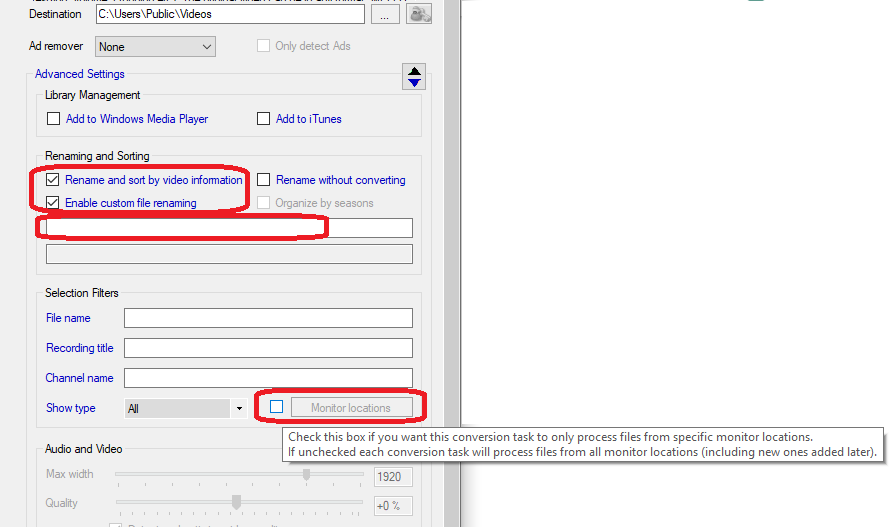
Can I create multiple monitor tasks for each folder? (If so how do I link Monitor Location to the associated ConversionTask?)
EDIT: I think I found the solution … under Expert Settings …
---
### Author:  [@Goose](https://discussion.mcebuddy2x.com/u/Goose)
#### Post date: [March 11, 2020, 8:27pm UTC](https://discussion.mcebuddy2x.com/t/recursive-files-folders-destinations/3477/2 "2020-03-11T20:27:15Z")
For custom folder structure creation check out the custom renaming patterns here: [MCEBuddy - Advanced Settings, Commands and Tweaking](https://discussion.mcebuddy2x.com/t/mcebuddy-advanced-settings-commands-and-tweaking/30#customrenaming)
For tying conversion tasks to monitor tasks enable the Monitor Location in the Conversion Task settings as show in the picture picture:
---
### Author:  [@Tom\_Cichowicz](https://discussion.mcebuddy2x.com/u/Tom_Cichowicz)
#### Post date: [March 12, 2020, 5:04pm UTC](https://discussion.mcebuddy2x.com/t/recursive-files-folders-destinations/3477/3 "2020-03-12T17:04:27Z")
Thanks!!!