# Reading TV Mosaic filenames
**URL:** https://discussion.mcebuddy2x.com/t/reading-tv-mosaic-filenames/2324
**Category:** TV Mosaic
**Tags:** metadata
**Created:** [November 7, 2018, 7:06pm UTC](https://discussion.mcebuddy2x.com/t/reading-tv-mosaic-filenames/2324 "2018-11-07T19:06:06Z")
**Posts on this page:** 20
**Page:** 1
### Author:  [@robtheone](https://discussion.mcebuddy2x.com/u/robtheone)
#### Post date: [November 7, 2018, 7:06pm UTC](https://discussion.mcebuddy2x.com/t/reading-tv-mosaic-filenames/2324/1 "2018-11-07T19:06:06Z")
Hi all. I have searched the forums for an answer, and perhaps my issue is unique. I use TV Mosaic for program recording (formerly DVBLogic), and I am having an issue with Date Based TV shows, specifically their metadata. I record every night the following date based shows, each which concludes (according to MCEBuddy) an original broadcast date of 2018-05-05.
NBC Nightly News, Rachel Maddow, 11th Hours with Brian Williams, and Watch What Happens Live.
I see in the logs on each of these shows during the metadata extraction process:
OriginalBroadcastDateTime: 2018-05-05T00:00:00
Then at the end of the MCEBuddy process, it writes in the metadata, like this:
2018-11-07T12:20:39 MCEBuddy.AppWrapper.AtomicParsley --\> Process arguments “C:\Program Files\MCEBuddy2x\working0\The 11th Hour With Brian Williams -20181105.mp4” --overWrite --title “The 11th Hour With Brian Williams \*” --TVShowName “The 11th Hour With Brian Williams \*” --stik “TV Show” --TVNetwork “MSNBC HD” --genre “News” **–year "2018-05-05** T04:00:00Z" --description “Brian Williams delivers an early look at the stories that will drive tomorrow’s conversation.” --longdesc “Brian Williams delivers an early look at the stories that will drive tomorrow’s conversation.” --comment “Brian Williams delivers an early look at the stories that will drive tomorrow’s conversation.” --encodingTool “MCEBuddy”
So I can see it creating a tag for year as 2018-05-05, despite the fact that the title of the original file has the correct date in it 20181105.
It is very odd to me, because I can’t find anywhere in the original metadata even where MCEBuddy is finding this 2018-05-05 date.
So where does this OriginalBroadcastDateTime information come from? If I use FFPROBE, it doesn’t show up. If I use VLC to view metadata it shows the date only as year 2018. I asked TV Mosaic and they said they are only passing the year in the metadata, and have added an enhancement request for the exact date to be added. Despite that, I am adding the date recorded into the show name for every show, so not sure how MCEBuddy gets this 2018-05-05 date or how else I can find where this date is being pulled from.
It is quite an annoying issue, as Plex, Kodi, and MRMC seem to vary as to how they will display different information for the exact same show. I suppose if they use the title, it will display correctly, but if they use Metadata, it will always show as date 05/05/2018. Occasionally, it even happens on regular TV shows, that are season and episode based. It will show that it was recorded on 2018-05-05.
I have successfully uploaded 3 log files and 2 TV Show recordings to the FTP site for your review. I can upload more if you need. Unfortunately if I attempt to split the original file to upload to the FTP site, it seems to lose all of its metadata, so I have upload the entire file.
Any ideas why this is happening and how I can fix it? Thank you!
---
### Author:  [@Goose](https://discussion.mcebuddy2x.com/u/Goose)
#### Post date: [November 7, 2018, 10:48pm UTC](https://discussion.mcebuddy2x.com/t/reading-tv-mosaic-filenames/2324/2 "2018-11-07T22:48:41Z")
If your original file is a TS file it’s likely taking it from the filename. Attach your conversion log so we can see what’s going on.
---
### Author:  [@robtheone](https://discussion.mcebuddy2x.com/u/robtheone)
#### Post date: [November 7, 2018, 11:16pm UTC](https://discussion.mcebuddy2x.com/t/reading-tv-mosaic-filenames/2324/3 "2018-11-07T23:16:41Z")
Is the conversion log just the file called mcebuddy.log? If so, I have just uploaded it to the same FTP location as the rest of my files and logs.
If it is something else, not sure. Let me know. thanks
---
### Author:  [@robtheone](https://discussion.mcebuddy2x.com/u/robtheone)
#### Post date: [November 7, 2018, 11:27pm UTC](https://discussion.mcebuddy2x.com/t/reading-tv-mosaic-filenames/2324/4 "2018-11-07T23:27:32Z")
And yes, the original file was indeed a .TS file generated by TV Mosaic. Then I have TV Mosaic setup to send the file over to an MCEBuddy folder. In doing so, I choose an option that converts the TS recording to MP4 without transcoding. This process adds the metadata tags that are present, but the only date related tag it sends is a YEAR tag, which is always just the 4 digit year.
If I send the file over to MCEBuddy in original TS format, it has zero metadata, and gives a bunch of errors during the commercial removal and conversion process. I looked at the options you had for metadata extraction, but they related only to DVBLink, and didn’t work for TV Mosaic, The only files that generally have the 2018-05-05 issue tend to be date related shows.
---
### Author:  [@Goose](https://discussion.mcebuddy2x.com/u/Goose)
#### Post date: [November 8, 2018, 3:41am UTC](https://discussion.mcebuddy2x.com/t/reading-tv-mosaic-filenames/2324/5 "2018-11-08T03:41:16Z")
No. Each conversion will have its own log file in the log directory. Make sure it’s set to Debug in the System Settings page of MCEBuddy.
---
### Author:  [@robtheone](https://discussion.mcebuddy2x.com/u/robtheone)
#### Post date: [November 8, 2018, 2:47pm UTC](https://discussion.mcebuddy2x.com/t/reading-tv-mosaic-filenames/2324/6 "2018-11-08T14:47:32Z")
OK, got ya. Those logs were [uploaded at the same time I uploaded the video files](https://discussion.mcebuddy2x.com/t/5076) when I created this topic. They are all on the FTP site under user robtheone. I created a separate folder under my username called “Metadata issue Date Based Shows”.
At the bottom of my original post,
> [@robtheone](#):
>
> I have successfully [uploaded 3 log](https://discussion.mcebuddy2x.com/t/5076) files and 2 TV Show recordings to the FTP site for your review.
Sorry, my posts are way too long, I know. Will work on trying to be less wordy. Thanks a million for looking!!!
---
### Author:  [@Goose](https://discussion.mcebuddy2x.com/u/Goose)
#### Post date: [November 8, 2018, 5:34pm UTC](https://discussion.mcebuddy2x.com/t/reading-tv-mosaic-filenames/2324/7 "2018-11-08T17:34:14Z")
You have a MP4 and not a TS file. MCEBuddy is reading the metadata tags from your MP4 file, where where the original broadcast date is coming from:
> INFORMATION\> 2018-11-07T12:09:32 MCEBuddy.MetaData.VideoMetaData → Read Tags: MPEG4 file detected using AppleTag
---
### Author:  [@robtheone](https://discussion.mcebuddy2x.com/u/robtheone)
#### Post date: [November 8, 2018, 6:12pm UTC](https://discussion.mcebuddy2x.com/t/reading-tv-mosaic-filenames/2324/8 "2018-11-08T18:12:14Z")
Yes, correct. MCEBuddy starts with an MP4 file, but here is the only metadata that is on the MP4 file before MCEBuddy touches it:
Input #0, mov,mp4,m4a,3gp,3g2,mj2, from ‘The 11th Hour With Brian Williams -20181105.mp4’:
Metadata:
major\_brand : isom
minor\_version : 512
compatible\_brands: isomiso2avc1mp41
title : The 11th Hour With Brian Williams \*
date : 2018
encoder : TVMosaic
genre : News
description : Brian Williams delivers an early look at the stories that will drive tomorrow’s conversation.
network : MSNBC HD
hd\_video : 1
Can you tell me where this date of 2018-05-05 is coming from? I can’t seem to find that date anywhere in the metadata. TV Mosaic says they are not creating that date, and I can’t seem to override it either.
Thanks
---
### Author:  [@Goose](https://discussion.mcebuddy2x.com/u/Goose)
#### Post date: [November 8, 2018, 6:29pm UTC](https://discussion.mcebuddy2x.com/t/reading-tv-mosaic-filenames/2324/9 "2018-11-08T18:29:23Z")
> [@robtheone](#):
>
> date : 2018
It’s taking this date and then adding the 5-5 to it.
Anyways, we’ve added support for reading metadata from TV Mosaic filenames in today’s build. You can try it out.
---
### Author:  [@robtheone](https://discussion.mcebuddy2x.com/u/robtheone)
#### Post date: [November 8, 2018, 6:39pm UTC](https://discussion.mcebuddy2x.com/t/reading-tv-mosaic-filenames/2324/10 "2018-11-08T18:39:26Z")
Wow. OK! You are wicked fast! Will give it a try this evening! As always, a million thanks for your amazing support.
---
### Author:  [@robtheone](https://discussion.mcebuddy2x.com/u/robtheone)
#### Post date: [November 9, 2018, 11:25pm UTC](https://discussion.mcebuddy2x.com/t/reading-tv-mosaic-filenames/2324/11 "2018-11-09T23:25:03Z")
On a positive note, MCEBuddy has successfully named and dated all my shows recorded yesterday. It is VERY nice to look at the screen and see a correct date. Thank you!
It seems though that there is still some sort of issue with the metadata, not sure really. Not an expert on reading these log files, but I noticed that the News broadcast took 07:12 for “Getting show information and banner from Internet sources”, while only 4:37 to scan for commercials. Seven minutes seems like something isn’t right. Can you look at my attached log and see if anything sticks out to you as being an issue? I see previous instances of 0:01 seconds and 0:33 seconds. On 2 other date-based shows also recorded last night with the same exact profile and settings, they took 0:12 seconds and 1:14 seconds for downloading internet sources, so not sure what was different about this one that took 7 minutes.
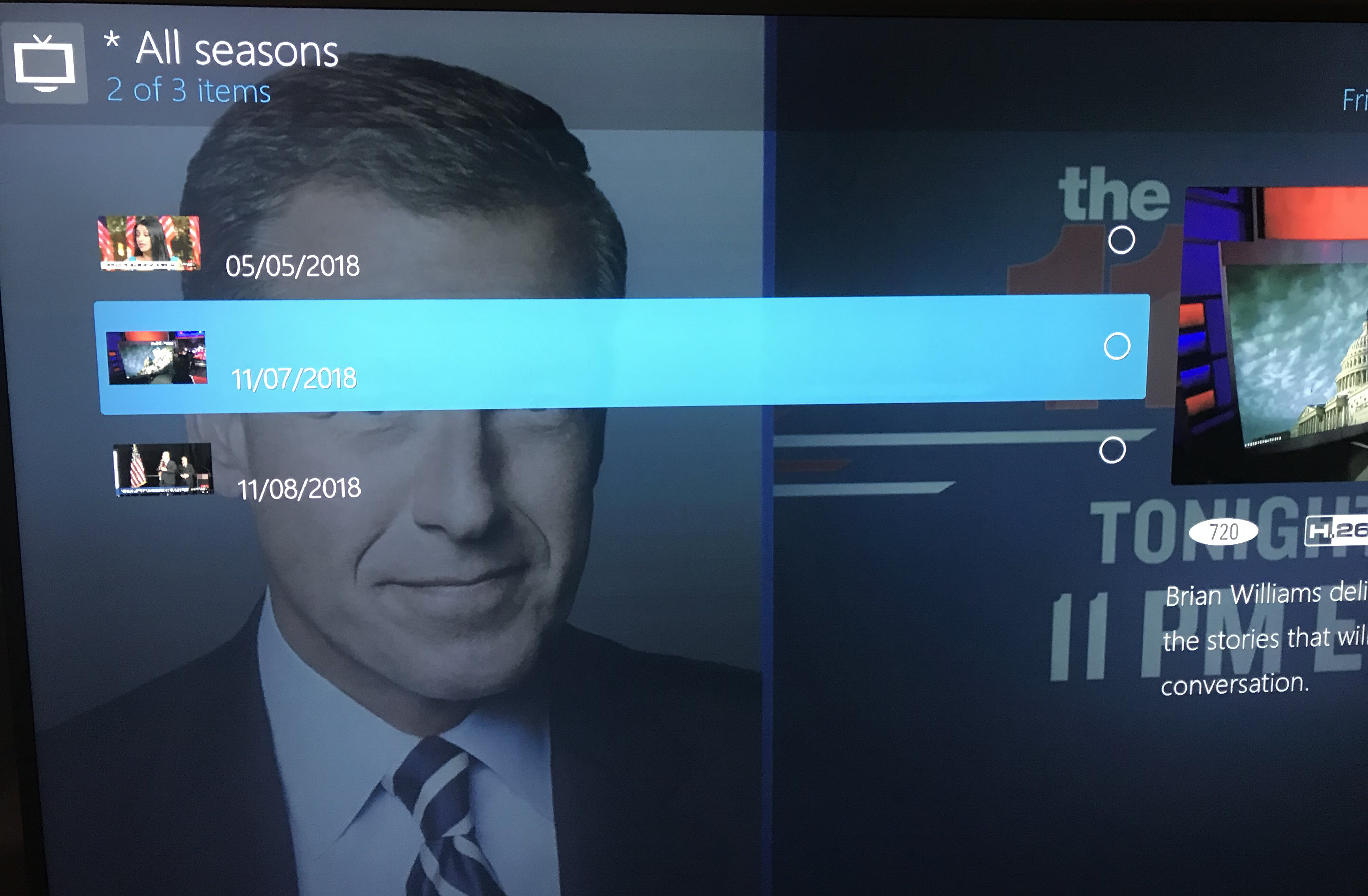
[NBC Nightly News With Lester Holt -20181108.mp4-MP4 Conversion-2018-11-08T22-41-25.1097032-05-00.log](https://mcebuddy-discussion-forum.s3.dualstack.us-east-1.amazonaws.com/original/1X/92d6bc14848fdc7adf0292cf23dd40bdc7f0e37b.log) (809.5 KB)
Thank you!
---
### Author:  [@robtheone](https://discussion.mcebuddy2x.com/u/robtheone)
#### Post date: [November 13, 2018, 7:55pm UTC](https://discussion.mcebuddy2x.com/t/reading-tv-mosaic-filenames/2324/12 "2018-11-13T19:55:41Z")
UPDATE: Over the last few days, I have noticed more shows with the 2018-05-05 problem. These aren’t dated programs, but regular shows with an SxxExx naming convention. I am attaching log files for your review.
“Real Time With Bill Maher -S16E34-20181109” - original file name with date of episode, as well as S16E34 info, but MCEBuddy still dating the episode 2018-05-05. In this case, at least the other metadata (guests on the show) was correct.
“Saturday Night Live -S44E05-20181110-Liev Schreiber; Lil Wayne.mp4” - original file name given to MCEBuddy. In this case, not only did MCEBuddy change the date of the show, but it also completely changed the metadata to match that of the show that occurred on 2018-05-05. So it shows up as date 2018-05-05 with show guests being Donald Glover/Childish Gambino, which I watched back in May. The guests this past Saturday night are in the original filename Liev Schreiber; Lil Wayne.
Both logs attached for your review. Thanks for your time.[Saturday Night Live -S44E05-20181110-Liev Schreiber; Lil Wayne.mp4-MP4 Conversion-2018-11-11T01-03-58.5175253-05-00.log](https://mcebuddy-discussion-forum.s3.dualstack.us-east-1.amazonaws.com/original/1X/a331c19b7e9853621514e9b54ab1c8e00e9bcc0e.log) (1.0 MB)[Real Time With Bill Maher -S16E34-20181109-Bob Woodward; Sarah Silverman; Cornell Belcher; Katty Kay; Bret Stephens.mp4-MP4 Conversion-2018-11-09T23-03-22.7246554-05-00.log](https://mcebuddy-discussion-forum.s3.dualstack.us-east-1.amazonaws.com/original/1X/3b03ca9c940b188814b7b956c6860f94343145f6.log) (741.6 KB)
---
### Author:  [@Goose](https://discussion.mcebuddy2x.com/u/Goose)
#### Post date: [November 14, 2018, 2:12am UTC](https://discussion.mcebuddy2x.com/t/reading-tv-mosaic-filenames/2324/13 "2018-11-14T02:12:39Z")
Is there a standard for filenames? It looks it’s changing:
> Saturday Night Live -S44E05-20181110-Liev Schreiber; Lil Wayne.mp4
---
### Author:  [@robtheone](https://discussion.mcebuddy2x.com/u/robtheone)
#### Post date: [November 14, 2018, 3:21am UTC](https://discussion.mcebuddy2x.com/t/reading-tv-mosaic-filenames/2324/14 "2018-11-14T03:21:13Z")
I have the ability with TVMosaic to change the name format of the original file based on any of the following 8 available options:

At the bottom, where it says result, are the current options I have selected. Is there a way that would work better with MCEBuddy?
---
### Author:  [@Goose](https://discussion.mcebuddy2x.com/u/Goose)
#### Post date: [November 14, 2018, 7:30pm UTC](https://discussion.mcebuddy2x.com/t/reading-tv-mosaic-filenames/2324/15 "2018-11-14T19:30:24Z")
MCEBuddy currently supports the following types of filenames for extracting metadata, I would recommend choosing a filename pattern in TV Mosaic that supports one of these
> [@Metadata matching, extraction, renaming from files and downloading from the Internet](https://discussion.mcebuddy2x.com/t/renaming-extracting-metadata-from-files-and-downloading-from-the-internet/69):
>
> MCEBuddy can extract metadata in many ways from a file, summarizing the sequence: Extract from WTV and DVRMS file using Windows DirectShow filters (see this thread on how to install the filters in [Windows Servers](https://discussion.mcebuddy2x.com/t/enabling-metadata-extraction-on-windows-servers/70)) Extract from containers that support metadata like MP4, MKV, M4V, AVI, MP3, TS and WMV Extract from proprietary recording software containers like TiVO, PlayLater, SiliconDust DVR Extract using supporting metadata files like XML, NFO and PROPERTIES from Media Portal, nPVR,…
Looks like the `Program Name-Season/Episode-Program subname` or `Program name_Program date` would be your best bet. The original air date should be available for download from the internet once the season/episode details are available.
---
### Author:  [@robtheone](https://discussion.mcebuddy2x.com/u/robtheone)
#### Post date: [November 14, 2018, 11:27pm UTC](https://discussion.mcebuddy2x.com/t/reading-tv-mosaic-filenames/2324/16 "2018-11-14T23:27:22Z")
OK. Made the changes and will see how it goes. Thanks for the advice!
---
### Author:  [@robtheone](https://discussion.mcebuddy2x.com/u/robtheone)
#### Post date: [November 15, 2018, 12:38am UTC](https://discussion.mcebuddy2x.com/t/reading-tv-mosaic-filenames/2324/17 "2018-11-15T00:38:39Z")
OK, the first show finished recording 25 minutes ago. I checked and the filename created by TVMosaic was:
NBC Nightly News With Lester Holt .mp4
MCEBuddy finished commercial removal and placed the file in the correct folder “NBC Nightly News with Lester Holt”, then in the subfolder “season 2018”, with filename of:
S2018E125-May 5 Sat.mp4
Log attached.
[NBC Nightly News With Lester Holt .mp4-MP4 Conversion-2018-11-14T19-02-07.1430506-05-00.log](https://mcebuddy-discussion-forum.s3.dualstack.us-east-1.amazonaws.com/original/1X/2e99e1cca5d22559b1e28d1c2072f77504c65edd.log) (795.6 KB)
Any other suggestions? The file format you suggested may very well work on some shows, not sure. Here is a photo of the directory containing this particular show. It worked fine for the last few days based on the previous file naming format, but that format didn’t work for other shows.
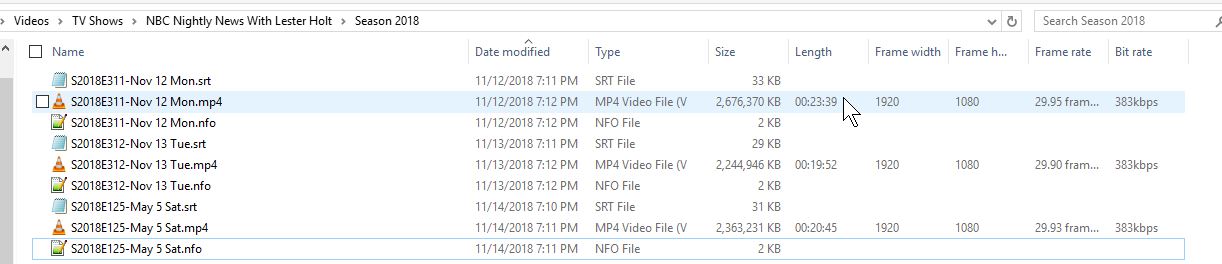
The log shows: 2018-11-14T19:02:09 MCEBuddy.MetaData.VideoMetaData --\> Trying to extract generic TV Mosaic filename metadata -\> NBC Nightly News With Lester Holt
2018-11-14T19:02:09 MCEBuddy.MetaData.VideoMetaData --\> Invalid generic TV Mosaic filename
---
### Author:  [@Goose](https://discussion.mcebuddy2x.com/u/Goose)
#### Post date: [November 15, 2018, 1:11am UTC](https://discussion.mcebuddy2x.com/t/reading-tv-mosaic-filenames/2324/18 "2018-11-15T01:11:33Z")
TV Mosaic named the file
> NBC Nightly News With Lester Holt .mp4
Wasn’t TV Mosaic supposed to add the season/episode and subtitle information also as the naming convention you had configured?
If it isn’t providing the season/episode information then you can try this naming format (from the link I had provided above)
> Program name\_Program date
Note here that you’ll have to change your separator from `-` to `_` in TV Mosaic
---
### Author:  [@robtheone](https://discussion.mcebuddy2x.com/u/robtheone)
#### Post date: [November 15, 2018, 1:35am UTC](https://discussion.mcebuddy2x.com/t/reading-tv-mosaic-filenames/2324/19 "2018-11-15T01:35:16Z")
That is correct. Here is how it shows now:

Going to guess (their log file doesn’t show this info) that it doesn’t have season/episode or subname info for the nightly news, which is why it put in a space between the file name and mp4:
NBC Nightly News With Lester Holt .mp4
BTW, I also re-ran Saturday Night Live through MCEBuddy with the new naming convention, and it DID add the correct guest names, but still kept the date of 2018-05-05.
So, your suggestion is this format? Leave out season and episode? That won’t impact other shows?

---
### Author:  [@Goose](https://discussion.mcebuddy2x.com/u/Goose)
#### Post date: [November 15, 2018, 1:38am UTC](https://discussion.mcebuddy2x.com/t/reading-tv-mosaic-filenames/2324/20 "2018-11-15T01:38:08Z")
> [@robtheone](#):
>
> I also re-ran Saturday Night Live through MCEBuddy with the new naming convention, and it DID add the correct guest names, but still kept the date of 2018-05-05
Tough one, that’s because the year is included in the MP4 metadata and MCEBuddy is picking it up from there. If that’s important then I would suggest you use the program date naming convention:
> Program name\_Program date
and it should download the rest of the stuff from the internet if it can match the original air date (program date). Try it out.
[Next page](https://discussion.mcebuddy2x.com/t/reading-tv-mosaic-filenames/2324.md?page=2)