# Playon TV watermark removal setting
**URL:** https://discussion.mcebuddy2x.com/t/playon-tv-watermark-removal-setting/5145
**Category:** PlayOn
**Created:** [October 2, 2023, 9:51pm UTC](https://discussion.mcebuddy2x.com/t/playon-tv-watermark-removal-setting/5145 "2023-10-02T21:51:41Z")
**Posts on this page:** 5
**Page:** 1
### Author:  [@DaronHarmon](https://discussion.mcebuddy2x.com/u/DaronHarmon)
#### Post date: [October 2, 2023, 9:51pm UTC](https://discussion.mcebuddy2x.com/t/playon-tv-watermark-removal-setting/5145/1 "2023-10-02T21:51:42Z")
Hello can someone please provide me with the recommended setting or a “How to Guide” on removing the first and last 5 seconds of a Playon tv recording? I have a large selection of recorded episodes that all have a very annoying “Playon TV Watermark” that will display my personal email and IP address at the beginning and ending of each episode. Any help would be greatly appreciated Thx!.
---
### Author:  [@Goose](https://discussion.mcebuddy2x.com/u/Goose)
#### Post date: [October 3, 2023, 3:46am UTC](https://discussion.mcebuddy2x.com/t/playon-tv-watermark-removal-setting/5145/2 "2023-10-03T03:46:09Z")
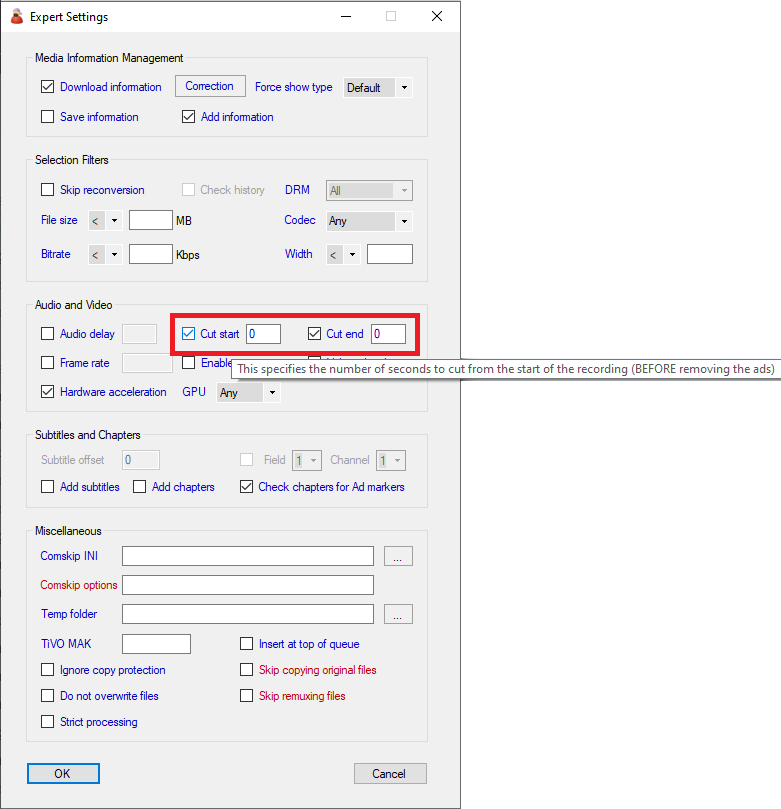
From _Conversion task → Expert settings_ try the `Cut start` and `Cut end` options
---
### Author:  [@DaronHarmon](https://discussion.mcebuddy2x.com/u/DaronHarmon)
#### Post date: [October 3, 2023, 2:43pm UTC](https://discussion.mcebuddy2x.com/t/playon-tv-watermark-removal-setting/5145/3 "2023-10-03T14:43:58Z")
Hey Goose thx for the response. I have seen that screenshot before in another chat but unfortunately I cant seem to find that screen anywhere. I am currently running Mcbuddy version 2.5.7 so maybe you are running a newer beta version? If I click on the “add” button under converted tasks, I’ll see a new pop up with Task Name, Profile (dropdown) and Destination field. I have clicked on the down arrow for advanced settings but see nothing for the “Cut start and Cut end” options?
---
### Author:  [@DaronHarmon](https://discussion.mcebuddy2x.com/u/DaronHarmon)
#### Post date: [October 3, 2023, 3:22pm UTC](https://discussion.mcebuddy2x.com/t/playon-tv-watermark-removal-setting/5145/4 "2023-10-03T15:22:10Z")
Never mind my last message I found the Cut start and Cut end options at the bottom of that screen I mentioned but it was just hiding. Thx again for the help.
---
### Author:  [@Goose](https://discussion.mcebuddy2x.com/u/Goose)
#### Post date: [October 3, 2023, 3:50pm UTC](https://discussion.mcebuddy2x.com/t/playon-tv-watermark-removal-setting/5145/5 "2023-10-03T15:50:11Z")
We’ve improved the user interface and added new features in 2.6.1 to make it easier to navigate and use options.