# Order of conversion tasks
**URL:** https://discussion.mcebuddy2x.com/t/order-of-conversion-tasks/4595
**Category:** General Support / Questions
**Created:** [February 8, 2022, 3:23pm UTC](https://discussion.mcebuddy2x.com/t/order-of-conversion-tasks/4595 "2022-02-08T15:23:46Z")
**Posts on this page:** 3
**Page:** 1
### Author:  [@d\_col](https://discussion.mcebuddy2x.com/u/d_col)
#### Post date: [February 8, 2022, 3:23pm UTC](https://discussion.mcebuddy2x.com/t/order-of-conversion-tasks/4595/1 "2022-02-08T15:23:47Z")
I assume the order of conversion tasks is the order in the list. So, in the first task, if I put some recording titles in the selection filter only those titles will use that filter. If there is no match then it proceeds to the next filter and so on. Is this correct?
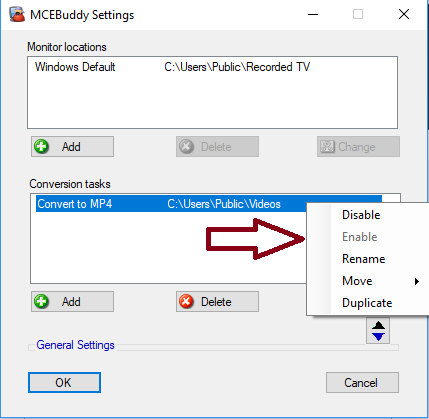
Also if this is correct, it would be nice to be able to reorder the tasks in the GUI. I know there is an option in expert settings to put the current task at the top of queue, but I have multiple items in the task list and it would be nice to move task 4 to task 3 and so on.
---
### Author:  [@Goose](https://discussion.mcebuddy2x.com/u/Goose)
#### Post date: [February 9, 2022, 7:35pm UTC](https://discussion.mcebuddy2x.com/t/order-of-conversion-tasks/4595/2 "2022-02-09T19:35:00Z")
Already exists, right click on the task
---
### Author:  [@mike808](https://discussion.mcebuddy2x.com/u/mike808)
#### Post date: [February 15, 2022, 12:58am UTC](https://discussion.mcebuddy2x.com/t/order-of-conversion-tasks/4595/3 "2022-02-15T00:58:32Z")
Also, in the main file monitor window, you can drag files up and down to change the order of individual files to process.