# Not removing commercials
**URL:** https://discussion.mcebuddy2x.com/t/not-removing-commercials/5108
**Category:** Commercial Removal
**Created:** [September 3, 2023, 10:24pm UTC](https://discussion.mcebuddy2x.com/t/not-removing-commercials/5108 "2023-09-03T22:24:49Z")
**Posts on this page:** 10
**Page:** 1
### Author:  [@city](https://discussion.mcebuddy2x.com/u/city)
#### Post date: [September 3, 2023, 10:24pm UTC](https://discussion.mcebuddy2x.com/t/not-removing-commercials/5108/1 "2023-09-03T22:24:50Z")
Hi, I’m new to the forum and I’m having some issues getting the service to work properly, Would appreciate any assistance to get this straightened out After recording a show, buddy starts up and does it’s thing some shows record and work with no issue others don’t remove commercials at all and other programs show the following message, which is stated below: Under “show History” , conversion status shows “error”, under error message says “moving converted file to destination folder failed” Not sure how to resolve, I can also send logs but they’re very lengthy and not sure what part of it you need to see Thanks for any help City
---
### Author:  [@TLCTimFL](https://discussion.mcebuddy2x.com/u/TLCTimFL)
#### Post date: [September 4, 2023, 4:43pm UTC](https://discussion.mcebuddy2x.com/t/not-removing-commercials/5108/2 "2023-09-04T16:43:52Z")
First things first How many different “Conversion Tasks” have you created? Since you are new, try just creating one task and get it to work 100% of the time. Then create others by **right** clicking on the Task that works and select “Duplicate”. From that point, change the new task to do exactly what you need. Example: I used to run many different tasks and isolate them to particular shows. But lately decided on only 2 Tasks (TV Shows & Movies) because I want the destinations to be 2 different folders on my NAS. Here are my settings which may help you to get started. You may notice that I record to a local drive on my Plex server where MCEBuddy watches for new recordings. My destination is the MyCloud network server.
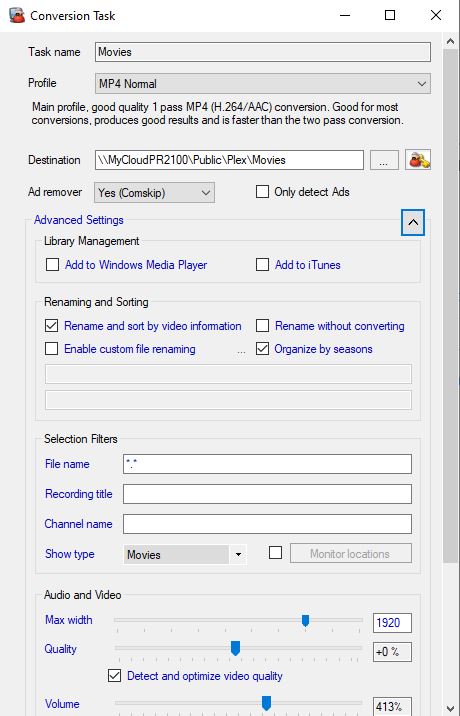
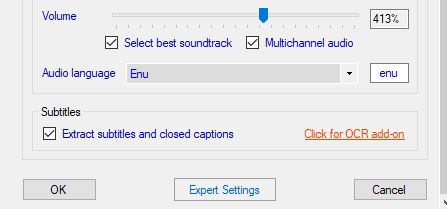
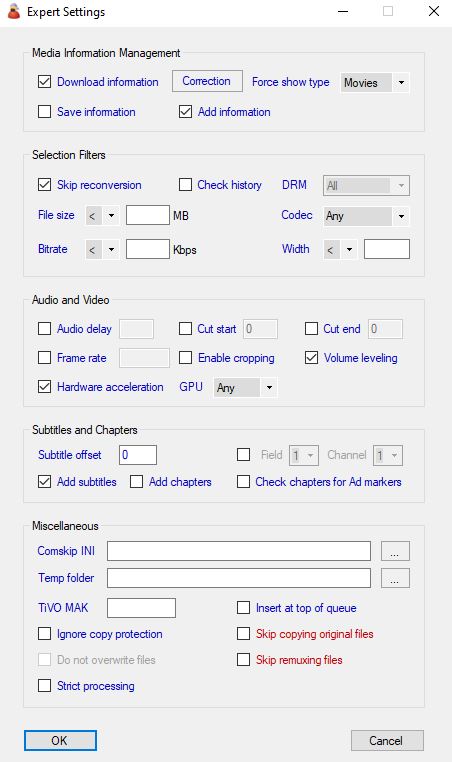
Secondly, Moving converted file error:
Where is your destination folder? Are you trying to save it to a local drive on the same computer or a network drive? This error would appear if you are saving to a network drive and don’t have the correct username/password setup.
---
### Author:  [@city](https://discussion.mcebuddy2x.com/u/city)
#### Post date: [September 6, 2023, 1:07am UTC](https://discussion.mcebuddy2x.com/t/not-removing-commercials/5108/3 "2023-09-06T01:07:46Z")
Hi, Hope everyone had a good weekend… I’m enclosing my log for a sports center espn recoding I made (no commercials were removed) I’m also using the same profile under conversion tasks for a different recording I made on the military channel Lee And Grant and the commercials were removed and the program worked flawlessly.
[Lee\_\_\_Grant\_20230905\_180704.ts-Convert to MP4 Tivimate-2023-09-05T19-00-03.log](https://discussion.mcebuddy2x.com/uploads/short-url/8oLuH0kLbjei0MHOLYP32dHqGs5.log) (641.9 KB) [SportsCenter\_ᴺᵉʷ\_20230904\_130000.ts-Convert to MP4 Tivimate-2023-09-04T14-00-05.log](https://discussion.mcebuddy2x.com/uploads/short-url/otXQU9vN9hDe2iz1driFzHpQuPP.log) (2.2 MB)
Not sure why these recording are hit and miss. Would appreciate any help with some adjustments that need to made Thanks
---
### Author:  [@RBoy](https://discussion.mcebuddy2x.com/u/RBoy)
#### Post date: [September 14, 2023, 2:50pm UTC](https://discussion.mcebuddy2x.com/t/not-removing-commercials/5108/4 "2023-09-14T14:50:39Z")
Some sports channel have ticker tape / crawl at the bottom which don’t go away during ads and likely won’t work with the default Comskip INI files. You can tweak your INI files to ignore a specific range in the top & bottom sections of the video. See this post
> [@MeTV / Top TickerTape / TopLogo Comskip says no commercials found](https://discussion.mcebuddy2x.com/t/metv-top-tickertape-toplogo-comskip-says-no-commercials-found/4801/3):
>
> Use the Comskip INI Editor included with MCEBuddy to adjust the comskip.ini settings (create a new one ideally specifically for your conversion task) and adjust the ticker\_tape settings
---
### Author:  [@RBoy](https://discussion.mcebuddy2x.com/u/RBoy)
#### Post date: [September 14, 2023, 3:16pm UTC](https://discussion.mcebuddy2x.com/t/not-removing-commercials/5108/5 "2023-09-14T15:16:37Z")
If you can [upload some samples](https://discussion.mcebuddy2x.com/t/5076) of the videos which are a problem I can take a look to see if there’s something specific that can be done
> [@Uploading file samples and submitting logs for analysis](https://discussion.mcebuddy2x.com/t/uploading-samples-and-submitting-logs-for-analysis/5076):
>
> LOGS IN MCEBUDDY Open MCEBuddy from the Windows Start Menu, click on the Logs link on the right corner and it will open the folder which contains all the log files. There are two types of log files in MCEBuddy (which you can attach to your posts by dragging and dropping them into your post on this forum): mcebuddy.log → Engine log file: MCEBuddy’s settings and details of all the folders and files that the engine scans/monitors prior to starting a conversion. Usually not required. A…
---
### Author:  [@city](https://discussion.mcebuddy2x.com/u/city)
#### Post date: [September 22, 2023, 10:27am UTC](https://discussion.mcebuddy2x.com/t/not-removing-commercials/5108/6 "2023-09-22T10:27:33Z")
Hi, Attached are some log files you requested… Logs seems to show commercials being removed, but on playback commercials are still there Please advise Thanks
[SportsNite\_ᴺᵉʷ\_9\_21\_23\_11\_02\_PM.ts-Convert to MP4 Tivimate-2023-09-21T23-32-37.log](https://discussion.mcebuddy2x.com/uploads/short-url/tNuuidS0ezRu3uQbCk7f5XD9OUN.log) (640.7 KB)
[MLB\_Tonight\_ᴺᵉʷ\_20230921\_202737.ts-Convert to MP4 Tivimate-2023-09-21T20-58-20.log](https://discussion.mcebuddy2x.com/uploads/short-url/33D20t2rOqxT6IlFk9H8In9akEW.log) (473.5 KB)
---
### Author:  [@RBoy](https://discussion.mcebuddy2x.com/u/RBoy)
#### Post date: [September 22, 2023, 1:01pm UTC](https://discussion.mcebuddy2x.com/t/not-removing-commercials/5108/7 "2023-09-22T13:01:25Z")
According to your logs there are 3 small commercial segments that were identified by Comskip. Will need your original video uploaded to investigate it
> MCEBuddy.CommercialScan.Scanner → ParseEDL: Cut Segment Start:0.000 End:37.340 Action:0
> 2023-09-21T23:39:15 MCEBuddy.CommercialScan.Scanner → ParseEDL: Cut Segment Start:93466.060 End:93512.400 Action:0
> 2023-09-21T23:39:15 MCEBuddy.CommercialScan.Scanner → ParseEDL: Cut Segment Start:93895.250 End:94116.780 Action:0
---
### Author:  [@city](https://discussion.mcebuddy2x.com/u/city)
#### Post date: [September 23, 2023, 12:18am UTC](https://discussion.mcebuddy2x.com/t/not-removing-commercials/5108/8 "2023-09-23T00:18:20Z")
Hi, I’m having some issues sending the file thru Can you recommend some setting adjustments in the INI file that can be adjusted? I’ll attach my INI to you Thanks
[comskip.ini.ini](https://discussion.mcebuddy2x.com/uploads/short-url/cufllui8Xv9oKstK01qF3GxQ2qB.ini) (4.8 KB)
---
### Author:  [@Goose](https://discussion.mcebuddy2x.com/u/Goose)
#### Post date: [September 26, 2023, 2:50am UTC](https://discussion.mcebuddy2x.com/t/not-removing-commercials/5108/9 "2023-09-26T02:50:34Z")
Having the source is helpful to understand the context, what type of show it is, seeing the layout also matters. Are you having trouble with FTP? Try using active or passive modes using FileZille or just use Windows explorer to upload the entire file.
---
### Author:  [@RBoy](https://discussion.mcebuddy2x.com/u/RBoy)
#### Post date: [October 2, 2023, 1:59pm UTC](https://discussion.mcebuddy2x.com/t/not-removing-commercials/5108/10 "2023-10-02T13:59:10Z")
2 posts were split to a new topic: [Comskip not running](https://discussion.mcebuddy2x.com/t/comskip-not-running/5143)