# MCEBuddy Custom Cuts and Subtitles
**URL:** https://discussion.mcebuddy2x.com/t/mcebuddy-custom-cuts-and-subtitles/3121
**Category:** Custom Cuts
**Tags:** subtitles
**Created:** [September 25, 2019, 5:16pm UTC](https://discussion.mcebuddy2x.com/t/mcebuddy-custom-cuts-and-subtitles/3121 "2019-09-25T17:16:19Z")
**Posts on this page:** 20
**Page:** 1
### Author:  [@Mike-EEE](https://discussion.mcebuddy2x.com/u/Mike-EEE)
#### Post date: [September 25, 2019, 5:16pm UTC](https://discussion.mcebuddy2x.com/t/mcebuddy-custom-cuts-and-subtitles/3121/1 "2019-09-25T17:16:19Z")
I am attempting to use MCEBuddy Custom Cuts and while it appears the EDL is working and the file is emitted as expected, there appears to be a problem in preserving the subtitles.
Looking into the log file, it would seem that the probe finds the subtitles from the source, but they do not make it into the temporary `working0` working folder `.ts` copy:
```auto
2019-09-25T12:02:50 MCEBuddy.AppWrapper.FFmpeg --> Launching process C:\Program Files\MCEBuddy2x\ffmpeg\ffmpeg.exe
2019-09-25T12:02:50 MCEBuddy.AppWrapper.FFmpeg --> Process arguments -hide_banner -probesize 100M -analyzeduration 300M -y -i "E:\Inbound\NFL Football\NFL Football - S2019E2037 - Los Angeles Chargers at Detroit Lions.m4v" -ss 0 -vcodec copy -acodec copy -map 0:a -map 0:0 -f mpegts "C:\Program Files\MCEBuddy2x\working0\NFL Football - S2019E2037 - Los Angeles Chargers at Detroit Lions.ts"
2019-09-25T12:02:50 MCEBuddy.AppWrapper.FFmpeg --> UI Session Admin Process : True
2019-09-25T12:02:50 MCEBuddy.AppWrapper.FFmpeg --> Starting process as a UISession process with Admin privileges. This requires atleast 1 user to be logged into the system (remote desktop or locally)
2019-09-25T12:02:50 MCEBuddy.AppWrapper.FFmpeg --> Setting process priority to Normal
2019-09-25T12:02:51 MCEBuddy.AppWrapper.FFmpeg --> Input #0, mov,mp4,m4a,3gp,3g2,mj2, from 'E:\Inbound\NFL Football\NFL Football - S2019E2037 - Los Angeles Chargers at Detroit Lions.m4v':
2019-09-25T12:02:51 MCEBuddy.AppWrapper.FFmpeg --> Metadata:
2019-09-25T12:02:51 MCEBuddy.AppWrapper.FFmpeg --> major_brand : mp42
2019-09-25T12:02:51 MCEBuddy.AppWrapper.FFmpeg --> minor_version : 512
2019-09-25T12:02:51 MCEBuddy.AppWrapper.FFmpeg --> compatible_brands: isomiso2mp41
2019-09-25T12:02:51 MCEBuddy.AppWrapper.FFmpeg --> creation_time : 2019-09-15T21:33:58.000000Z
2019-09-25T12:02:51 MCEBuddy.AppWrapper.FFmpeg --> encoder : MCEBuddy
2019-09-25T12:02:51 MCEBuddy.AppWrapper.FFmpeg --> date : 1900-01-01T12:00:00Z
2019-09-25T12:02:51 MCEBuddy.AppWrapper.FFmpeg --> RecordingTimestamp: 1900-01-01T12:00:00
2019-09-25T12:02:51 MCEBuddy.AppWrapper.FFmpeg --> SeriesPremiere : 1900-01-01T12:00:00
2019-09-25T12:02:51 MCEBuddy.AppWrapper.FFmpeg --> CopyProtected : False
2019-09-25T12:02:51 MCEBuddy.AppWrapper.FFmpeg --> title : Los Angeles Chargers at Detroit Lions
2019-09-25T12:02:51 MCEBuddy.AppWrapper.FFmpeg --> show : NFL Football
2019-09-25T12:02:51 MCEBuddy.AppWrapper.FFmpeg --> season_number : 227
2019-09-25T12:02:51 MCEBuddy.AppWrapper.FFmpeg --> episode_sort : 245
2019-09-25T12:02:51 MCEBuddy.AppWrapper.FFmpeg --> media_type : 10
2019-09-25T12:02:51 MCEBuddy.AppWrapper.FFmpeg --> Duration: 02:52:45.53, start: 0.000000, bitrate: 12369 kb/s
--> Video duration=10365.53
2019-09-25T12:02:51 MCEBuddy.AppWrapper.FFmpeg --> Stream #0:0(und): Video: hevc (Main) (hvc1 / 0x31637668), yuv420p(tv, bt709), 1920x1080 [SAR 1:1 DAR 16:9], 12199 kb/s, 29.67 fps, 29.97 tbr, 90k tbn, 29.97 tbc (default)
2019-09-25T12:02:51 MCEBuddy.AppWrapper.FFmpeg --> Metadata:
2019-09-25T12:02:51 MCEBuddy.AppWrapper.FFmpeg --> creation_time : 2019-09-15T21:33:58.000000Z
2019-09-25T12:02:51 MCEBuddy.AppWrapper.FFmpeg --> handler_name : VideoHandler
2019-09-25T12:02:51 MCEBuddy.AppWrapper.FFmpeg --> Stream #0:1(eng): Audio: aac (LC) (mp4a / 0x6134706D), 48000 Hz, stereo, fltp, 160 kb/s (default)
2019-09-25T12:02:51 MCEBuddy.AppWrapper.FFmpeg --> Metadata:
2019-09-25T12:02:51 MCEBuddy.AppWrapper.FFmpeg --> creation_time : 2019-09-15T21:33:58.000000Z
2019-09-25T12:02:51 MCEBuddy.AppWrapper.FFmpeg --> handler_name : SoundHandler
2019-09-25T12:02:51 MCEBuddy.AppWrapper.FFmpeg --> Stream #0:2(spa): Subtitle: mov_text (tx3g / 0x67337874), 1920x162, 0 kb/s (default)
2019-09-25T12:02:51 MCEBuddy.AppWrapper.FFmpeg --> Metadata:
2019-09-25T12:02:51 MCEBuddy.AppWrapper.FFmpeg --> creation_time : 2019-09-15T21:33:58.000000Z
2019-09-25T12:02:51 MCEBuddy.AppWrapper.FFmpeg --> handler_name : SubtitleHandler
2019-09-25T12:02:51 MCEBuddy.AppWrapper.FFmpeg --> Output #0, mpegts, to 'C:\Program Files\MCEBuddy2x\working0\NFL Football - S2019E2037 - Los Angeles Chargers at Detroit Lions.ts':
2019-09-25T12:02:51 MCEBuddy.AppWrapper.FFmpeg --> Metadata:
2019-09-25T12:02:51 MCEBuddy.AppWrapper.FFmpeg --> major_brand : mp42
2019-09-25T12:02:51 MCEBuddy.AppWrapper.FFmpeg --> minor_version : 512
2019-09-25T12:02:51 MCEBuddy.AppWrapper.FFmpeg --> compatible_brands: isomiso2mp41
2019-09-25T12:02:51 MCEBuddy.AppWrapper.FFmpeg --> media_type : 10
2019-09-25T12:02:51 MCEBuddy.AppWrapper.FFmpeg --> episode_sort : 245
2019-09-25T12:02:51 MCEBuddy.AppWrapper.FFmpeg --> date : 1900-01-01T12:00:00Z
2019-09-25T12:02:51 MCEBuddy.AppWrapper.FFmpeg --> RecordingTimestamp: 1900-01-01T12:00:00
2019-09-25T12:02:51 MCEBuddy.AppWrapper.FFmpeg --> SeriesPremiere : 1900-01-01T12:00:00
2019-09-25T12:02:51 MCEBuddy.AppWrapper.FFmpeg --> CopyProtected : False
2019-09-25T12:02:51 MCEBuddy.AppWrapper.FFmpeg --> title : Los Angeles Chargers at Detroit Lions
2019-09-25T12:02:51 MCEBuddy.AppWrapper.FFmpeg --> show : NFL Football
2019-09-25T12:02:51 MCEBuddy.AppWrapper.FFmpeg --> season_number : 227
2019-09-25T12:02:51 MCEBuddy.AppWrapper.FFmpeg --> encoder : Lavf58.24.100
2019-09-25T12:02:51 MCEBuddy.AppWrapper.FFmpeg --> Stream #0:0(eng): Audio: aac (LC) (mp4a / 0x6134706D), 48000 Hz, stereo, fltp, 160 kb/s (default)
2019-09-25T12:02:51 MCEBuddy.AppWrapper.FFmpeg --> Metadata:
2019-09-25T12:02:51 MCEBuddy.AppWrapper.FFmpeg --> creation_time : 2019-09-15T21:33:58.000000Z
2019-09-25T12:02:51 MCEBuddy.AppWrapper.FFmpeg --> handler_name : SoundHandler
2019-09-25T12:02:51 MCEBuddy.AppWrapper.FFmpeg --> Stream #0:1(und): Video: hevc (Main) (hvc1 / 0x31637668), yuv420p(tv, bt709), 1920x1080 [SAR 1:1 DAR 16:9], q=2-31, 12199 kb/s, 29.67 fps, 29.97 tbr, 90k tbn, 90k tbc (default)
2019-09-25T12:02:51 MCEBuddy.AppWrapper.FFmpeg --> Metadata:
2019-09-25T12:02:51 MCEBuddy.AppWrapper.FFmpeg --> creation_time : 2019-09-15T21:33:58.000000Z
2019-09-25T12:02:51 MCEBuddy.AppWrapper.FFmpeg --> handler_name : VideoHandler
2019-09-25T12:02:51 MCEBuddy.AppWrapper.FFmpeg --> Stream mapping:
2019-09-25T12:02:51 MCEBuddy.AppWrapper.FFmpeg --> Stream #0:1 -> #0:0 (copy)
2019-09-25T12:02:51 MCEBuddy.AppWrapper.FFmpeg --> Stream #0:0 -> #0:1 (copy)
```
I am also attaching the full log to this post. Is there something very obvious that I am overlooking here? Thank you in advance for any assistance you can provide!
[NFL Football - S2019E2037 - Los Angeles Chargers at Detroit Lions.m4v-Football-2019-09-25T12-02-07.0358516-04-00.log](https://discussion.mcebuddy2x.com/uploads/short-url/ccX62lvBOg1EJ4KxrGQDV0xzjGu.log) (3.3 MB)
---
### Author:  [@Mike-EEE](https://discussion.mcebuddy2x.com/u/Mike-EEE)
#### Post date: [September 26, 2019, 10:54am UTC](https://discussion.mcebuddy2x.com/t/mcebuddy-custom-cuts-and-subtitles/3121/2 "2019-09-26T10:54:58Z")
Digging further into this. I just so happen to have a script that I use due to [another recent issue that I have encountered](https://forums.plex.tv/t/subtitle-questions-mov-text/458142/8) to extract `.srt` files. Using this script I can extract the `.srt` file which gets picked up by MCEBuddy when added to the queue. Unfortunately, it would seem that the `.srt` file is then copied and not embedded.
I then have to upload the `.srt` to Plex as it doesn’t readily get recognized and updated for whatever reason.
Hardly ideal, and a lot of steps. I would appreciate any further thoughts/suggestions to improve this workflow. 👍
---
### Author:  [@Goose](https://discussion.mcebuddy2x.com/u/Goose)
#### Post date: [September 26, 2019, 10:09pm UTC](https://discussion.mcebuddy2x.com/t/mcebuddy-custom-cuts-and-subtitles/3121/3 "2019-09-26T22:09:46Z")
You haven’t enabled the `Exact closed captions and subtitles` option in the conversion task, so it never extracts them (and consequently doesn’t embed them even though you’ve enabled that option)
> Closed Captions →
---
### Author:  [@Mike-EEE](https://discussion.mcebuddy2x.com/u/Mike-EEE)
#### Post date: [September 27, 2019, 10:20am UTC](https://discussion.mcebuddy2x.com/t/mcebuddy-custom-cuts-and-subtitles/3121/4 "2019-09-27T10:20:38Z")
Ahhh unfortunately that did not solve the problem. Selecting `Extract closed captions and subtitles` in the conversion task does extract an `.srt` file and places it in the same folder as the outputted `.mp4` file when I input a `.ts` file. The resulting `.mp4` file also has the subtitles embedded in it.
(I should note that subtitles are embedded into the `.mp4` without the use of `Extract closed captions and subtitles`, as well.)
So far, so good.
However, when I then further use Custom Cuts to create additional edits into an `.edl` file and subsequently `Process with MCEBuddy`, the file gets added to the queue, processes with the same conversion task, but the extracted `.srt` file is never embedded.
Perhaps I am doing something terribly wrong?
---
### Author:  [@RBoy](https://discussion.mcebuddy2x.com/u/RBoy)
#### Post date: [September 27, 2019, 1:49pm UTC](https://discussion.mcebuddy2x.com/t/mcebuddy-custom-cuts-and-subtitles/3121/5 "2019-09-27T13:49:15Z")
Logs please
---
### Author:  [@Mike-EEE](https://discussion.mcebuddy2x.com/u/Mike-EEE)
#### Post date: [September 27, 2019, 3:29pm UTC](https://discussion.mcebuddy2x.com/t/mcebuddy-custom-cuts-and-subtitles/3121/6 "2019-09-27T15:29:57Z")
Boh! Sorry about that.
Here are the logs from the first (successful, works as expected) conversion, from `.ts` -\> `.m4v`:
[NFL Football - S2019E2037 - Los Angeles Chargers at Detroit Lions.ts-Football-2019-09-27T07-52-33.2881663-04-00.log](https://discussion.mcebuddy2x.com/uploads/short-url/jkWaAsW0K2vrFfcqYymWHV9MNqZ.log) (7.3 MB)
This generates a `.m4v` which is exactly as expected, containing the embedded subtitles. Accordingly, now that I have checked `Extract closed captions and subtitles` in the conversion task there is a corresponding `.srt` file in the output directory now, too.
I then open this newly created `.m4v` file in Custom Cuts, create cut points, and then save the `.edl`.
So now in my output directory I have:
- `.m4v` file
- `.srt` file
- `.edl` file
Keep in mind that the `.m4v` file contains embedded subtitles as expected.
I then click `Process with MCEBuddy` on Custom Cuts, which generates this output:
[NFL Football - S2019E2037 - Los Angeles Chargers at Detroit Lions.m4v-Football-2019-09-27T10-47-49.2347885-04-00.log](https://discussion.mcebuddy2x.com/uploads/short-url/rBJKh5in8tSAQ4AyomojAONjhbP.log) (2.5 MB)
Now I have the 3 files listed above, and a new smaller `.srt` file that was generated from the above, but with a `0` attached to the primary name (`NFL Football - S2019E2037 - Los Angeles Chargers at Detroit Lions0.srt`).
Additionally, the `.m4v` file no longer has embedded subtitles like it did from the `.ts` -\> `.m4v` conversion.
Please let me know if you require any additional information to further diagnose this issue.
---
### Author:  [@RBoy](https://discussion.mcebuddy2x.com/u/RBoy)
#### Post date: [September 27, 2019, 8:38pm UTC](https://discussion.mcebuddy2x.com/t/mcebuddy-custom-cuts-and-subtitles/3121/7 "2019-09-27T20:38:38Z")
There’s something wrong with your SRT file or the video file, MCEBuddy it unable to add it:
> 2019-09-27T11:18:58 MCEBuddy.AppWrapper.MP4Box → Launching process C:\Program Files\MCEBuddy2x\mp4Box\mp4box.exe
> 2019-09-27T11:18:58 MCEBuddy.AppWrapper.MP4Box → Process arguments -add “C:\Program Files\MCEBuddy2x\working0\NFL Football - S2019E2037 - Los Angeles Chargers at Detroit Lions.srt”:hdlr=sbtl:lang=eng “C:\Program Files\MCEBuddy2x\working0\NFL Football - S2019E2037 - Los Angeles Chargers at Detroit Lions.m4v”
> 2019-09-27T11:18:58 MCEBuddy.AppWrapper.MP4Box → UI Session Admin Process : False
> 2019-09-27T11:18:58 MCEBuddy.AppWrapper.MP4Box → Setting process priority to Normal
> **→ Process exited with code -1073741515**
If you can [upload the original SRT, EDL and M4V file](https://discussion.mcebuddy2x.com/t/5076) we can look into it.
---
### Author:  [@Mike-EEE](https://discussion.mcebuddy2x.com/u/Mike-EEE)
#### Post date: [September 28, 2019, 12:17pm UTC](https://discussion.mcebuddy2x.com/t/mcebuddy-custom-cuts-and-subtitles/3121/8 "2019-09-28T12:17:35Z")
Great! Thank you for your assistance. I have provided the files for your review here:
[https://1drv.ms/u/s!AgSt7TEEAf8En7Iw5bedZw2Xjl4D7A?e=VAJvqg](https://1drv.ms/u/s!AgSt7TEEAf8En7Iw5bedZw2Xjl4D7A?e=VAJvqg)
Please let me know if there is any further information or articles you require to further troubleshoot/debug this issue.
---
### Author:  [@RBoy](https://discussion.mcebuddy2x.com/u/RBoy)
#### Post date: [October 2, 2019, 10:53pm UTC](https://discussion.mcebuddy2x.com/t/mcebuddy-custom-cuts-and-subtitles/3121/9 "2019-10-02T22:53:25Z")
I’m a little confused here. According to the log file you attached above, it shows a TS file converted to M4V and there was no subtitle tracks embedded into the final M4V file as I pointed out from the logs above.
However, the M4V file you’ve uploaded has a subtitle track embedded and I can play it back. So, what file did you upload?
---
### Author:  [@Mike-EEE](https://discussion.mcebuddy2x.com/u/Mike-EEE)
#### Post date: [October 10, 2019, 1:27pm UTC](https://discussion.mcebuddy2x.com/t/mcebuddy-custom-cuts-and-subtitles/3121/10 "2019-10-10T13:27:37Z")
Apologies for the delay here, @RBoy. I was out of town and got back in yesterday, and was able to upload more information for you this morning.
To reiterate, there are two conversions occurring within the scenario we’re discussing here:
1. (Referenced as `First`) `.ts` -\> `.m4v`. MCEBuddy performs this conversion either when Plex performs post-processing or by adding a `.ts` file directly to MCEBuddy’s queue. Each time this particular conversion occurs, it works exactly as expected: the file gets converted and subtitles are embedded within the resulting `.m4v` file. Note that `Extract closed captions and subtitles` was not needed for this to work as such. FWIW, when I say “embedded” subtitles, I mean that they are in the resulting `.m4v` file and I can see them if I copy this `.m4v` file into a new directory altogether and probe it via Handbrake: 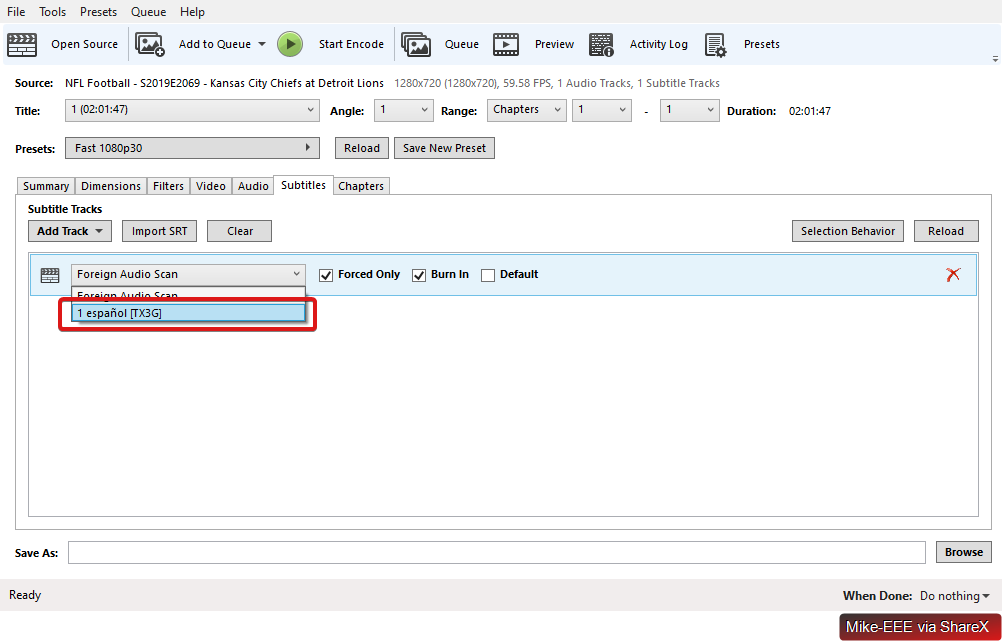
2. (Referenced as `Second`) `.mv4` -\> `.mv4` With this conversion, I am taking the output of the `First` conversion (which has embedded subtitles within it), using Custom Cuts to create the .`edl` file, and then further using `Process with MCEBuddy` to send it to MCEBuddy’s queue. While the input from `First` does have embedded subtitles, these subtitles never make it into the output of this `Second` conversion task, whether using `Extract closed captions and subtitles` or not.
As mentioned earlier, I have uploaded an additional example of this scenario created from scratch into the shared folder above (in addition to archiving the previous example). In the shared folder above, there should now be a total of three folders:
1. `.Archive` has the files from before. You can ignore this as it only exists for history purposes.
2. `First` contains the input (`.ts`), outputs (`.m4v`) as well as the `.log` file from the `First` conversion described above. That is, this is the `.ts` -\> `.m4v` conversion that works as expected, resulting in embedded subtitles. The outputs from this conversion were then copied into a new folder and utilized as inputs for the next (`Second`) conversion task:
3. `Second` contains the outputs of the `Second` conversion outlined above. That is, this is the `.m4v` -\> `.m4v` conversion along with its `.log` file as a result of using Custom Cuts. This folder contains the resulting `.m4v` file that is encountering the issue of subtitles not being embedded at all.
All told, you should see that `First\NFL Football - S2019E2069 - Kansas City Chiefs at Detroit Lions.m4v` contains embedded subtitles, whereas `Second\NFL Football - S2019E2069 - Kansas City Chiefs at Detroit Lions.m4v` does not.
Please let me know if there is any further information I can provide to further assist.
---
### Author:  [@Mike-EEE](https://discussion.mcebuddy2x.com/u/Mike-EEE)
#### Post date: [October 16, 2019, 12:34pm UTC](https://discussion.mcebuddy2x.com/t/mcebuddy-custom-cuts-and-subtitles/3121/11 "2019-10-16T12:34:02Z")
I wanted to check in with this issue. Please let me know if there is any further information that I can provide to assist towards diagnosing and/or solving it. It would also be valuable to know if the information I have provided is useful and/or you have been able to reproduce the issue on your end with the provided data. Thank you!
---
### Author:  [@RBoy](https://discussion.mcebuddy2x.com/u/RBoy)
#### Post date: [October 16, 2019, 6:19pm UTC](https://discussion.mcebuddy2x.com/t/mcebuddy-custom-cuts-and-subtitles/3121/12 "2019-10-16T18:19:40Z")
I see from the logs that it failed to add the subtitles to your file:
> → Process exited with code -1073741515
When I tried to replicate it here with your settings and original M4V file, it worked just fine:
> 2019-10-16T13:53:27 MCEBuddy.AppWrapper.MP4Box → ISO File Writing: |====================| (100/100)
> 2019-10-16T13:56:29 MCEBuddy.AppWrapper.MP4Box →
> → Process exited with code 0
> 2019-10-16T13:56:38 MCEBuddy.Engine.ConversionJob → Finished adding subtitles and chapters to file, file size [KB] 10,283,663.00
There’s some issue with your setup which is preventing MP4Box from adding the subtitles. I see that you have enough space so I don’t really know. All I can say is try a different hard drive for your temp folder or a different computer.
---
### Author:  [@Mike-EEE](https://discussion.mcebuddy2x.com/u/Mike-EEE)
#### Post date: [October 16, 2019, 6:51pm UTC](https://discussion.mcebuddy2x.com/t/mcebuddy-custom-cuts-and-subtitles/3121/13 "2019-10-16T18:51:03Z")
OK cool thank you for your assistance and reply, @RBoy… I’m still trying to understand the different settings here, so please bear with me. In the `First` conversion task I also see this same error code by MP4Box but it happens to embed the subtitles as expected in this task.
I was also under the impression that Handbrake is used to embed subtitles as well, so not 100% certain that MP4Box is the culprit here (or at least do not understand it as of yet). A lot of moving pieces here for sure. 😅
---
### Author:  [@RBoy](https://discussion.mcebuddy2x.com/u/RBoy)
#### Post date: [October 16, 2019, 9:49pm UTC](https://discussion.mcebuddy2x.com/t/mcebuddy-custom-cuts-and-subtitles/3121/14 "2019-10-16T21:49:29Z")
Handbrake is used to burn subtitles (not embed).
MP4Box is the last step in the process to embed the subtitles, the logs show there is no subtitle in the file after it finishes, so that’s where the issue lies. I’m not sure why, like I said your file and profile works fine here. You can try a different hard disk/computer and see if that helps.
---
### Author:  [@RBoy](https://discussion.mcebuddy2x.com/u/RBoy)
#### Post date: [October 16, 2019, 10:09pm UTC](https://discussion.mcebuddy2x.com/t/mcebuddy-custom-cuts-and-subtitles/3121/15 "2019-10-16T22:09:19Z")
I had another look at your logs, in the first case the subtitles were part of the TS stream stored as closed captions. You were using a custom profile which instructed handbrake to use those built in closed captions and preserve them, which is why it worked:
> 2019-09-27T08:19:21 MCEBuddy.AppWrapper.Handbrake → + subtitle tracks:
> 2019-09-27T08:19:21 MCEBuddy.AppWrapper.Handbrake → + 1, español, Closed Caption [CC608]
One thing you can try is, enable the `Skip remuxing` option in the expert settings which will allow handbrake to work directly on the original M4V file instead of the remuxed TS file in the second case, it may detect the built in subtitles and work with it.
---
### Author:  [@Mike-EEE](https://discussion.mcebuddy2x.com/u/Mike-EEE)
#### Post date: [October 16, 2019, 10:09pm UTC](https://discussion.mcebuddy2x.com/t/mcebuddy-custom-cuts-and-subtitles/3121/16 "2019-10-16T22:09:48Z")
> [@RBoy](#):
>
> the logs show there is no subtitle in the file after it finishes, so that’s where the issue lies
Ah, so to make sure I understand, are you saying that the logs are saying the subtitles are not embedded, but they actually are in the resulting file? I can open `First\NFL Football - S2019E2069 - Kansas City Chiefs at Detroit Lions.m4v` in either Handbrake or VLC and see the subtitles embedded there as a result of the first conversion task. Again, the log file for this task contains the same error code found in that log file as with `Second` that you mentioned earlier.
Unfortunately, I do not have another machine/environment readily available to try this out on so will have to see if I can get it working with the current configuration if at all possible.
---
### Author:  [@RBoy](https://discussion.mcebuddy2x.com/u/RBoy)
#### Post date: [October 16, 2019, 10:23pm UTC](https://discussion.mcebuddy2x.com/t/mcebuddy-custom-cuts-and-subtitles/3121/17 "2019-10-16T22:23:37Z")
In the first conversion, your original file is a `TS` file which contains closed captions. MCEBuddy extracts those closed captions as a SRT file but it fails to embed them since MP4Box fails.
However you have a custom profile and in your profile you instruct handbrake to look for closed captions while converting, it finds those muxed closed captions in the TS stream and automatically converted them into an embedded SRT file.
During the second conversion you start with a M4V file which the embedded SRT file, MCEBuddy extracts the SRT file and remuxes the M4V to a TS format for processing (which doesn’t contain any subtitles or closed captions), hence when it reaches handbrake it doesn’t detect anything and when mcebuddy tries to eventually put those subtitles back into the container it’s failing on your setup.
You have three options:
1. Try a different computer where MP4Box doesn’t fail (it’s working here on Windows 10, 64bit)
2. Enable the `Skip remuxing` option for your second conversion task (this way MCEBuddy won’t remuxed the M4V into TS and when handbrake gets the original M4V it may be able to detect the embedded SRT file and preserve it)
3. Modify your profile for the second conversion to instruct handbrake to use the SRT file that’s extracted by MCEBuddy along with the remuxed TS file in the temp folder and embed it into your converted M4V. Try adding `--srt-file .srt` to your profile `handbrake-video` line. See [inserting special commands](https://discussion.mcebuddy2x.com/t/mcebuddy-advanced-settings-commands-and-tweaking/30/1#specialcommands) for details on how _\_ works.
---
### Author:  [@Mike-EEE](https://discussion.mcebuddy2x.com/u/Mike-EEE)
#### Post date: [October 17, 2019, 3:08pm UTC](https://discussion.mcebuddy2x.com/t/mcebuddy-custom-cuts-and-subtitles/3121/18 "2019-10-17T15:08:59Z")
> [@RBoy](#):
>
> However you have a custom profile and in your profile you instruct handbrake to look for closed captions while converting, it finds those muxed closed captions in the TS stream and automatically converted them into an embedded SRT file.
Ok! That makes sense to me now, @RBoy. Thank you for taking the time and having the patience to explain this to me. I believe I have enough now to take the next steps. I will try seeing if I can get the `--srt-file` command working, and if not, see if I can figure out what’s going on with the machine spitting out the MP4Box error.
Thanks again to you and everyone there for your great work with this product and – even more importantly – for supporting it! 👍
---
### Author:  [@RBoy](https://discussion.mcebuddy2x.com/u/RBoy)
#### Post date: [October 17, 2019, 3:41pm UTC](https://discussion.mcebuddy2x.com/t/mcebuddy-custom-cuts-and-subtitles/3121/19 "2019-10-17T15:41:45Z")
You’re welcome, take a minute to help us spread the word
---
### Author:  [@Mike-EEE](https://discussion.mcebuddy2x.com/u/Mike-EEE)
#### Post date: [October 22, 2019, 2:29pm UTC](https://discussion.mcebuddy2x.com/t/mcebuddy-custom-cuts-and-subtitles/3121/20 "2019-10-22T14:29:02Z")
> [@RBoy](#):
>
> Enable the `Skip remuxing` option for your second conversion task
So funny thing along the way to trying things out here. 😅 I was reviewing this thread and it seems I have missed [your earlier post](https://discussion.mcebuddy2x.com/t/mcebuddy-custom-cuts-and-subtitles/3121/15), and this subsequent suggestion.
I did try creating a new conversion task with `SkipRemux=True`. When I attempt to run it on the `.m4v` from the first task, it does seem that the subtitles are exported correctly, horray! However, it doesn’t seem to respect the `.edl` that was created from Custom Cuts, boo.
So, I wanted to see if there is anything obvious to consider here. What I like about this approach is that I can turn off the `Extract closed captions and subtitles` option and save myself an extra file hanging around with each conversion.
[Next page](https://discussion.mcebuddy2x.com/t/mcebuddy-custom-cuts-and-subtitles/3121.md?page=2)