# Max Width 720 Does Not Always Work
**URL:** https://discussion.mcebuddy2x.com/t/max-width-720-does-not-always-work/4563
**Category:** Bugs
**Created:** [January 11, 2022, 12:06pm UTC](https://discussion.mcebuddy2x.com/t/max-width-720-does-not-always-work/4563 "2022-01-11T12:06:57Z")
**Posts on this page:** 9
**Page:** 1
### Author:  [@Guarddog](https://discussion.mcebuddy2x.com/u/Guarddog)
#### Post date: [January 11, 2022, 12:06pm UTC](https://discussion.mcebuddy2x.com/t/max-width-720-does-not-always-work/4563/1 "2022-01-11T12:06:57Z")
I am running MCEBuddy 2.7 Beta 7.
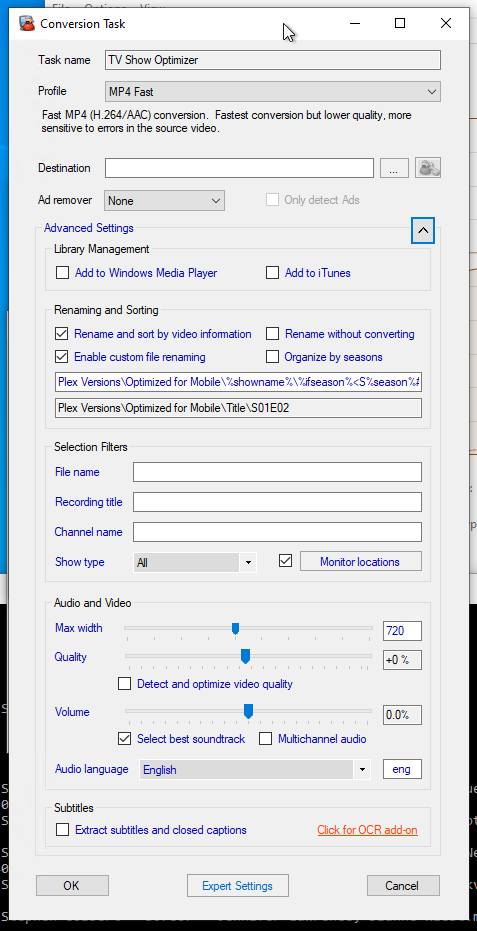
I have a conversion job, where I am converting OTA recordings to a max with of 720p. Essentially creating an optimized version for Plex.
The conversions are happening, but not always at 720p. The majority of the time the final version is still 1080p.
I have uploaded a log of a conversion that worked correctly and a version that did not work correctly. There is mention in the logs (even of the ones that do not work) that the max width is supposed to be 720 it just does not end up that way.
---
### Author:  [@mike808](https://discussion.mcebuddy2x.com/u/mike808)
#### Post date: [January 11, 2022, 11:43pm UTC](https://discussion.mcebuddy2x.com/t/max-width-720-does-not-always-work/4563/2 "2022-01-11T23:43:24Z")
Are you mistaking the max **width** parameter for a max **height** parameter?
720p and 1080p are height parameters, not width parameters.
Also, they are _maximum_ parameters, not forced upscaling. So if the original is less than 720 **wide** , it won’t do anything.
Or did @Goose hange the parameter to be height instead of width and forgot to update the text in the dialog?
---
### Author:  [@Guarddog](https://discussion.mcebuddy2x.com/u/Guarddog)
#### Post date: [January 12, 2022, 3:02am UTC](https://discussion.mcebuddy2x.com/t/max-width-720-does-not-always-work/4563/3 "2022-01-12T03:02:12Z")
> [@mike808](#):
>
> Also, they are _maximum_ parameters, not forced upscaling. So if the original is less than 720 **wide** , it won’t do anything.
Oh yea, looks like I screwed up - BUT, I am trying to have MCEBuddy create a 1280x720 version. So I entered 720 when I really should have put 1280 for the width.
Even so, if I put 720 that means it should have created an even smaller size than I wanted, right?
I will go back and correct my max width to be 1280 and see what it does.
---
### Author:  [@Guarddog](https://discussion.mcebuddy2x.com/u/Guarddog)
#### Post date: [January 12, 2022, 3:09am UTC](https://discussion.mcebuddy2x.com/t/max-width-720-does-not-always-work/4563/4 "2022-01-12T03:09:53Z")
I can confirm the width value is really width.
I had it incorrect at 720 and as mentioned sometimes it works and sometimes it does not. I found it converted a show correctly and it produced a video that was 720x406.
As Mike mentioned, I screwed up but it still appears that sometimes the system is ignoring or not able to process the max width value correctly.
---
### Author:  [@mike808](https://discussion.mcebuddy2x.com/u/mike808)
#### Post date: [January 12, 2022, 4:04am UTC](https://discussion.mcebuddy2x.com/t/max-width-720-does-not-always-work/4563/5 "2022-01-12T04:04:04Z")
I remembered where I was trying to do what you are doing, i.e. forced upscaling/downscaling to a specific screen width.
It isn’t in MCEBuddy. The max width is for _downscaling_ a raw mpeg2 OTA 1920x1080i HD video to a smaller image to get better compression. I think the storage is cheaper now and so that’s not really an issue anymore. Also, I’m getting great compression with x265 instead of MP4/x264.
Back to forced screen size. It was in the options for **Handbrake**. So what you might be able to do is setup extra parameters in your config and force handbrake to do the conversions, or work out the equivalent with FFMPEG (the other encoder MCEBuddy uses).
I know there are some posts here about people trying to force FFMPEG or Handbrake and some others where they wanted to pass special options into the encoders. That’s what I think you might need to do here.
I serve up my content with Plex too, but I have all the transcoding disabled and send the video to the player and let the player do any transcoding. So far, no issues with anything playing back 1280x720p or 1920x1080i (OTA) transcoded to **1280 max width** (it will downscale the 1920x1080, but that’s always interlaced for my TV stations). I don’t have an ATSC3.0 tuner yet to see what’s in 4K or a 4K (UHD) TV, so no problems there yet.
And with x265 and nVidia 2060 HW encoding on an ancient i5 Haswell (4th Gen), it hasn’t been an issue transcoding and a 1 hour show runs about 350MB for “good enough” for OTA HD content.
MCEBuddy moves the original to the archive folder and I schedule a task to delete anything older than 10 days. That way, I can manually run MCEBuddy to cut ads with a different profile on anything I want to keep at full resolution/low compression (but in x265 of course) in those 10 days.
Playback is fine on mobile and VLC on PC and even on my Tivo Roamio OTA via the Tivo Plex app.
---
### Author:  [@Goose](https://discussion.mcebuddy2x.com/u/Goose)
#### Post date: [January 12, 2022, 3:24pm UTC](https://discussion.mcebuddy2x.com/t/max-width-720-does-not-always-work/4563/6 "2022-01-12T15:24:34Z")
Thanks for the logs. In the one that’s failing I see that the video is corrupted which is causing handbrake to fail and then it falls back to ffmpeg which tries to see the qsv graphics driver to rescale the video but that’s failing to rescale it. Can you also upload the original video which is failing (Late show) so we can analyze it and see how to fix it.
---
### Author:  [@Goose](https://discussion.mcebuddy2x.com/u/Goose)
#### Post date: [January 12, 2022, 4:58pm UTC](https://discussion.mcebuddy2x.com/t/max-width-720-does-not-always-work/4563/7 "2022-01-12T16:58:51Z")
We’ve released an update to BETA 2.5.7 which should fix the issue. Try out todays’ 2.5.7 beta build and if it doesn’t we would need a copy of the erring video to analyze it further.
---
### Author:  [@Guarddog](https://discussion.mcebuddy2x.com/u/Guarddog)
#### Post date: [January 12, 2022, 8:59pm UTC](https://discussion.mcebuddy2x.com/t/max-width-720-does-not-always-work/4563/8 "2022-01-12T20:59:43Z")
OK, I have upgraded to the new build. Will let it run and see what happens.
---
### Author:  [@Guarddog](https://discussion.mcebuddy2x.com/u/Guarddog)
#### Post date: [January 19, 2022, 11:51pm UTC](https://discussion.mcebuddy2x.com/t/max-width-720-does-not-always-work/4563/9 "2022-01-19T23:51:49Z")
OK, I am reporting back. So far, so good. The new build is able to correctly size the videos!
Thanks.