# Help with Deleting a file
**URL:** https://discussion.mcebuddy2x.com/t/help-with-deleting-a-file/721
**Category:** General Support / Questions
**Created:** [October 5, 2017, 1:18am UTC](https://discussion.mcebuddy2x.com/t/help-with-deleting-a-file/721 "2017-10-05T01:18:27Z")
**Posts on this page:** 2
**Page:** 1
### Author:  [@Troy\_Sigwing](https://discussion.mcebuddy2x.com/u/Troy_Sigwing)
#### Post date: [October 5, 2017, 1:18am UTC](https://discussion.mcebuddy2x.com/t/help-with-deleting-a-file/721/1 "2017-10-05T01:18:28Z")
As a good grandpa, I am recording all episodes of Paw Patrol for the grandkids. Looks like when a show records that I already have it doesn’t re-convert and doesn’t delete.
2017-10-04T12:34:44 MCEBuddy.Engine.QueueManager --\> Monitor task PLEX DVR : File F:\PLEX DVR\PAW Patrol (2013)\Season 03\PAW Patrol (2013) - S03E11 - Pups Save a Stinky Flower; Pups Save a Monkey-Naut.ts already converted with status Converted
Is it possible to have mcebuddy go ahead and delete the file if this occurs?
---
### Author:  [@Goose](https://discussion.mcebuddy2x.com/u/Goose)
#### Post date: [October 5, 2017, 7:41pm UTC](https://discussion.mcebuddy2x.com/t/help-with-deleting-a-file/721/2 "2017-10-05T19:41:25Z")
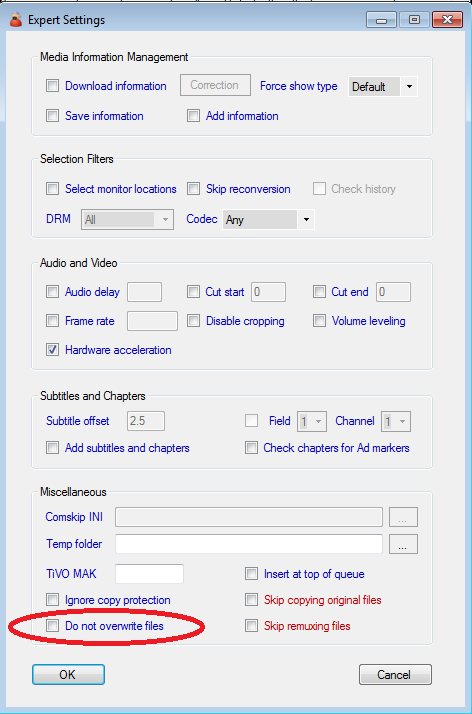
Yes you can, open your `Monitor Location`, click on `Expert Settings` and you’ll see the option to delete the original file.

Note that this will delete the original file on ALL successful conversions (it will not delete the original file on a failed conversion).
In this case because you’ve configured MCEBuddy to skip re converting the file (assuming you’ve checked the option for `Do not overwrite files`) if it already exists (based on destination filename), it will be treated a successful conversion.
However if your original file has the same name as a file that has already been converted (and in the same directory), MCEBuddy will not attempt to reconvert it again. If you want it to reprocess the file with same names, select the option in the Monitor Location Expert Settings `Re-monitor recorded videos`, AND also check the option for `Do not overwrite files` in your Conversion Task Expert Options.