# Does not remove all adverts from video files
**URL:** https://discussion.mcebuddy2x.com/t/does-not-remove-all-adverts-from-video-files/5271
**Category:** Commercial Removal
**Created:** [December 4, 2023, 7:03pm UTC](https://discussion.mcebuddy2x.com/t/does-not-remove-all-adverts-from-video-files/5271 "2023-12-04T19:03:05Z")
**Posts on this page:** 15
**Page:** 1
### Author:  [@dan29](https://discussion.mcebuddy2x.com/u/dan29)
#### Post date: [December 4, 2023, 7:03pm UTC](https://discussion.mcebuddy2x.com/t/does-not-remove-all-adverts-from-video-files/5271/1 "2023-12-04T19:03:05Z")
hi mcebuddy can i please ask you a question about your software right i have used the [trial version](https://discussion.mcebuddy2x.com/t/35) of this software cos it says on your website you can use it for 15 days or 15 converted video files.
anyway i added 15 video files that have adverts in them at the beginning and middle and end of the video files when i go to remove the adverts the software converts the video files.
and goes through them each one but it only removes adverts from the beginning of the video files
and in the middle and the end of the video files still have adverts in them the only adverts it cuts out is the beginning of the video files.
it is the same thing with the video files i added cos i wanted to see if it really does remove adverts from video files only the beginning of a video file will it remove the adverts the rest of the video files still have adverts in them i would only buy the software if it removed all the adverts from the beginning and middle and near the end of a video files.
it is just some tv shows i recorded off tv and this software is so post to remove all the adverts from the video files but the software does not so the rest of the video files still have adverts in them so is there anyway you could please fix this software i would be willing to buy the software the lifetime price one for this software.
if it removed all adverts which it does not and also it has left some of the audio from the beginning of the adverts only about 3 seconds when i play the video files then the video file starts with the tv show but there is adverts still in the video files when you convert them so is there anyway you can please fix this software.
also this is a other question i have got about your software
is there anyway possible for you to add to the software
a way to remove black bars from video files. cos i dont know of any software that will do that and make video files full screen a lot of stuff i record have black bars in the video files it would be great if i could remove the black bars from video files.
also is there anyway you could add to your software a watermark removeal tool or something in the convert bit were it removes watermarks from video files. cos some stuff i record of tv have watermarks in them it would be great if i could remove them from video files were they are not bluring in the video files.
---
### Author:  [@Goose](https://discussion.mcebuddy2x.com/u/Goose)
#### Post date: [December 4, 2023, 7:12pm UTC](https://discussion.mcebuddy2x.com/t/does-not-remove-all-adverts-from-video-files/5271/2 "2023-12-04T19:12:19Z")
You may wan to start with seeing the topic on [tuning comskip](https://discussion.mcebuddy2x.com/t/29) for commercial detection. If it’s not aggressive enough you can change the ini settings to make it more aggressive or even try one the community generated comskip ini files. There are lots of options to play with in there.
> [@dan29](#):
>
> a way to remove black bars from video files
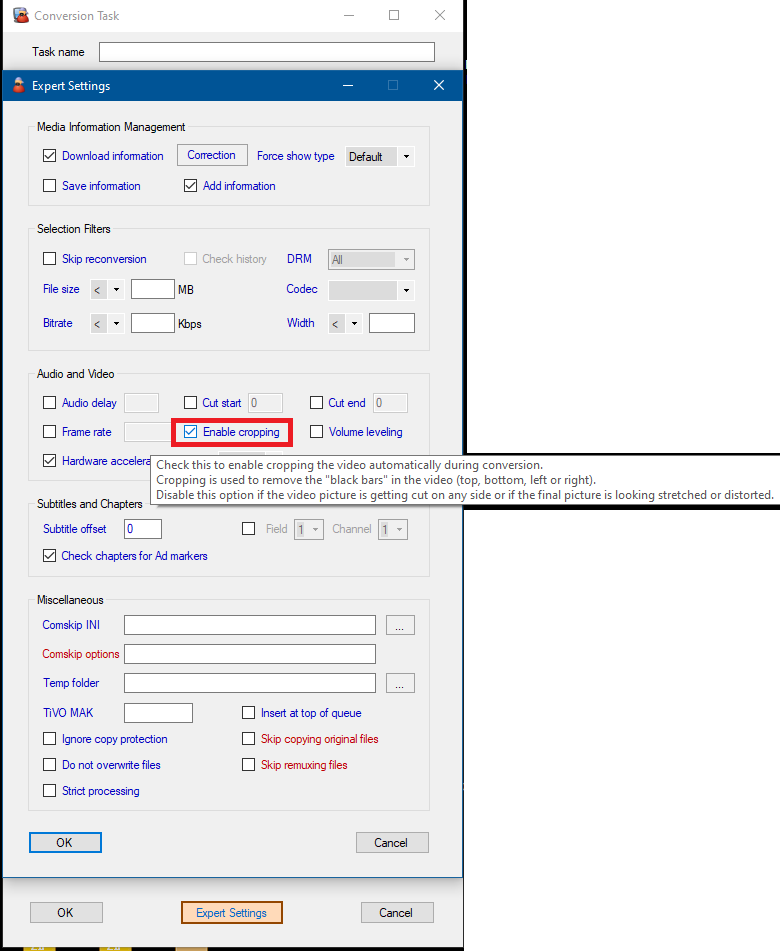
Check the `Enable cropping` option in the `Conversion Task -> Expert settings` page (you can rest your mouse any option for instant pop up help)
---
### Author:  [@Goose](https://discussion.mcebuddy2x.com/u/Goose)
#### Post date: [December 5, 2023, 7:35am UTC](https://discussion.mcebuddy2x.com/t/does-not-remove-all-adverts-from-video-files/5271/3 "2023-12-05T07:35:16Z")
Try changing `detect_method=175` in your comskip.ini (see [tuning comskip](https://discussion.mcebuddy2x.com/t/29)) and you should see more aggressive commercial detection. Let me know how it goes.
---
### Author:  [@dan29](https://discussion.mcebuddy2x.com/u/dan29)
#### Post date: [January 2, 2024, 12:48pm UTC](https://discussion.mcebuddy2x.com/t/does-not-remove-all-adverts-from-video-files/5271/5 "2024-01-02T12:48:12Z")
so has the mcebuddy software been updated then i used the software a few Months ago and it did not remove all the adverts only the beginning of the video files but the rest of the adverts it left them in the video files
---
### Author:  [@dan29](https://discussion.mcebuddy2x.com/u/dan29)
#### Post date: [January 2, 2024, 1:40pm UTC](https://discussion.mcebuddy2x.com/t/does-not-remove-all-adverts-from-video-files/5271/6 "2024-01-02T13:40:25Z")
goose how do i change the detect method i can bring up the text document of comskip it says Main Settings detect\_method = then a number do i change that
or i can open the comskip ini editorv1.0 and that has lots of settings and at the top of that it says detect-method 43 uniform color and logo and resolution change and aspect ratio all are ticked do i have to change anything there
or can i change the comskip text document
---
### Author:  [@Goose](https://discussion.mcebuddy2x.com/u/Goose)
#### Post date: [January 3, 2024, 3:40pm UTC](https://discussion.mcebuddy2x.com/t/does-not-remove-all-adverts-from-video-files/5271/7 "2024-01-03T15:40:30Z")
You can do either, same result.
---
### Author:  [@dan29](https://discussion.mcebuddy2x.com/u/dan29)
#### Post date: [January 6, 2024, 11:36am UTC](https://discussion.mcebuddy2x.com/t/does-not-remove-all-adverts-from-video-files/5271/8 "2024-01-06T11:36:58Z")
hi goose so if i change that then will it cut out all the adverts or will it leave some the method i did was to leave it as normal but it only cut out the adverts at the beginning of the video file. the middle and end of the video file has adverts so by changing it would that mean it removes more adverts then.
---
### Author:  [@dan29](https://discussion.mcebuddy2x.com/u/dan29)
#### Post date: [January 6, 2024, 4:06pm UTC](https://discussion.mcebuddy2x.com/t/does-not-remove-all-adverts-from-video-files/5271/9 "2024-01-06T16:06:06Z")
also goose i have tried to change the
detect\_method from 43 which it is set at that i am trying to change it to detect\_method=175 i cant change it in the ComskipINIEditor it wount let me i can get it to say 175 but when i exit it it goes back to 43 and when i go to change it in the text document of comskip it says i dont have permission contact the owner so how do i change it then
---
### Author:  [@Goose](https://discussion.mcebuddy2x.com/u/Goose)
#### Post date: [January 7, 2024, 5:16am UTC](https://discussion.mcebuddy2x.com/t/does-not-remove-all-adverts-from-video-files/5271/10 "2024-01-07T05:16:01Z")
If you’re trying to edit it directly from the installation folder then you need administrative rights. Start the Comskip gui ini editor with ad administrative right or copy it to to your desktop, edit it and then put it back.
---
### Author:  [@scarng](https://discussion.mcebuddy2x.com/u/scarng)
#### Post date: [January 13, 2024, 1:49pm UTC](https://discussion.mcebuddy2x.com/t/does-not-remove-all-adverts-from-video-files/5271/11 "2024-01-13T13:49:46Z")
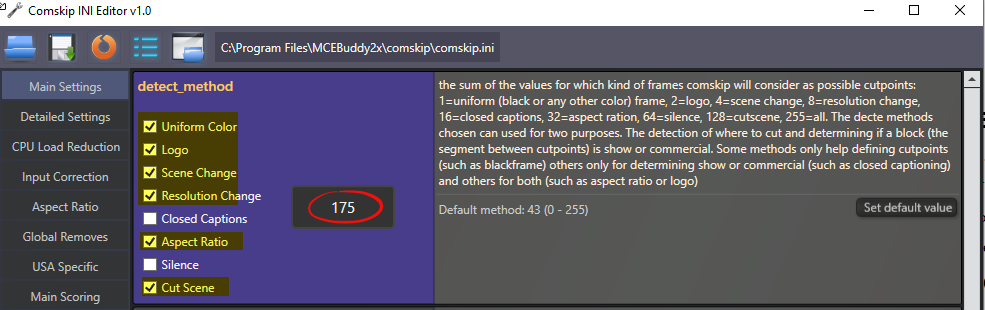
Check the box to get detect\_method=175
---
### Author:  [@Goose](https://discussion.mcebuddy2x.com/u/Goose)
#### Post date: [March 30, 2024, 8:16pm UTC](https://discussion.mcebuddy2x.com/t/does-not-remove-all-adverts-from-video-files/5271/12 "2024-03-30T20:16:55Z")
2 posts were split to a new topic: [Joining multiple files](https://discussion.mcebuddy2x.com/t/joining-multiple-files/5424)
---
### Author:  [@Goose](https://discussion.mcebuddy2x.com/u/Goose)
#### Post date: [April 7, 2024, 3:12pm UTC](https://discussion.mcebuddy2x.com/t/does-not-remove-all-adverts-from-video-files/5271/13 "2024-04-07T15:12:01Z")
2 posts were split to a new topic: [Reducing file size](https://discussion.mcebuddy2x.com/t/reducing-file-size/5427)
---
### Author:  [@dan29](https://discussion.mcebuddy2x.com/u/dan29)
#### Post date: [April 24, 2024, 3:25pm UTC](https://discussion.mcebuddy2x.com/t/does-not-remove-all-adverts-from-video-files/5271/14 "2024-04-24T15:25:59Z")
hi i have got some video files and i want to remove the adverts from the video files and remove the black bars from video files and convert the video files
right i go to do all that with the software i have tick the remove black bars bit and when it converts the video files it remove the black bars from the video files but when it converts the video files it still keeps the adverts in the video files and comskip is selected i am trying to convet a folder of video files like 9 video files or more is that the problem i am doing if i convert 1 video file at a time i can remove the adverts from the video file and also remove the black bars from the video file i have also tick the comskip settings ini editor to 175 like scarng said to remove the adverts from the video files that only seems to work with 1 video file if you go to do that with more than 1 video file it does not remove the adverts from the video files so what am i doing wrong
---
### Author:  [@Goose](https://discussion.mcebuddy2x.com/u/Goose)
#### Post date: [April 26, 2024, 3:44pm UTC](https://discussion.mcebuddy2x.com/t/does-not-remove-all-adverts-from-video-files/5271/15 "2024-04-26T15:44:15Z")
It helps to attach conversion logs otherwise there’s no way to see what’s going on.
You may want to try doing it in two passes if Comskip is having trouble with the “black bars” while detecting commercials.
Try this manually first to see if it fixes your issue:
1. Convert the file and remove the black bars (no comskip)
2. Now change the settings to run comskip and run the output of 1 above with the new settings to have comskip remove the commercials
If that’s working as expected then you can automate the entire 2 process by creating a daisy chain configuration where you have 2 monitor tasks and 2 conversions tasks, the first one will remove the black bars (and be sure to use the Unprocessed profile here to avoid reducing in video quality) and the second one will run comskip and convert the video format.
> [@Creating an automated daisy chain - ordering a sequence of multiple conversions](https://discussion.mcebuddy2x.com/t/creating-an-automated-daisy-chain-ordering-a-sequence-of-multiple-conversions/5441):
>
> “Daisy Chaining” Conversions Daisy chaining allows you to create a sequence of actions/conversions where the output of one conversion task feeds as the input of the next conversion task in a specific order. This helps if you need to sequence actions or conversions in a specific order. This is just an example of how to create a two step sequence. First you setup one monitor task which feeds into the first conversion task (e.g. MKV Unprocessed), then you setup a second monitor task which monitors…
---
### Author:  [@Goose](https://discussion.mcebuddy2x.com/u/Goose)
#### Post date: [June 1, 2024, 1:57pm UTC](https://discussion.mcebuddy2x.com/t/does-not-remove-all-adverts-from-video-files/5271/16 "2024-06-01T13:57:09Z")
3 posts were split to a new topic: [Purchase and upgrade](https://discussion.mcebuddy2x.com/t/purchase-and-upgrade/5471)