# Converting TS \> WTV. Using "QualityMultiplier" to enhance resolution
**URL:** https://discussion.mcebuddy2x.com/t/converting-ts-wtv-using-qualitymultiplier-to-enhance-resolution/1203
**Category:** General Support / Questions
**Created:** [December 19, 2017, 9:06pm UTC](https://discussion.mcebuddy2x.com/t/converting-ts-wtv-using-qualitymultiplier-to-enhance-resolution/1203 "2017-12-19T21:06:00Z")
**Posts on this page:** 4
**Page:** 1
### Author:  [@SebastopolSlim](https://discussion.mcebuddy2x.com/u/SebastopolSlim)
#### Post date: [December 19, 2017, 9:06pm UTC](https://discussion.mcebuddy2x.com/t/converting-ts-wtv-using-qualitymultiplier-to-enhance-resolution/1203/1 "2017-12-19T21:06:00Z")
I looked for documentation on “QualityMultiplier”, but couldn’t find anything. I’m posting to see if there is anyone who knows anything about it.
I recently switched from cable to sat and am still in the process of figuring out various “ins and outs”.
Of the options I’m considering, continuing with Windows Media Center is the front runner.
My issue is when I convert a TS file to WTV using default settings, the resolution of the video takes a hit. As you would expect, the converted file is also quite a bit smaller.
I stumbled onto “QualityMultiplier” and set it to maximum. Looking at the log file, the line “QualityMultiplier=1” was changed to “QualityMultiplier=2”.
Running a conversion with the new setting, the quality of the video was preserved, but the converted file is now twice the size of the TS. So naturally, I want to find the setting that preserves the video without making it any larger than necessary.
I’m up for trial and error, but if someone here knows something, that would be better.
I can watch the TS files in WMC, but there is no meta data. Not a deal breaker, but it is nice to have the meta data, which MCE Buddy does a mostly nice job of adding, with the exception that the cast does not get added.
Thanks, in advance.
---
### Author:  [@Goose](https://discussion.mcebuddy2x.com/u/Goose)
#### Post date: [December 22, 2017, 7:19am UTC](https://discussion.mcebuddy2x.com/t/converting-ts-wtv-using-qualitymultiplier-to-enhance-resolution/1203/2 "2017-12-22T07:19:29Z")
> [@SebastopolSlim](#):
>
> when I convert a TS file to WTV using default settings, the resolution of the video takes a hit
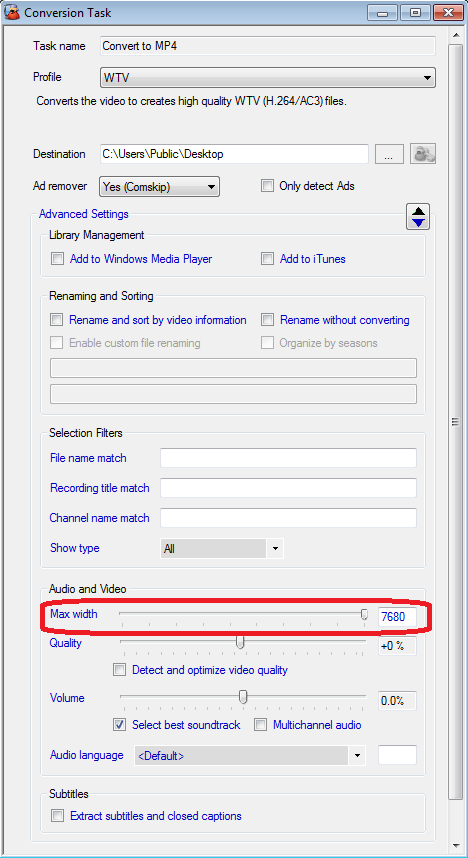
The default resolution is 720 width (with a recent update we changed that to 1920 width). Make sure you’ve increased the max resolution slider all the way to the right to keep the original resolution
> [@SebastopolSlim](#):
>
> I stumbled onto “QualityMultiplier” and set it to maximum
I’m assuming you modified this using the `Quality` slider on the application and not directly in the configuration file (avoid doing this).
As you increase the quality slider the file size will increase, at quality set to 100% increase, you’ll find the final file is bigger than the original file (which is normal)
> [@SebastopolSlim](#):
>
> I want to find the setting that preserves the video without making it any larger than necessary
Use the `WTV Unprocessed` profile. It retains the original video (no recoding) and puts it into a WTV file as well. Note in Unprocessed profiles you cannot modify any of the “video” settings like max resolution and quality since it essentially copies the original video.
---
### Author:  [@SebastopolSlim](https://discussion.mcebuddy2x.com/u/SebastopolSlim)
#### Post date: [December 22, 2017, 5:10pm UTC](https://discussion.mcebuddy2x.com/t/converting-ts-wtv-using-qualitymultiplier-to-enhance-resolution/1203/3 "2017-12-22T17:10:23Z")
Thanks, Goose.
Your assumption is correct. I used the slider just below “Max width”.
I changed “Max width” from 1920 to the max of 7630, but didn’t expect it to make a difference. It did not seem to.
I already tried using the “WTV Unprocessed”, and did so again after upping “Max width”, as this would be ideal given to how quick the conversions are.
Alas, the WTV files created with the unprocessed profile will not play in WMC. If you click on the “play” button, it “blinks”, displays no error messages, and returns to the display as if nothing happened. A quick look at the Windows logs reveals no entries, so I don’t have any information as to why it won’t play.
I should add that the TS files are created by Hauppauge’s HDPVR2, so maybe there is an issue with how they encode them.
Anyway, that’s what I think I know, which may not be all that much. It’s not a show stopper and most of the recordings aren’t so pretty that it matters all that much, so I may reserve the high resolution conversions to those individual recordings where the difference is noticeable.
Thanks, again!
---
### Author:  [@RBoy](https://discussion.mcebuddy2x.com/u/RBoy)
#### Post date: [December 23, 2017, 2:54am UTC](https://discussion.mcebuddy2x.com/t/converting-ts-wtv-using-qualitymultiplier-to-enhance-resolution/1203/4 "2017-12-23T02:54:49Z")
Try moving the slider to less than 100%. Day around 50% and work your way up.