# Converted file replace the original file
**URL:** https://discussion.mcebuddy2x.com/t/converted-file-replace-the-original-file/5301
**Category:** General Support / Questions
**Created:** [December 30, 2023, 1:53pm UTC](https://discussion.mcebuddy2x.com/t/converted-file-replace-the-original-file/5301 "2023-12-30T13:53:41Z")
**Posts on this page:** 3
**Page:** 1
### Author:  [@hackernc](https://discussion.mcebuddy2x.com/u/hackernc)
#### Post date: [December 30, 2023, 1:53pm UTC](https://discussion.mcebuddy2x.com/t/converted-file-replace-the-original-file/5301/1 "2023-12-30T13:53:43Z")
OK, I’m new to this and I was wondering if in the settings I can just use comskip to get rid of commercials and convert back to “.wtv” while JUST using the 1 hard drive where the recordings are located? Then delete the original so that when it’s done my recordings are just showing normal in WMC but no commercials.
(Maybe use my “C” drive for the conversions?)
Thanks
20 views but no help. Somebody must be able to explain.
---
### Author:  [@Goose](https://discussion.mcebuddy2x.com/u/Goose)
#### Post date: [January 1, 2024, 10:32pm UTC](https://discussion.mcebuddy2x.com/t/converted-file-replace-the-original-file/5301/4 "2024-01-01T22:32:22Z")
> [@hackernc](#):
>
> while JUST using the 1 hard drive
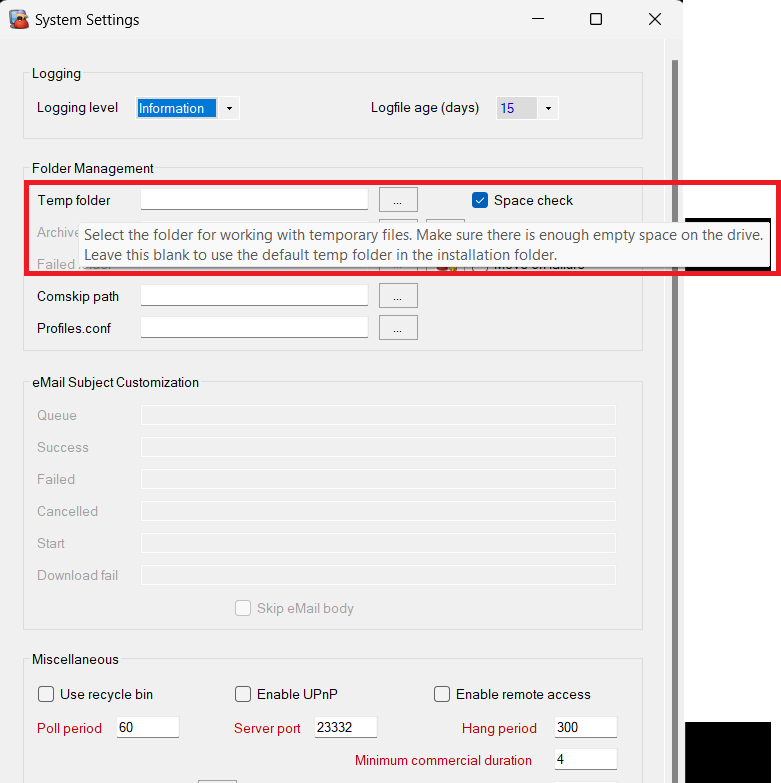
Set the temp folder in _Settings → Expert settings_
> [@hackernc](#):
>
> I was wondering if in the settings I can just use comskip to get rid of commercials and convert back to “.wtv”
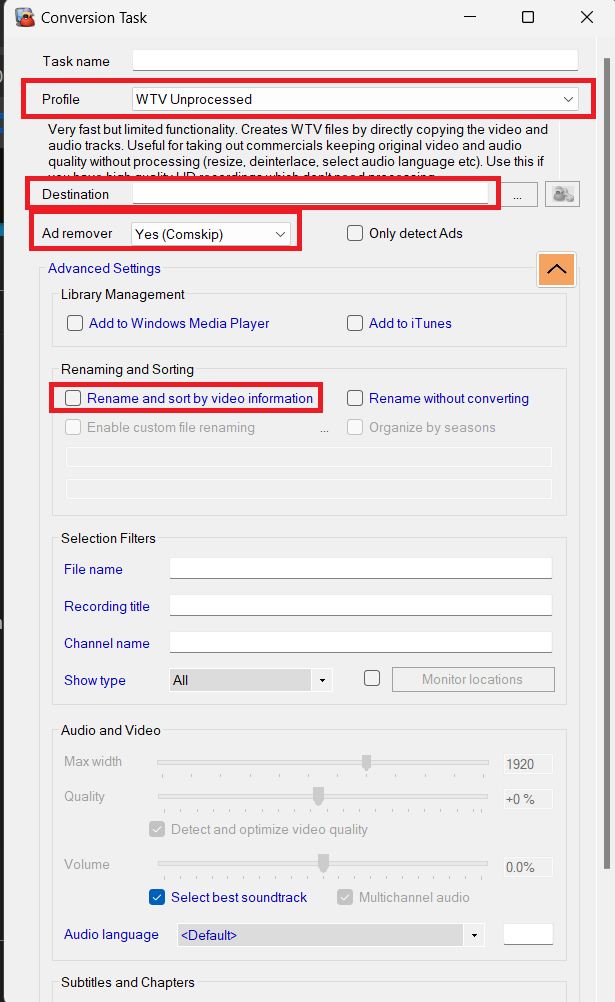
Yes, Select _WTV Unprocessed_ as the profile, leave the Destination _blank/empty_ (i.e. use original video directory), select _Comskip_ and uncheck the renaming option (i.e. use original filename) - NOTE this will overwrite the original wtv file.
> [@hackernc](#):
>
> Then delete the original
If you’ve deselected the renaming option and left the destination folder empty the converted wtv file should overwrite the original
Rest your mouse over each option to get instant pop up help
---
### Author:  [@Goose](https://discussion.mcebuddy2x.com/u/Goose)
#### Post date: [January 2, 2024, 11:24pm UTC](https://discussion.mcebuddy2x.com/t/converted-file-replace-the-original-file/5301/5 "2024-01-02T23:24:38Z")
2 posts were split to a new topic: [Reconverting files](https://discussion.mcebuddy2x.com/t/reconverting-files/5308)