# Conversion queue item priority
**URL:** https://discussion.mcebuddy2x.com/t/conversion-queue-item-priority/5099
**Category:** General Support / Questions
**Created:** [August 21, 2023, 1:46am UTC](https://discussion.mcebuddy2x.com/t/conversion-queue-item-priority/5099 "2023-08-21T01:46:11Z")
**Posts on this page:** 4
**Page:** 1
### Author:  [@toasterking](https://discussion.mcebuddy2x.com/u/toasterking)
#### Post date: [August 21, 2023, 1:46am UTC](https://discussion.mcebuddy2x.com/t/conversion-queue-item-priority/5099/1 "2023-08-21T01:46:11Z")
When/after adding a new item to the queue and there are already items being processed in the queue, it would be great to be able to right-click a particular queue item using the MCEBuddy GUI and select something like “Set to High Priority”. Once an item is designated _High Priority_, the item would be moved to the top of the queue, any existing conversions that are _not_ _High Priority_ would be paused, and the _High Priority_ items would be processed. Once the _High Priority_ items have completed, the lower-priority items would resume.
If it’s not possible with the current architecture to pause a conversion task, I’d go so far as to request that the normal priority items already in progress be aborted and retried later (maybe with an option to disable that behavior in Settings for those who don’t agree).
You could add multiple higher and lower priorities for queue items, but I’m only really interested in “do this one first” functionality.
The problem I am trying to solve: It’s annoying when there is already a conversion backlog, especially for items that will take a while to convert, but there’s something new that I want to watch _now_. Yes, it’s possible to drag the new item _(very slowly)_ to the top of the list, then manually cancel the items currently being processed, then go to history and delete the records of the canceled items, then re-add or re-scan the items I canceled, but it’s such a pain. Even then, if the number of conversions in Settings is set to more than 1, it still doesn’t devote full resources to the item I just promoted.
---
### Author:  [@SystemIdleProcess](https://discussion.mcebuddy2x.com/u/SystemIdleProcess)
#### Post date: [August 21, 2023, 11:11am UTC](https://discussion.mcebuddy2x.com/t/conversion-queue-item-priority/5099/2 "2023-08-21T11:11:19Z")
This sort of exists, it will not stop an existing conversion in progress but you can have things added to the top of the queue automatically. Within the Conversion task expert settings you need to select “Insert at top of queue”.
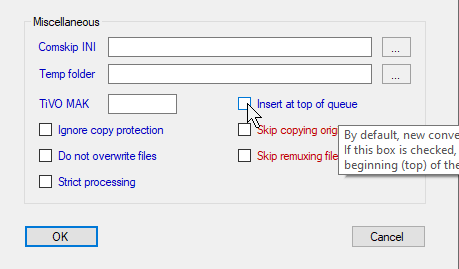
I’ve used this before, where I copied the conversion task I normally use and set that option and then have a separate monitor location for the priority conversion task and drop the files I want done sooner there.
---
### Author:  [@toasterking](https://discussion.mcebuddy2x.com/u/toasterking)
#### Post date: [August 21, 2023, 3:32pm UTC](https://discussion.mcebuddy2x.com/t/conversion-queue-item-priority/5099/3 "2023-08-21T15:32:02Z")
Thanks, @SystemIdleProcess. This is good to know, but it’s not quite what I want, since, as you noted, it requires a separate monitor location or way to trigger the task. I generally like to keep an identical hierarchy of folders at the source and the destination: one original, one converted.
I’d really just like to be able to select an item already in the queue and say, “Drop everything you’re doing and work on this instead.”
---
### Author:  [@Goose](https://discussion.mcebuddy2x.com/u/Goose)
#### Post date: [September 14, 2023, 10:36pm UTC](https://discussion.mcebuddy2x.com/t/conversion-queue-item-priority/5099/4 "2023-09-14T22:36:28Z")
> [@toasterking](#):
>
> able to right-click a particular queue item using the MCEBuddy GUI
You can drag items in the queue up or down the list to change their priority in real time. That way you can set the next item to be processed by dragging it all the way up to the top. Note that the priority is changed in real time, it doesn’t save it, so it if you stop the engine and restart it you’ll lose any real time changes you made to the queue priorities.
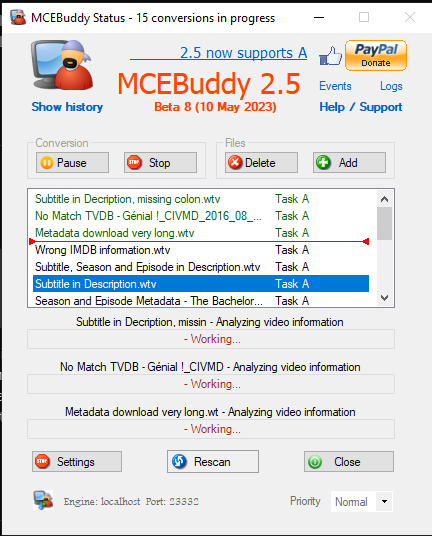
This feature has been around for a while: [Drag/Drop or Right Click ability to Move and Reorder Pending Conversion in GUI](https://discussion.mcebuddy2x.com/t/drag-drop-or-right-click-ability-to-move-and-reorder-pending-conversion-in-gui/1087)