# Commercial detection and removal
**URL:** https://discussion.mcebuddy2x.com/t/commercial-detection-and-removal/4990
**Category:** Commercial Removal
**Tags:** comskip, showanalyzer
**Created:** [March 6, 2023, 5:30pm UTC](https://discussion.mcebuddy2x.com/t/commercial-detection-and-removal/4990 "2023-03-06T17:30:35Z")
**Posts on this page:** 14
**Page:** 1
### Author:  [@timlab1955](https://discussion.mcebuddy2x.com/u/timlab1955)
#### Post date: [March 6, 2023, 5:30pm UTC](https://discussion.mcebuddy2x.com/t/commercial-detection-and-removal/4990/1 "2023-03-06T17:30:35Z")
Does MCE Buddy need to have comstrip and do I need to download it?
---
### Author:  [@Goose](https://discussion.mcebuddy2x.com/u/Goose)
#### Post date: [March 6, 2023, 5:42pm UTC](https://discussion.mcebuddy2x.com/t/commercial-detection-and-removal/4990/2 "2023-03-06T17:42:56Z")
> [@How to install a custom Comskip and get additional INI files](https://discussion.mcebuddy2x.com/t/how-to-install-a-custom-comskip-and-get-additional-ini-files/64):
>
> Starting version 2.6.4 MCEBuddy now includes a custom donator build of Comskip with 8K hardware acceleration and support for native decoding of additional file formats (including MPEG2, H.264, HEVC, AV1, VP8, VP9 etc). Also see additional information about [enabling Comskip hardware acceleration](https://discussion.mcebuddy2x.com/t/tuning-comskip-and-custom-comskip-inis-country-channel-specific/29#a-namehardwareusing-hardware-decodinga-6) and [benchmarks](https://discussion.mcebuddy2x.com/t/59/2). Please continue to support the Comskip team for their work at [http://www.comskip.org/](http://www.comskip.org/)[Also Check out the Channel / Country specific Comskip INI’s created by our community users here](https://discussion.mcebuddy2x.com/t/custom-comskip-inis-country-channel-specific/29) Th…
---
### Author:  [@timlab1955](https://discussion.mcebuddy2x.com/u/timlab1955)
#### Post date: [March 11, 2023, 4:52am UTC](https://discussion.mcebuddy2x.com/t/commercial-detection-and-removal/4990/3 "2023-03-11T04:52:11Z")
I did my first video with mcebuddy. While watching the video without commercials, I noticed that an actor was going to do something, and I heard a women voice say “as the chief took off his hat”, and sure enough the chief took off his hat. What is this a joke?
THanks
Dan
---
### Author:  [@timlab1955](https://discussion.mcebuddy2x.com/u/timlab1955)
#### Post date: [March 16, 2023, 5:48pm UTC](https://discussion.mcebuddy2x.com/t/commercial-detection-and-removal/4990/4 "2023-03-16T17:48:28Z")
Hey Goose - Great program as I paid for the full version of it. However, is it your program or comskip that does the actually taking out commercial? The reason why I ask is because I used your program for two programs last night and noticed that it left 3 full commercial in the program that I was watching. Is there away to tighten the program to catch more commercials?
Thanks
Dan
---
### Author:  [@Goose](https://discussion.mcebuddy2x.com/u/Goose)
#### Post date: [March 16, 2023, 5:58pm UTC](https://discussion.mcebuddy2x.com/t/commercial-detection-and-removal/4990/5 "2023-03-16T17:58:57Z")
MCEBuddy uses Comskip or ShowAnalyzer to “identify” commercials. You can tweak it using tips from here
> [@Tuning Comskip and Custom Comskip INI's (Country / Channel specific)](https://discussion.mcebuddy2x.com/t/tuning-comskip-and-custom-comskip-inis-country-channel-specific/29):
>
> Tuning Comskip Commercial Detection See [this post for details if you’re want to install a custom version of Comskip](https://discussion.mcebuddy2x.com/t/64). Tuning Comskip INI’s Comskip can be fine tuned to better detect and cut commercials for each country/region. There is a file called comskip.ini in the comskip directory in the MCEBuddy installation directory (by default C:\Program Files\MCEBuddy2x). The details of the tuning parameters can be found at: [http://www.kaashoek.com/files/tuning.htm](http://www.kaashoek.com/files/tuning.htm) NOTE: Starting v2.4.1 there is a GU…
> [@Tuning ShowAnalyzer](https://discussion.mcebuddy2x.com/t/tuning-showanalyzer/4426):
>
> To adjust the ShowAnalyzer ad detection settings, start Showanalyzer User Interface from the Start Menu. Then click on Tools → Settings. Then click on Default Profile. NOTE: MCEBuddy always uses the default profile at this time so make sure any changes made to the ad detection settings are always made in the default profile. Here you can get a list of all the settings that ShowAnalyzer uses to detect commercials. If you click on a setting it will sh…
---
### Author:  [@timlab1955](https://discussion.mcebuddy2x.com/u/timlab1955)
#### Post date: [March 16, 2023, 6:10pm UTC](https://discussion.mcebuddy2x.com/t/commercial-detection-and-removal/4990/6 "2023-03-16T18:10:26Z")
O great and fairless leader Goose. Thank you for the quick reply. As I understand your last email that your program uses two programs (Comskip and ShowAnalyzer) to take out the commercials? I tried to log into Comskip forum and when I was registration the last question on the bottom got me. I answer it 3 different times and each time it rejected my answer. I guess they don’t want me. How did you answer the question if you don’t mind me asking.
Wait to hear from you.
Dan
---
### Author:  [@mike808](https://discussion.mcebuddy2x.com/u/mike808)
#### Post date: [March 19, 2023, 5:54pm UTC](https://discussion.mcebuddy2x.com/t/commercial-detection-and-removal/4990/7 "2023-03-19T17:54:04Z")
The login (username/password) for the forums is different than the username/password you use to download the premium version from the download site. I recommend keeping them separate. You can change the one for the forums website, not the one Goose assigned for your premium download.
I use Comskip, and the defaults have served me well. The installer should ask you which one you want to use when you install (Comskip or ShowAnalyzer).
Also note that things like weather alerts, elections, etc., that have a “crawl” across the top or bottom of the screen will sometimes confuse Comskip because the crawl blocks the detection of the ads. Another thing that some of the broadcasters have started doing is triggering the “end of ads” like it is returning to the show and marking the stream as non-ad content, when what they are really doing is showing you another ad for some other show on the network (and pretending it isn’t an “ad” from a paid advertiser), and then they will slip in some more actual ads before returning to the show. It’s all a cat-and-mouse game to get you to watching more ads. It’s the price we pay for “free” TV, unfortunately.
If it really bothers you for a specific episode here and there, you can always use the companion Custom Cuts utility that comes with MCEBuddy just for that purpose to manually cut out the ads that Comskip misses.
---
### Author:  [@timlab1955](https://discussion.mcebuddy2x.com/u/timlab1955)
#### Post date: [March 19, 2023, 10:52pm UTC](https://discussion.mcebuddy2x.com/t/commercial-detection-and-removal/4990/8 "2023-03-19T22:52:18Z")
Hey, mike thanks for the info. I’ve been using MCEBuddy now for about a week, and I’m looking into tweeting it a little later on. I’ve used the Custom Cuts as well, and I wish comskip was like that, but I understand it can’t.
Again thanks for the info.
---
### Author:  [@mike808](https://discussion.mcebuddy2x.com/u/mike808)
#### Post date: [March 24, 2023, 3:39am UTC](https://discussion.mcebuddy2x.com/t/commercial-detection-and-removal/4990/9 "2023-03-24T03:39:45Z")
In the ‘comskip’ directory where you installed MCEBuddy (e.g. C:\Program Files\MCEBuddy2x\comskip), there is a ComskipINIEditor.exe that is a GUI editor for your Comskip.ini file. It’s a bit rough around the edges, but might be easier than editing the file directly with notepad, gVIM, or Notepad++, etc.
---
### Author:  [@timlab1955](https://discussion.mcebuddy2x.com/u/timlab1955)
#### Post date: [March 24, 2023, 4:00am UTC](https://discussion.mcebuddy2x.com/t/commercial-detection-and-removal/4990/10 "2023-03-24T04:00:47Z")
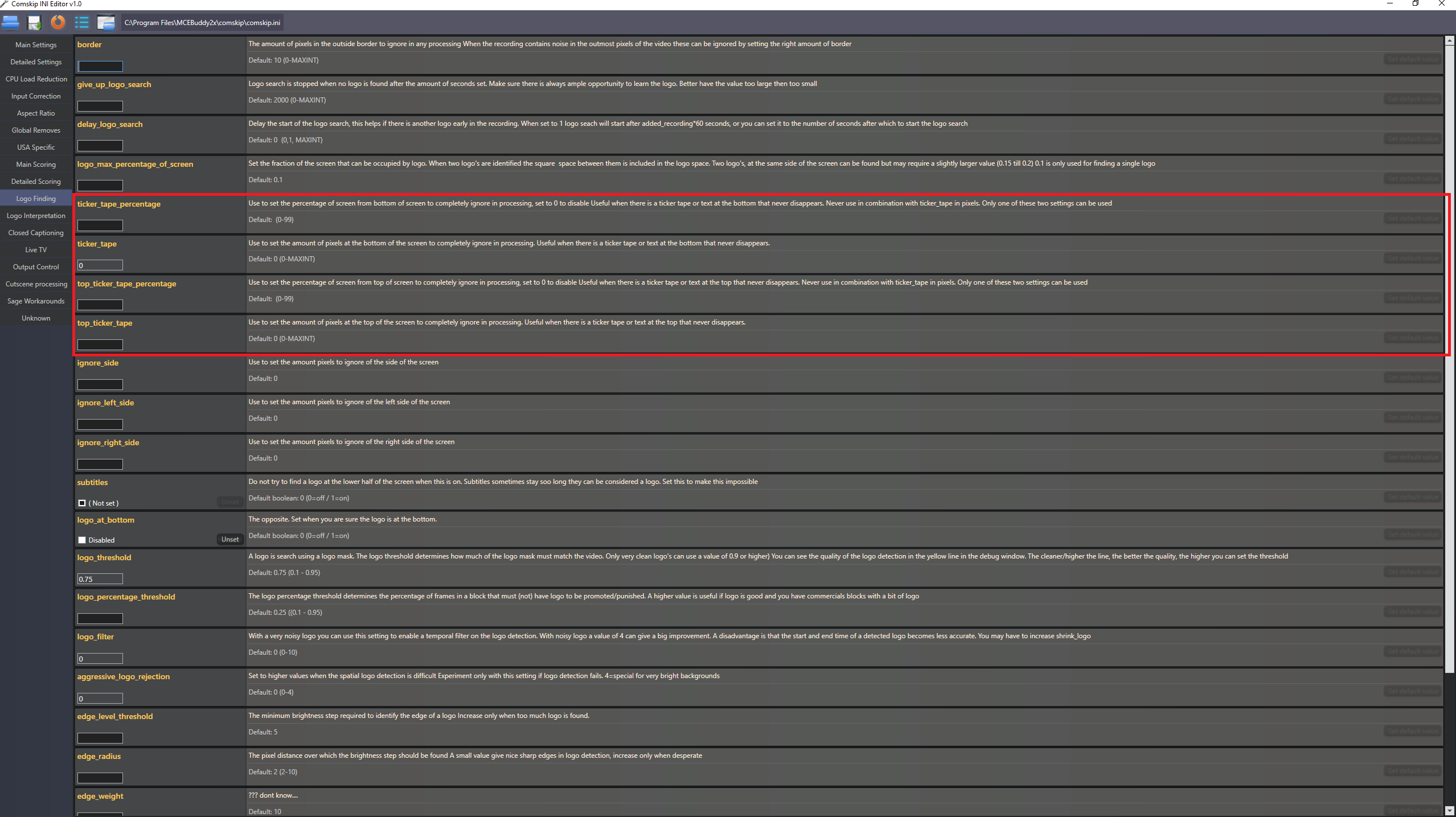
Thanks for the info. Had I idea, and that is can comskip ignore certain parts of the view windows? For example, I read someplace that when there is a weather warning that goes along the bottom and top of the screen, can comskip ignore that area of the screen?
Dan
---
### Author:  [@Goose](https://discussion.mcebuddy2x.com/u/Goose)
#### Post date: [March 27, 2023, 12:56pm UTC](https://discussion.mcebuddy2x.com/t/commercial-detection-and-removal/4990/11 "2023-03-27T12:56:46Z")
If you’re using the latest build of MCEBuddy you can use the ComkipINIEditor play with the settings highlighted which tell Comskip to skip the top or bottom % of the screen.
---
### Author:  [@city](https://discussion.mcebuddy2x.com/u/city)
#### Post date: [September 9, 2023, 3:51pm UTC](https://discussion.mcebuddy2x.com/t/commercial-detection-and-removal/4990/12 "2023-09-09T15:51:08Z")
Hi, Just have a question hoping I can get some help with… I’m using buddy and everything works great, with the exception of a few channels espn (sportscenter) and MLB network are two examples I think it has to do with the banner or crawl at the bottom of the screen, the log shows no commercials detected for those channels Any solutions or workarounds?? Thanks
---
### Author:  [@goljgsasidy](https://discussion.mcebuddy2x.com/u/goljgsasidy)
#### Post date: [March 21, 2024, 1:20pm UTC](https://discussion.mcebuddy2x.com/t/commercial-detection-and-removal/4990/13 "2024-03-21T13:20:00Z")
@city ooo I see what you mean yes, there is a banner at the bottom even during commercials. maybe that’s why the ads can’t be removed.
---
### Author:  [@mike808](https://discussion.mcebuddy2x.com/u/mike808)
#### Post date: [April 2, 2024, 5:45am UTC](https://discussion.mcebuddy2x.com/t/commercial-detection-and-removal/4990/14 "2024-04-02T05:45:37Z")
The ads can be detected, but you might have to tweak the configuration of comskip to basically ignore the bottom banner (x # of pixels). Use the ComskipINIEditor.exe in the MCEBuddy Comskip directory. Poke around for the configuration to tweak. You will need to run it as admin or allow yourself to write the comskip.ini configuration file before you edit it.
I think the parameter you want to look for is called “bottom\_ticker\_tape”. If you have a top banner, you’ll need to get the newest donator version of Comskip and set the path in MCEBuddy to where you installed it, because “top\_ticker\_tape” was added after the version included in MCEBuddy.
You’ll then process the file with MCEBuddy and that will hopefully detect and cut out your ads. Good luck, and don’t forget to reset your comskip settings back after you’re done. For advanced editing of the resulting video, you can run it through Handbrake or FFMPEG (both come with MCEBuddy as a command-line version) to crop out those bottom pixels.
For me personally, that’s a lot of work and most shows I record and watch later one time, it’s not really worth the effort.