# Auto start
**URL:** https://discussion.mcebuddy2x.com/t/auto-start/5020
**Category:** General Support / Questions
**Tags:** tweaking, commonissues
**Created:** [April 15, 2023, 6:52pm UTC](https://discussion.mcebuddy2x.com/t/auto-start/5020 "2023-04-15T18:52:54Z")
**Posts on this page:** 3
**Page:** 1
### Author:  [@MaxOne72218](https://discussion.mcebuddy2x.com/u/MaxOne72218)
#### Post date: [April 15, 2023, 6:52pm UTC](https://discussion.mcebuddy2x.com/t/auto-start/5020/1 "2023-04-15T18:52:55Z")
How do I get gui mode to load on startup?
---
### Author:  [@jsam01](https://discussion.mcebuddy2x.com/u/jsam01)
#### Post date: [April 21, 2023, 8:35pm UTC](https://discussion.mcebuddy2x.com/t/auto-start/5020/2 "2023-04-21T20:35:36Z")
I use Windows Task Scheduler with a trigger of log on of any user, and then the action of ‘Start a Program’
with the program pointing to:
“C:\Program Files\MCEBuddy2x\MCEBuddy.GUI.exe” (or wherever your install is)
and also ‘Add arguments’:
/startengine
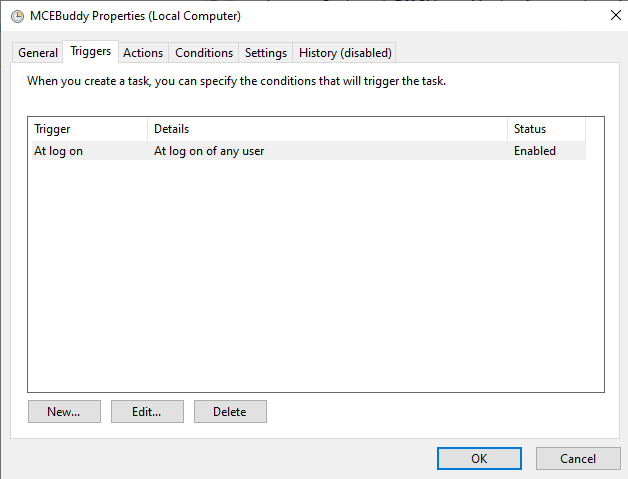
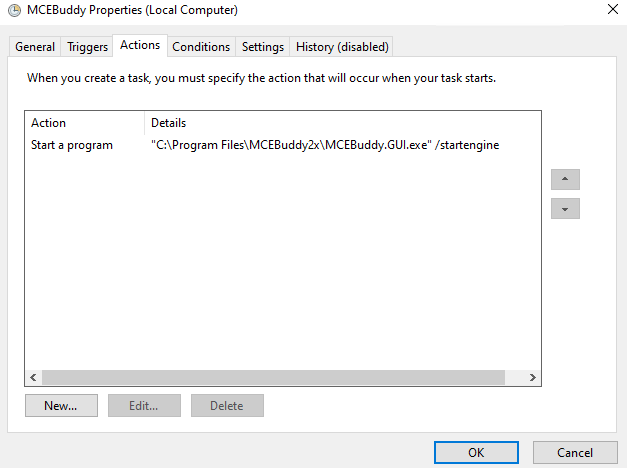
Everything else I’ve left pretty much as default.
---
### Author:  [@p37307](https://discussion.mcebuddy2x.com/u/p37307)
#### Post date: [April 21, 2023, 9:27pm UTC](https://discussion.mcebuddy2x.com/t/auto-start/5020/3 "2023-04-21T21:27:37Z")
Instead of Task Scheduler drop a shortcut to MCEBuddy in the common startup folder if you want it to load for all users
1. Press Win+R.
2. Type shell:Common Startup.
3. Press Enter:
4. Copy the MCEBuddy shortcut from the desktop and Paste the shortcut on common startup folder.