# All 1080i source videos are jittery/choppy when converted
**URL:** https://discussion.mcebuddy2x.com/t/all-1080i-source-videos-are-jittery-choppy-when-converted/2357
**Category:** General Support / Questions
**Created:** [November 18, 2018, 8:10pm UTC](https://discussion.mcebuddy2x.com/t/all-1080i-source-videos-are-jittery-choppy-when-converted/2357 "2018-11-18T20:10:11Z")
**Posts on this page:** 17
**Page:** 1
### Author:  [@Energy\_X](https://discussion.mcebuddy2x.com/u/Energy_X)
#### Post date: [November 18, 2018, 8:10pm UTC](https://discussion.mcebuddy2x.com/t/all-1080i-source-videos-are-jittery-choppy-when-converted/2357/1 "2018-11-18T20:10:11Z")
I was using the older free version and noticed that all 1080i TS recordings from Plex were very choppy/jittery when converted to mp4 or MKV (hesitation every few frames). I tried reducing the output to 720p, but I get the same results. I have now purchased the latest MCEBuddy version and still have this issue. Is there a setting or profile I need to use to prevent this from happening? All 720p sources convert from.ts to mp4 without any issue.
Thanks
---
### Author:  [@Goose](https://discussion.mcebuddy2x.com/u/Goose)
#### Post date: [November 19, 2018, 11:34pm UTC](https://discussion.mcebuddy2x.com/t/all-1080i-source-videos-are-jittery-choppy-when-converted/2357/2 "2018-11-19T23:34:00Z")
Try playing with `Detect and optimize video quality` option in the conversion task settings. It’s meant to help with interlaced video.
---
### Author:  [@Energy\_X](https://discussion.mcebuddy2x.com/u/Energy_X)
#### Post date: [November 20, 2018, 1:55am UTC](https://discussion.mcebuddy2x.com/t/all-1080i-source-videos-are-jittery-choppy-when-converted/2357/3 "2018-11-20T01:55:56Z")
That was default and I left it checked… if I encode the 1080i source .ts with Handbrake I don’t see the jitter/hesitation in the resulting file.
---
### Author:  [@Goose](https://discussion.mcebuddy2x.com/u/Goose)
#### Post date: [November 20, 2018, 3:38pm UTC](https://discussion.mcebuddy2x.com/t/all-1080i-source-videos-are-jittery-choppy-when-converted/2357/4 "2018-11-20T15:38:29Z")
Try to check the `Skip remuxing` option in the conversion task expert settings page. That should provide the file directly to handbrake if you’re using the MP4 profile.
---
### Author:  [@Energy\_X](https://discussion.mcebuddy2x.com/u/Energy_X)
#### Post date: [November 20, 2018, 4:25pm UTC](https://discussion.mcebuddy2x.com/t/all-1080i-source-videos-are-jittery-choppy-when-converted/2357/5 "2018-11-20T16:25:56Z")
Giving that a try. Thanks for the replies.
---
### Author:  [@Energy\_X](https://discussion.mcebuddy2x.com/u/Energy_X)
#### Post date: [November 28, 2018, 12:22am UTC](https://discussion.mcebuddy2x.com/t/all-1080i-source-videos-are-jittery-choppy-when-converted/2357/6 "2018-11-28T00:22:25Z")
Seems a little smoother, but there is still frame stutter when the camera is panning… any other ideas?
---
### Author:  [@Goose](https://discussion.mcebuddy2x.com/u/Goose)
#### Post date: [November 29, 2018, 12:13am UTC](https://discussion.mcebuddy2x.com/t/all-1080i-source-videos-are-jittery-choppy-when-converted/2357/7 "2018-11-29T00:13:42Z")
Check your profile and see if it’s using handbrake and what parameters are being used. Try playing with the `Detect and optimize video quality` option and the `Skip cropping` options.
---
### Author:  [@James\_Byrne](https://discussion.mcebuddy2x.com/u/James_Byrne)
#### Post date: [May 7, 2020, 1:03pm UTC](https://discussion.mcebuddy2x.com/t/all-1080i-source-videos-are-jittery-choppy-when-converted/2357/8 "2020-05-07T13:03:03Z")
I experience exactly the same issue converting interlaced .ts files did you ever find a solution to this?
---
### Author:  [@Energy\_X](https://discussion.mcebuddy2x.com/u/Energy_X)
#### Post date: [May 7, 2020, 1:23pm UTC](https://discussion.mcebuddy2x.com/t/all-1080i-source-videos-are-jittery-choppy-when-converted/2357/9 "2020-05-07T13:23:50Z")
I did not, but what I did realize is the source files Plex is storing from the HDHomerun are not right. If I watch the freshly recorded files (not being transcoded) for any 1080i (CBS or NBC) shows it’s jittery, like the de-interlacer is not working correctly. I’ve just learned to live with it for now.
---
### Author:  [@James\_Byrne](https://discussion.mcebuddy2x.com/u/James_Byrne)
#### Post date: [May 7, 2020, 1:36pm UTC](https://discussion.mcebuddy2x.com/t/all-1080i-source-videos-are-jittery-choppy-when-converted/2357/10 "2020-05-07T13:36:40Z")
Thanks for your quick reply. It appears devices like or similar to 4k fire tv sticks (even my nvidia shield cube) dont deal with interlaced video very well in some cases not at all. Im going to try changing the the decomb setting in mce buddy handbrake and see if that helps. If it does I will let you know.
---
### Author:  [@Goose](https://discussion.mcebuddy2x.com/u/Goose)
#### Post date: [May 7, 2020, 4:17pm UTC](https://discussion.mcebuddy2x.com/t/all-1080i-source-videos-are-jittery-choppy-when-converted/2357/11 "2020-05-07T16:17:51Z")
You want to try the `Detect and optimize video quality` option in the conversion task. It’s designed to check if the source is interlaced and then change the deinterlace settings automatically.

---
### Author:  [@James\_Byrne](https://discussion.mcebuddy2x.com/u/James_Byrne)
#### Post date: [May 7, 2020, 8:43pm UTC](https://discussion.mcebuddy2x.com/t/all-1080i-source-videos-are-jittery-choppy-when-converted/2357/12 "2020-05-07T20:43:19Z")
Hi, thanks for your suggestion. I am sure I have toggled this before and it hasn’t made a noticeable difference. I may set up a proper test though and see if it does make a difference.
---
### Author:  [@James\_Byrne](https://discussion.mcebuddy2x.com/u/James_Byrne)
#### Post date: [May 7, 2020, 8:57pm UTC](https://discussion.mcebuddy2x.com/t/all-1080i-source-videos-are-jittery-choppy-when-converted/2357/13 "2020-05-07T20:57:42Z")
Ok well I think _I may_ have found a solution. You cant re convert the converted files though. so the problem files I have in my library I couldn’t use for the test - the original recordings were deleted after the conversion. I had to find and record a problem file which has taken a while. I found that the issue is very noticeable on some scenic panning shots.
The profile I have been using is HDHomeRun H.264. This firstly chooses handbrake to do the conversion. I am sure if you are using another profile you can do the same. (Close Mcbuddy first before making any changes)
I changed the profiles.config using wordpad to decomb=bob and hit save
(C:\Program Files\MCEBuddy2x\config)
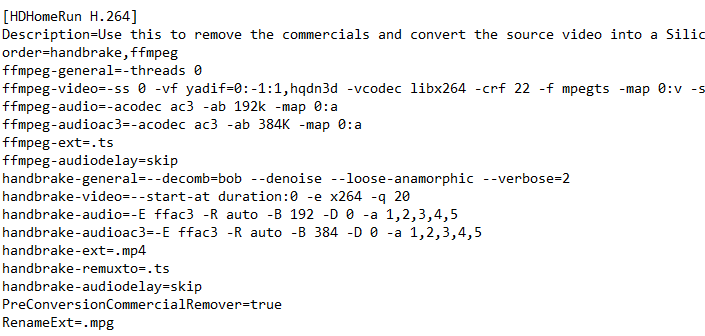
It is very heavy on the CPU though my previous conversion was using 99% gpu and hardly any ecu BOB uses 99% gpu and 75% cpu. It also nearly doubles the file size too. However it is comparable to the size of a native progressive recording size, converted through mce buddy using the same profile without bob
Time will tell……………………… If your up for making the change let me know how you get on
---
### Author:  [@James\_Byrne](https://discussion.mcebuddy2x.com/u/James_Byrne)
#### Post date: [May 8, 2020, 10:51pm UTC](https://discussion.mcebuddy2x.com/t/all-1080i-source-videos-are-jittery-choppy-when-converted/2357/14 "2020-05-08T22:51:59Z")
I can confirm that setting the decomb to BOB has cured the problem for me 🙂 (just managed to play about with a recent/new regular problem programme)
Hope it does for you 👍
---
### Author:  [@James\_Byrne](https://discussion.mcebuddy2x.com/u/James_Byrne)
#### Post date: [May 9, 2020, 12:04am UTC](https://discussion.mcebuddy2x.com/t/all-1080i-source-videos-are-jittery-choppy-when-converted/2357/15 "2020-05-09T00:04:06Z")
\*hmm on second thoughts different devices and players are yielding different results. (It worked for the player and device combo which made me search on here in the first place)
---
### Author:  [@Energy\_X](https://discussion.mcebuddy2x.com/u/Energy_X)
#### Post date: [May 9, 2020, 12:05am UTC](https://discussion.mcebuddy2x.com/t/all-1080i-source-videos-are-jittery-choppy-when-converted/2357/16 "2020-05-09T00:05:24Z")
Where did you set that? I don’t have a decomb option in MCEBuddy.
---
### Author:  [@James\_Byrne](https://discussion.mcebuddy2x.com/u/James_Byrne)
#### Post date: [May 9, 2020, 12:15am UTC](https://discussion.mcebuddy2x.com/t/all-1080i-source-videos-are-jittery-choppy-when-converted/2357/17 "2020-05-09T00:15:37Z")
C:\Program Files\MCEBuddy2x\config
follow this path depending on your device.
Close MCE budydy first
open profiles.config with wordpad

Find the profile your using in profiles.config (im using HDHomerun)
Modify where it says --decomb to --decomb=bob click save
open up MCE buddy and convert an original file 🤞👍